
AT Commands (AT-SMS)
AT-SMS Protocol
Introduction
AT-SMS protocol is a private set of AT commands supported by Advantech cellular routers. It can be used to access the cellular module in the router directly via AT commands, work with short messages (SMS), and retrieve cellular module state information and settings. AT commands listed here can be sent to the router via TCP or via a serial line. This feature must be enabled in the router configuration.
Caution
Only the commands supported by Advantech routers are listed in this application note. For other AT commands, the OK response is always sent. There is no support for processing complex AT commands, so in such cases the router sends an ERROR response.
Only the forms listed here are processed; for example, AT+CREG=<n> and AT+COPS=… return OK but have no effect. Commands concatenated with ; return ERROR.
Enabling AT-SMS Protocol
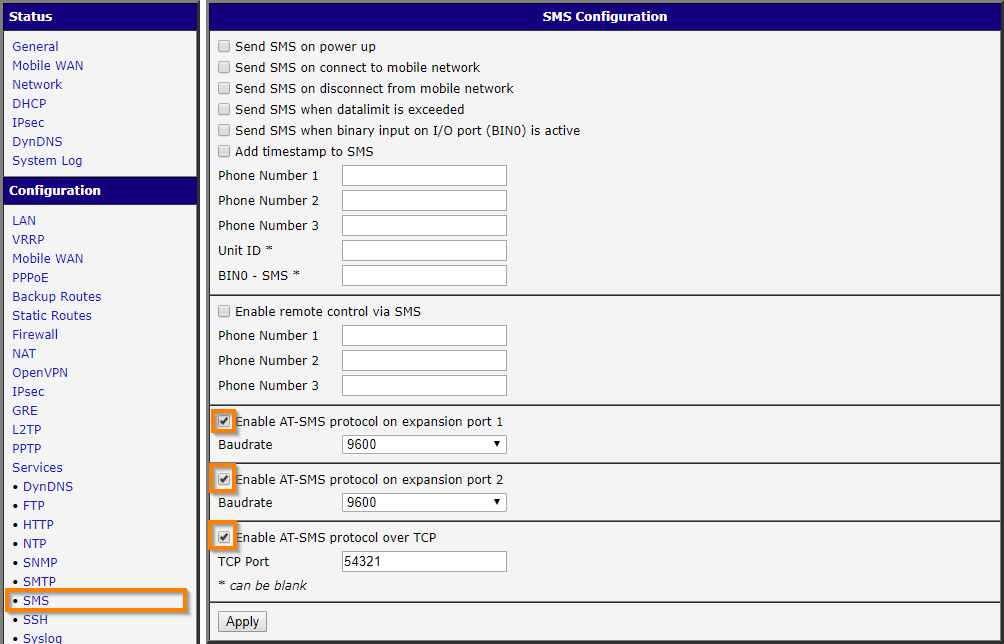
In the web interface of the router, navigate to Services → SMS in the Configuration section. Enable AT-SMS protocol on the desired interface — serial or TCP. Click the Apply button.
Tips
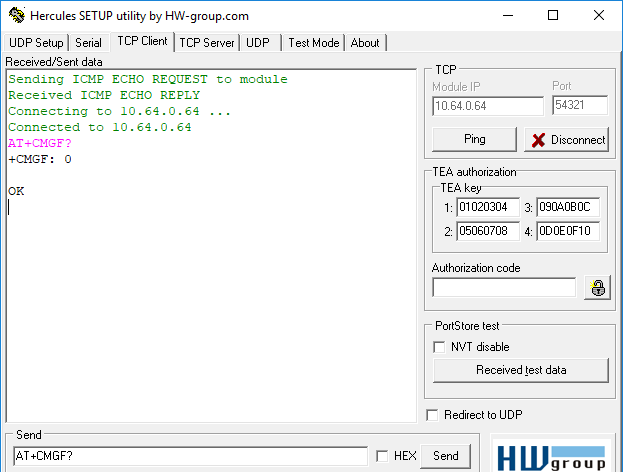
You can test the AT-SMS protocol using any TCP client (Enable AT-SMS protocol over TCP must be enabled). In the figure below, an example shows a test using Hercules TCP Client with the configuration from the previous figure (TCP port 54321). The response to the AT+CMGF? command is +CMGF: 0, indicating that SMS messages are in PDU mode.
Caution
When Enable remote control via SMS is activated on the router, any received SMS is immediately deleted after processing (see the first figure in Enabling AT-SMS Protocol). This behavior might cause confusion if you intend to use the AT-SMS protocol to read received SMS messages. For detailed information, refer to your router's manual. If remote control via SMS is enabled, the command contained in the SMS is executed, and then the SMS is deleted. If an unknown command is received, the script /var/scripts/sms is executed, and then the SMS is deleted.
Caution
AT commands sent to the router's cellular module using gsmat and gsmat2 (as described in the Command Line Interface Application Note, e.g. via SSH) are not processed as AT-SMS protocol commands. These are general AT commands, and their support may vary among different cellular module models.
Available AT Commands
ATE
The ATE<value> command determines whether or not the router echoes characters. By default, this function is disabled, but it may be useful for debugging.
- "
<value>" is 0 — characters are not echoed - "
<value>" is 1 — characters are echoed
ATE1             <press Enter key>
OK
AT+CMGF
To set the presentation format of short messages, use the AT+CMGF=<mode> command.
- "
<mode>" is 0 — PDU mode - "
<mode>" is 1 — text mode
AT+CMGF=1        <press Enter key>
OK
Tips
To determine the SMS format currently set, execute AT+CMGF?.
AT+CMGS
This command allows you to send a short message to a specified number. After issuing the command AT+CMGS="<number>" and pressing the Enter key, wait for the prompt >. At that point, type your message. The message is sent by pressing CTRL+Z (this may take some time). To cancel message composition, press the Esc key.
AT+CMGS="+420465717171"                    <press Enter key>
>Hello World!                              <CTRL+Z shortcut key>
OK
If you want to send an SMS in PDU mode, you must first convert your message text to PDU format, including the recipient's phone number (e.g., using an online converter).
The example below shows the string "test" sent to the phone number +420465717171. In PDU mode, sending an SMS is similar to text mode, but instead of a phone number, the binary length of the PDU message is provided:
AT+CMGS=18                                 <press Enter key>
>0011000C912440561717170000FF04F4F29C0E    <CTRL+Z shortcut key>
OK
AT+CMGW
This command allows you to write a short message to SIM storage. After issuing the command AT+CMGW="<length>" (where "<length>" specifies the maximum message length in bytes) and pressing the Enter key, wait for the prompt >. Then type your message. The message is stored by pressing CTRL+Z (this may take some time). To cancel SMS composition, press the Esc key. The response includes the storage location of the message.
AT+CMGW="140"         <press Enter key>
>Hello World!         <CTRL+Z shortcut key>
+CMGW: 2
AT+CMSS
The AT+CMSS command sends a message from SIM storage at the specified <index>. The index corresponds to the value returned by the AT+CMGW command. The response is a reference value.
AT+CMSS=2             <press Enter key>
+CMSS: 12
AT+CMGL
The AT+CMGL command is used to list messages with a specific status from a message storage area. When you use the command in the form AT+CMGL="ALL", it returns a list of all stored messages. Note that if a message is "received unread", retrieving it with AT+CMGL changes its status to "received read".
+CMGL: <index>,<status>,<sender number>,,<date>,<time>
   SMS text
Parameters:
- "
<index>" — location of the message in the message storage area - "
<status>" — specifies the message status:- REC UNREAD — received unread
- REC READ — received read
- STO UNSENT — stored unsent
- STO SENT — stored sent
- ALL — lists all messages (Note: This option does not work in PDU mode. Use AT+CMGL=4 in PDU mode instead.)
- "
<sender number>" — telephone number from which the message was received - "
<date>" — date when the message was received - "
<time>" — time when the message was received
AT+CMGL="ALL"                   <press Enter key>
+CMGL: 1,"REC UNREAD","+420465717171", ,"08/02/02, 10:33:26+04"
Hello World!
AT+CMGR
The AT+CMGR command is used to read a message from a message storage area. The message's location is specified by an <index> number. If the message is "received unread", retrieving it changes its status to "received read". Each message is displayed in the following format:
+CMGR: <index>,<status>,<sender number>,,<date>,<time>
SMS textAT+CMGR=1 <press Enter key>
+CMGR: 1,"REC READ","+420465717171", ,"08/01/12, 9:48:04+04"
Hello World!AT+CMGD
This command deletes a message at the specified <index> location.
AT+CMGD=1                 <press Enter key>
OK
AT+CPMS
To select SMS memory storage types for reading, writing, deleting, sending, or receiving messages, use the AT+CPMS command. For a SIM card, use "SM". The expected response is in the following format:
+CPMS: <used1>,<max1>,<used2>,<max2>,<used3>,<max3>Here, the used values indicate the current number of messages stored, and the max values indicate the maximum number of messages that can be stored.
AT+CPMS="SM","SM"         <press Enter key>
+CPMS: 1,10,1,10
OK
AT+CSCA
This command sets the short message service center (SMSC) number used for sending SMS text messages.
AT+CSCA="+491710760000"         <press Enter key>
OK
AT+CSCS
To change the character set, use the AT+CSCS=<set> command. If you enter AT+CSCS=?, the response lists the supported character sets.
AT+CSCS=?                       <press Enter key>
+CSCS: ("GSM","IRA","HEX")AT+CSCS="HEX" <press Enter key>
OKAT+CPIN
The AT+CPIN? command queries whether a PIN code is required. If the response is +CPIN: READY, no PIN is needed and the SIM card is ready for use. If the SIM card requires a PIN (response: +CPIN: SIM PIN), enter it using AT+CPIN=<PIN>. If the PIN is entered incorrectly more than three times, the SIM card is blocked and a PUK code is required (response: +CPIN: SIM PUK).
AT+CPIN="2654"                  <press Enter key>
OK
AT+CIMI
Executing this command returns the International Mobile Subscriber Identity number (IMSI). This unique 15-digit identifier is assigned to the SIM card by the mobile operator. The first 3 digits represent the Mobile Country Code (MCC), followed by the Mobile Network Code (MNC) — either 2 digits (European standard) or 3 digits (North American standard), with the length determined by the MCC value — and the remaining digits form the Mobile Subscription Identification Number (MSIN).
AT+CNUM
Executing this command returns the phone number of the SIM card, if it is stored on the SIM (by the mobile operator). Note that typically, the mobile operator does not store a phone number on the SIM card.
AT+CREG
The AT+CREG command displays network registration status. When you execute AT+CREG?, the response appears in the following format:
+CREG: <n>,<stat>Here, <n> corresponds to one of the following values:
0— disable network registration unsolicited result code1— enable network registration unsolicited result code
And <stat> (registration status) corresponds to:
0— not registered, not searching for a new operator1— registered, home network2— not registered, currently searching for a new operator3— registration denied4— unknown5— registered, roaming
AT+CREG?         <press Enter key>
+CREG: 0,1
AT+COPS?
The AT+COPS? command is used to identify available mobile networks. After executing the command and pressing Enter, the response appears in the following format:
+COPS: <mode>,<format>,<operator>Where <mode> specifies the registration mode:
0— automatic1— manual2— de-register from network4— manual/automatic (if manual selection fails, automatic mode is used)
And <operator> displays the operator identity in the format specified by <format>:
0— long alphanumeric format1— short alphanumeric format2— numeric format
AT+COPS?                <press Enter key>
+COPS: 0,0,"O2 - CZ"
AT+CSQ
This command returns the signal strength of the registered network. The response is in the form +CSQ: <rssi>,<ber>, where <rssi> represents the received signal strength (ranging from 0 for -113 dBm or lower, to 31 for -51 dBm or higher, or 99 if unknown), and <ber> represents the channel bit error rate. The BER can be measured only during an active call; at all other times its value is 0 or 99. When measurable, <ber> ranges from 0 to 7.
AT+CSQ            <press Enter key>
+CSQ: 28,99
ATI
Use the ATI<value> command to transmit manufacturer-specific information about the cellular module. The <value> parameter selects among various types of identification information, starting at 0 (which corresponds to AT+GMM).
AT+CGMI
Executing this command returns the manufacturer identity of the cellular module.
AT+CGMI                  <press Enter key>
+CGMI: Quectel
(Example for a router with the Quectel EC25 cellular module.)
AT+GMI
See the previous command AT+CGMI.
AT+CGMM
Executing this command returns the manufacturer-specific model identity of the cellular module.
AT+CGMM              <press Enter key>
+CGMM: "EC25"
(Example for a router with the Quectel EC25 cellular module.)
AT+GMM
See the previous command AT+CGMM.
AT+CGMR
Executing this command returns the manufacturer-specific model revision identity of the cellular module.
AT+CGMR                  <press Enter key>
+CGMR: EC25EUGAR06A03M4G
(Example for a router with the Quectel EC25 cellular module.)
AT+GMR
See the previous command AT+CGMR.
AT+CGSN
This command returns the serial number of the cellular module.
AT+CGSN                  <press Enter key>
+CGSN: 865546040009660
AT+GSN
See the command AT+CGSN.
AT+CGPADDR
To display the IP address of the Mobile WAN interface, use the AT+CGPADDR=<cid> command (for example, AT+CGPADDR=1). The response contains the IPv4 and IPv6 addresses of the Mobile WAN interface:
AT+CGPADDR=1          <press Enter key>
+CGPADDR: 1,"<IPv4 address>","<IPv6 address>"
OK
AT Commands Alphabetically
The following AT-SMS protocol commands are listed in alphabetical order:
| Item | Description |
|---|---|
| AT+CGMI | Returns the manufacturer specific identity |
| AT+CGMM | Returns the manufacturer specific model identity |
| AT+CGMR | Returns the manufacturer specific model revision identity |
| AT+CGPADDR | Displays the IP address of the Mobile WAN interface |
| AT+CGSN | Returns the product serial number |
| AT+CIMI | Returns the International Mobile Subscriber Identity number (IMSI) |
| AT+CMGD | Deletes a message from the location |
| AT+CMGF | Sets the presentation format of short messages |
| AT+CMGL | Lists messages of a certain status from a message storage area |
| AT+CMGR | Reads a message from a message storage area |
| AT+CMGS | Sends a short message from the router to a specified telephone number |
| AT+CMGW | Writes a short message to SIM storage |
| AT+CMSS | Sends a message from a specified SIM storage location |
| AT+CNUM | Returns the phone number, if available (stored on SIM card) |
| AT+COPS? | Identifies the available mobile networks |
| AT+CPIN | Queries the SIM card state and allows PIN entry |
| AT+CPMS | Selects SMS memory storage types for message operations |
| AT+CREG | Displays network registration status |
| AT+CSCA | Sets the short message service center (SMSC) number |
| AT+CSCS | Selects the character set |
| AT+CSQ | Returns the signal strength of the registered network |
| AT+GMI | Returns the manufacturer specific identity |
| AT+GMM | Returns the manufacturer specific model identity |
| AT+GMR | Returns the manufacturer specific model revision identity |
| AT+GSN | Returns the product serial number |
| ATE | Determines whether or not the router echoes characters |
| ATI | Transmits the manufacturer specific information about the cellular module |