FlexVPN
Basic Information
Internet Key Exchange Version 2 (IKEv2), a next-generation key management protocol defined in RFC 7296, is an enhancement of the IKE Protocol. IKEv2 is used for performing mutual authentication and establishing and maintaining security associations (SAs).
FlexVPN is Cisco's implementation of the IKEv2 standard featuring a unified paradigm and CLI that combines site-to-site, remote-access, hub-and-spoke topologies and partial meshes (direct spoke-to-spoke). FlexVPN offers a simple but modular framework that extensively uses the tunnel interface paradigm while remaining compatible with legacy VPN implementations using crypto maps.
Large customers deploying IPSec VPN over IP networks face high complexity and cost when deploying multiple types of VPN to meet various connectivity requirements. Customers often must learn different VPN types to manage and operate their networks. Once a technology is selected, migrating or adding functionality is frequently avoided. FlexVPN was created to simplify VPN deployment, address the complexity of multiple solutions, and provide a unified ecosystem covering all types of VPN—remote access, teleworker, site to site, mobility, managed security services, and others. See the figure below.
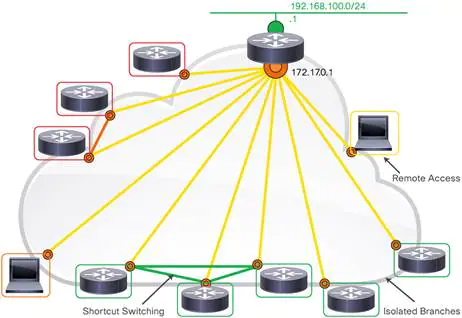
As customer networks span private, public, and cloud systems, unifying VPN technology becomes essential. Cisco IOS® FlexVPN enables organizations to dramatically increase network reach without significantly expanding infrastructure complexity. It is a robust, standards-based encryption technology that securely connects branch offices and remote users while providing significant cost savings compared to supporting multiple separate VPN solutions such as GRE, Crypto, and VTI-based implementations. FlexVPN relies on open-standards-based IKEv2 and adds many Cisco®-specific enhancements for high security, added value, and competitive differentiation.
Configuration Example
For example, two Advantech routers were used as spokes (Router A and Router B) and one Cisco ISR4331 router as the headquarters hub.
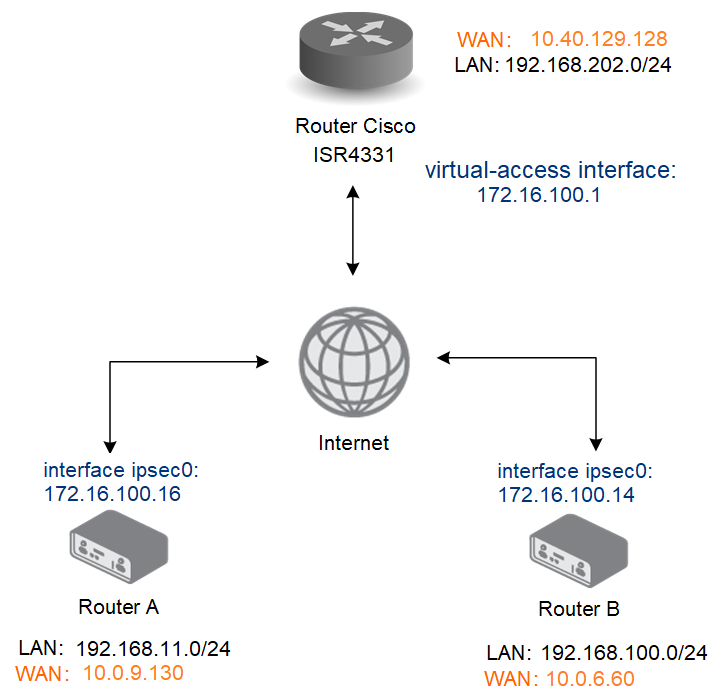
Necessary Requirements
- Cisco headquarters hub router and connection to the Internet from the hub and all spokes. Only a Cisco router can be used as the headquarters hub router.
- FRR router app in every spoke router.
See the example configuration below for more details.
Tips
The FRR Router App is not installed on Advantech routers by default. See the manual of your router, section Customization Pages → Router Apps, for instructions on how to upload a Router App.
Headquarters Hub Router Configuration
In this example configuration, the Cisco ISR4331 router was used as the headquarters hub router. The necessary configuration is provided below. (Log in to the Cisco router console and type the config terminal command. Refer to the appropriate Cisco manual for instructions on configuring the router.) More about IPsec Tunnel and certificate generation can be found in IPsec Tunnel Application Note.
aaa authorization network FLEXVPN-AAA-AUTHORIZATION local
!
crypto pki trustpoint server.cisco
enrollment pkcs12
revocation-check none
rsakeypair server.cisco
!
crypto pki certificate map ike_v2_certmap 10
subject-name co client
!
crypto pki certificate chain server.cisco
certificate 29BEF8C0BE9377F585E4C9E7E569B4B1FEA8544A
308203C2 308202AA A0030201 02021429 BEF8C0BE 9377F585 E4C9E7E5 69B4B1FE
A8544A30 0D06092A 864886F7 0D01010B 05003081 8E310B30 09060355 04061302
...
D1A4308D 19992469 0FB6A78F DCAD252B E83C040E 087BC4E0 F0379F41 02EEC176
56937ECD 03926DF0 3B782620 E1116E19 256426CB D188D214 5DF5A7AC D1E755E5
BDE3837E C26D
quit
certificate ca 29BEF8C0BE9377F585E4C9E7E569B4B1FEA8543C
308203FF 308202E7 A0030201 02021429 BEF8C0BE 9377F585 E4C9E7E5 69B4B1FE
A8543C30 0D06092A 864886F7 0D01010B 05003081 8E310B30 09060355 04061302
...
C319BFFF 3645B107 EA089A1A 9C3BC558 9AA9FF3F EA735430 83E7E464 B5311867
CF1E190B 020AB854 052B06A5 6883BA55 7C604513 82ED6A63 5CF567FD 66F49EE8 899C7B
quit
!
crypto ikev2 authorization policy ike_v2_policy
!
crypto ikev2 authorization policy IKE-AUTH-POLICY
pool VPN-SPLIT-TUNNEL-ADDRESSES
route set interface
!
crypto ikev2 proposal ike_v2_proposal
encryption aes-gcm-256
prf sha256
group 21
!
crypto ikev2 policy ike_v2_policy
proposal ike_v2_proposal
!
crypto ikev2 profile ike_v2_profile
match certificate ike_v2_certmap
identity local fqdn server.cisco
authentication remote rsa-sig
authentication local rsa-sig
pki trustpoint server.cisco
aaa authorization group cert list FLEXVPN-AAA-AUTHORIZATION IKE-AUTH-POLICY
virtual-template 20
!
crypto ipsec transform-set aes-gcm esp-gcm 256
mode tunnel
!
crypto ipsec profile FlexVPN
set security-policy limit 100
set transform-set aes-gcm
set pfs group21
set ikev2-profile ike_v2_profile
responder-only
!
interface Loopback2
ip address 172.16.100.1 255.255.255.255
!
interface GigabitEthernet0/0/0
ip address 10.40.29.128 255.255.252.0
ip nat outside
ip access-group 101 in
negotiation auto
spanning-tree portfast disable
!
interface GigabitEthernet0/0/1.202
encapsulation dot1Q 202
ip address 192.168.202.254 255.255.255.0
!
interface Virtual-Template20 type tunnel
ip unnumbered Loopback2
no ip redirects
tunnel source 10.40.29.128
tunnel mode ipsec ipv4
tunnel protection ipsec profile FlexVPN
!
router bgp 65001
bgp router-id 172.16.100.1
bgp log-neighbor-changes
bgp listen range 172.16.100.0/24 peer-group FLEXVPN_SPOKES
neighbor FLEXVPN_SPOKES peer-group
neighbor FLEXVPN_SPOKES remote-as 65001
neighbor FLEXVPN_SPOKES transport connection-mode passive
neighbor FLEXVPN_SPOKES update-source Loopback2
!
address-family ipv4
network 172.16.100.0 mask 255.255.255.0
network 192.168.202.0
neighbor FLEXVPN_SPOKES activate
neighbor FLEXVPN_SPOKES route-reflector-client
neighbor FLEXVPN_SPOKES next-hop-self
neighbor FLEXVPN_SPOKES route-map rr-out out
exit-address-family
!
ip local pool VPN-SPLIT-TUNNEL-ADDRESSES 172.16.100.2 172.16.100.200
ip route 172.16.100.0 255.255.255.0 Null0
!
route-map rr-out permit 10
set ip next-hop 172.16.100.1
!
IPsec Configuration
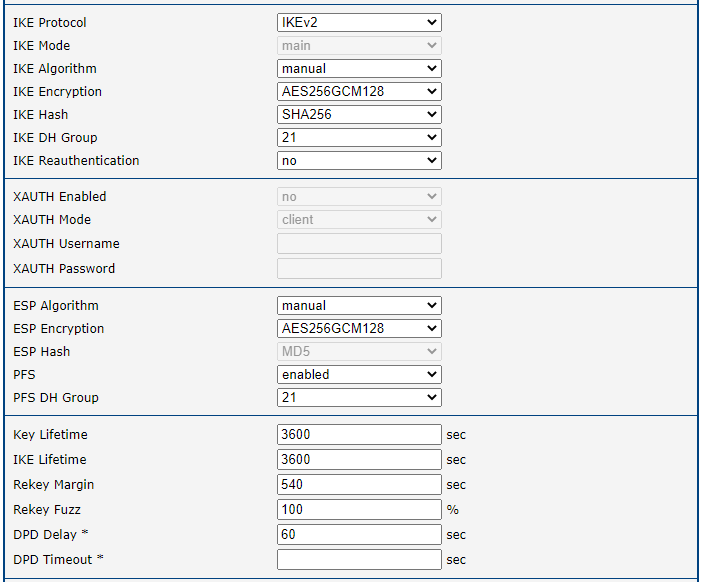
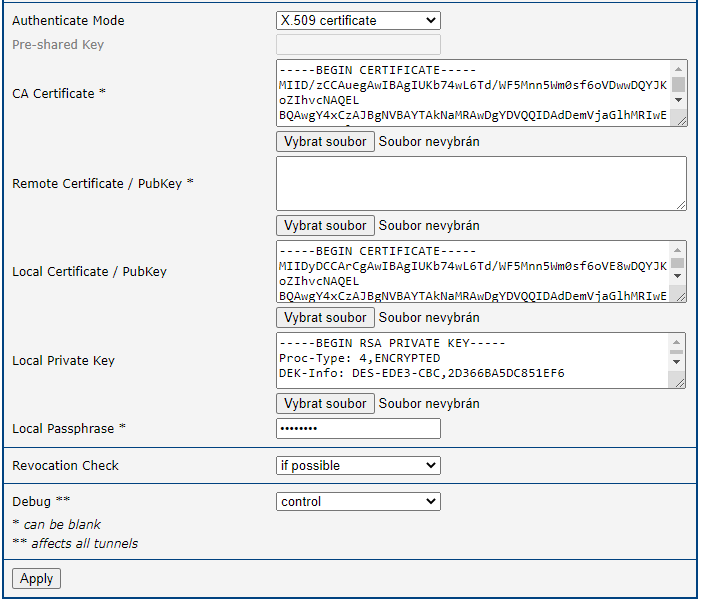
Open the web interface of the first spoke (Router A) and press the IPsec item in the Configuration section, then select 1st Tunnel. Fill in the configuration form as shown in the figures below.
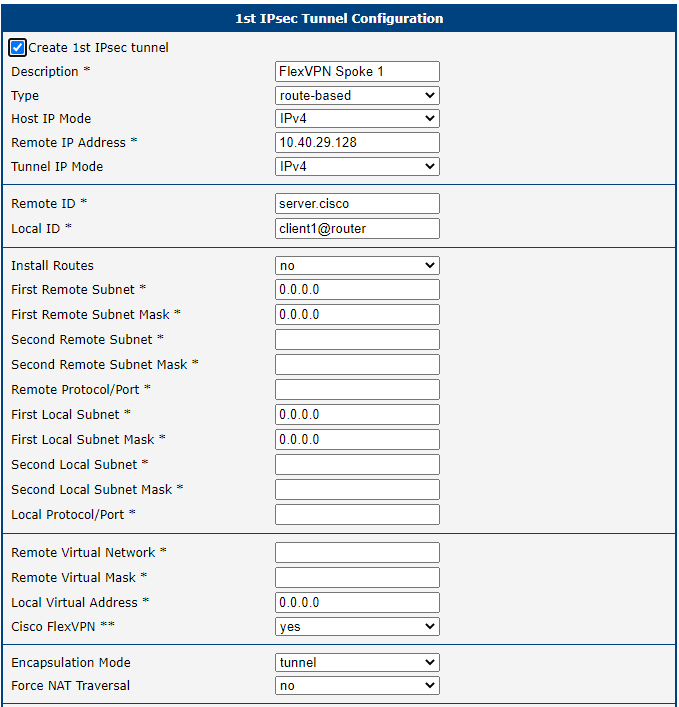
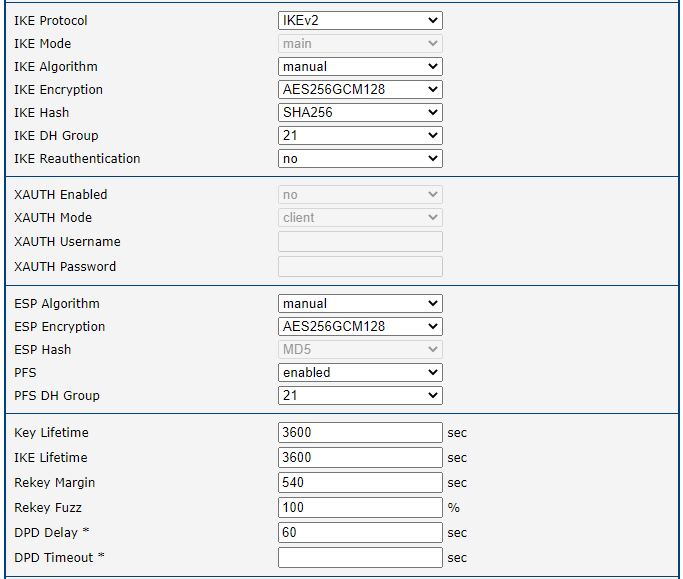
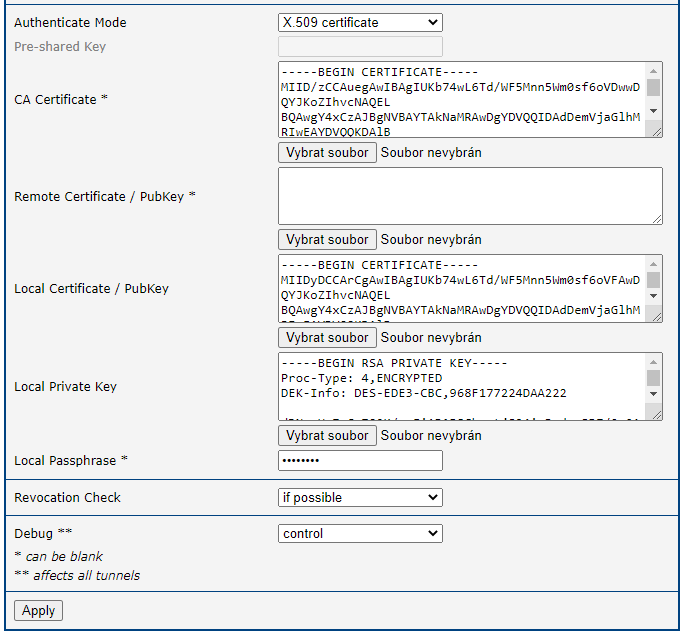
Save the changes using the Apply button. Use the same procedure for all spokes — for Router B the configuration looks like this:
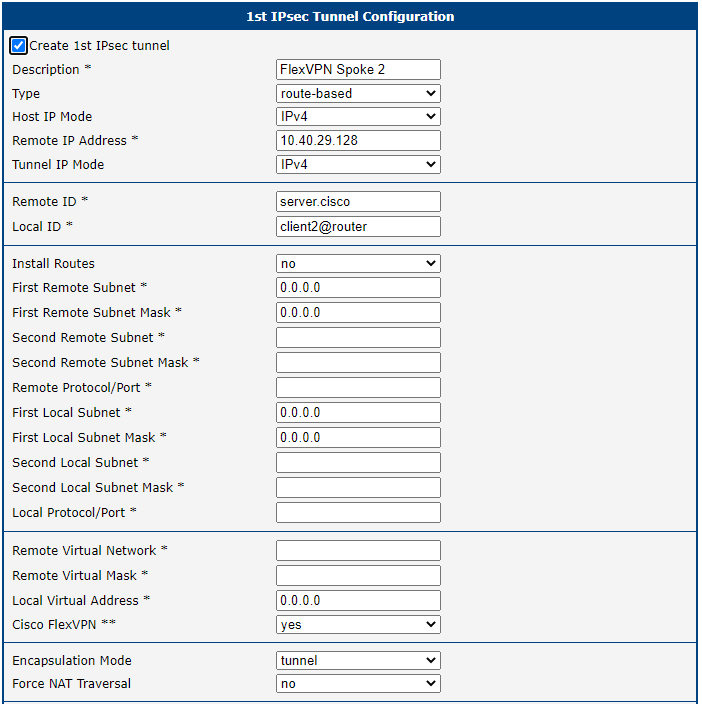
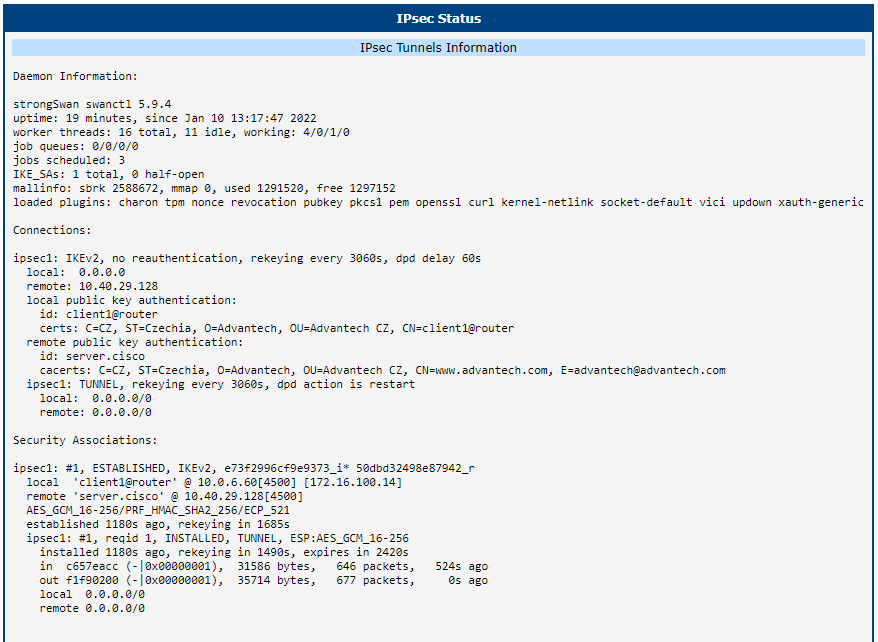
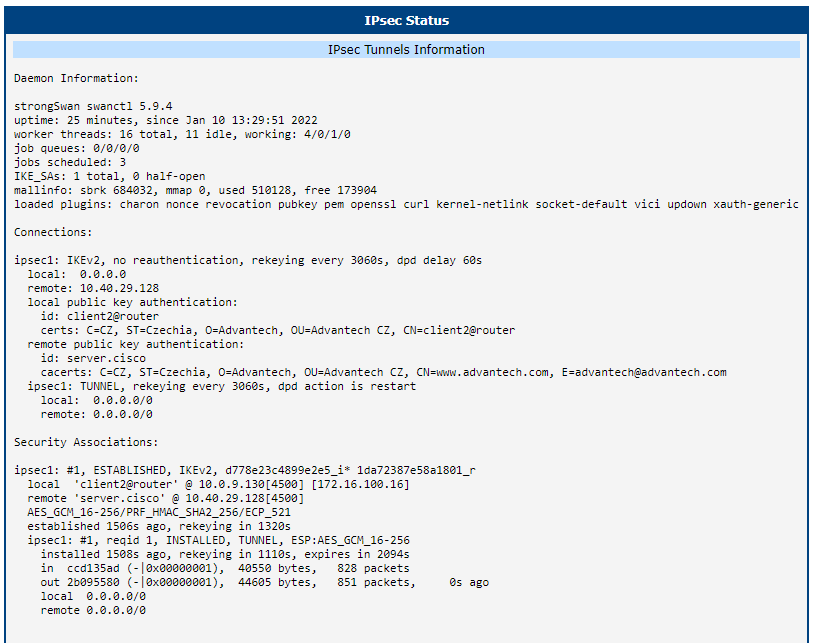
The IPsec status of the first router looks like this:
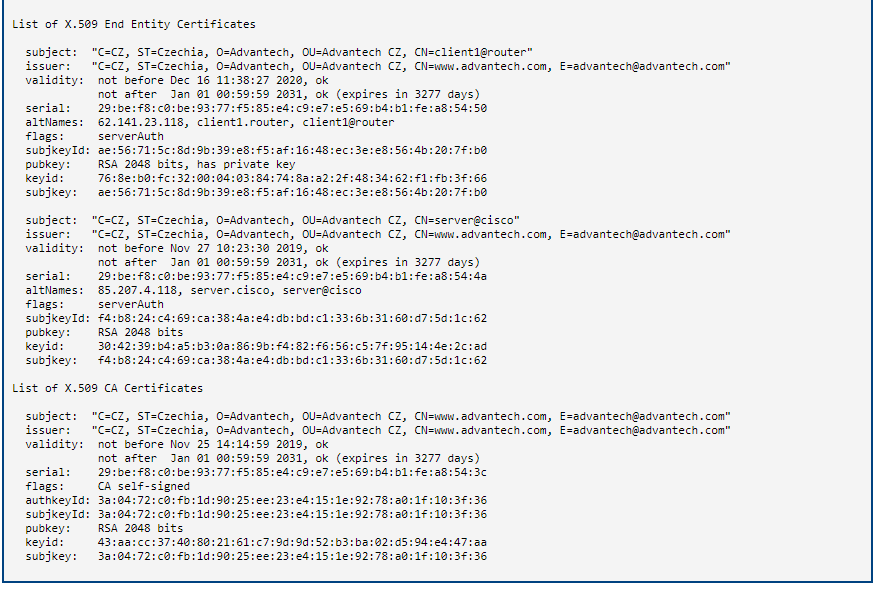
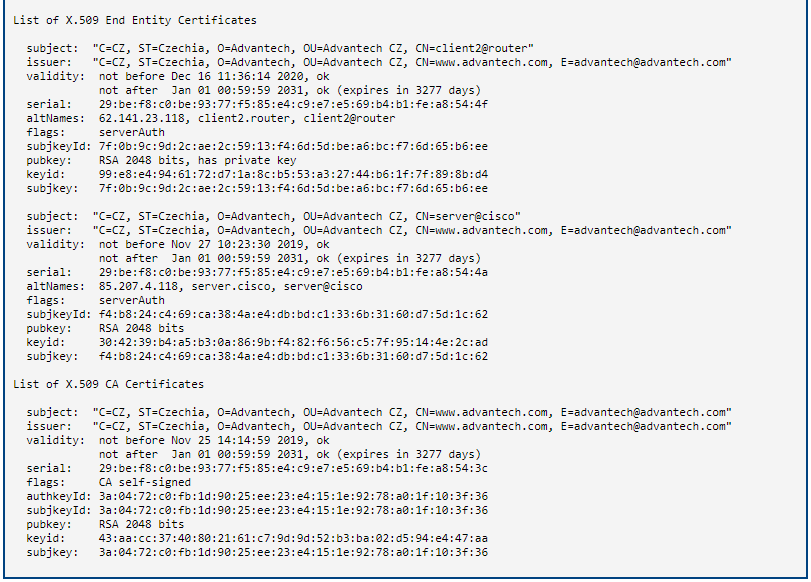
For the second router:
Zebra Configuration — FRR Router App
Zebra configuration can be done via the FRR router app.
Tips
The FRR Router App is not installed on Advantech routers by default. See the manual of your router, section Customization Pages → Router Apps, for instructions on how to upload a Router App.
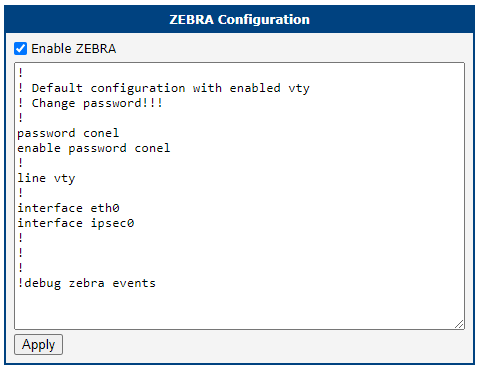
Go to the Router Apps page and then find the FRR item in the Configuration section to configure the ZEBRA protocol of this router. In the ZEBRA section, tick the Enable ZEBRA box and insert the configuration commands in the field.
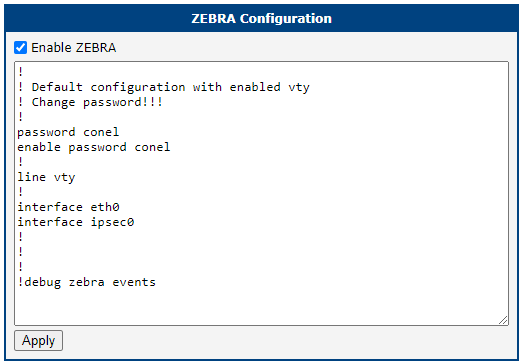
For Router B, the ZEBRA configuration is:
Static Configuration — FRR Router App
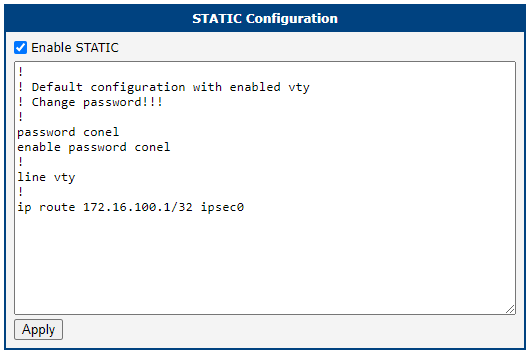
As in the Zebra section above, the Static configuration can be done via the FRR router app.
Go to the Router Apps page and then find the FRR item in the Configuration section to configure the STATIC protocol of this router. In the STATIC section, tick the Enable STATIC box and insert the configuration commands in the field.
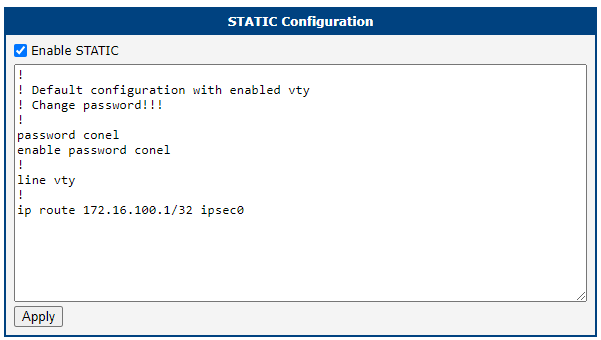
For Router B, the Static configuration is:
BGP Configuration — FRR Router App
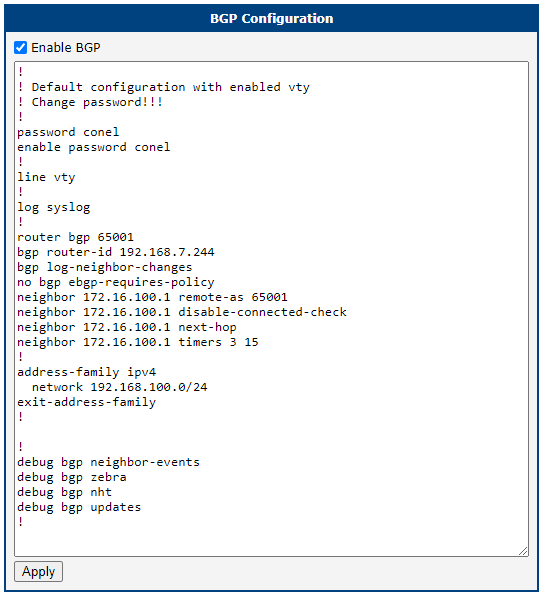
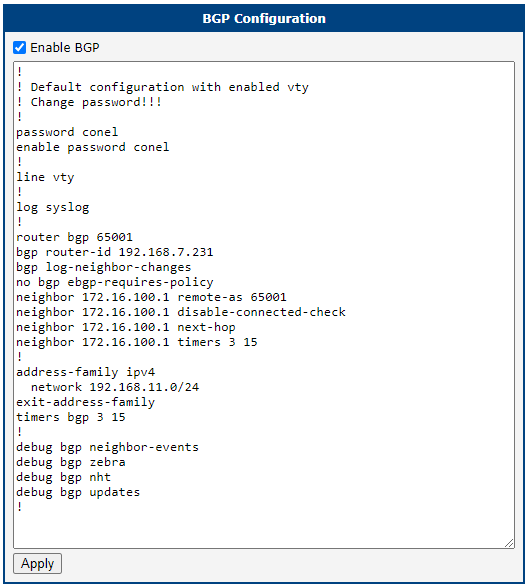
As with the Static and Zebra sections above, the BGP configuration can be done via the FRR router app.
Go to the Router Apps page and then find the FRR item in the Configuration section to configure the BGP protocol of this router. In the BGP section, tick the Enable BGP box and insert the configuration commands in the field.
Configuration for Router A should look like this:
For Router B, the BGP configuration looks like this:
Check the Function of FlexVPN
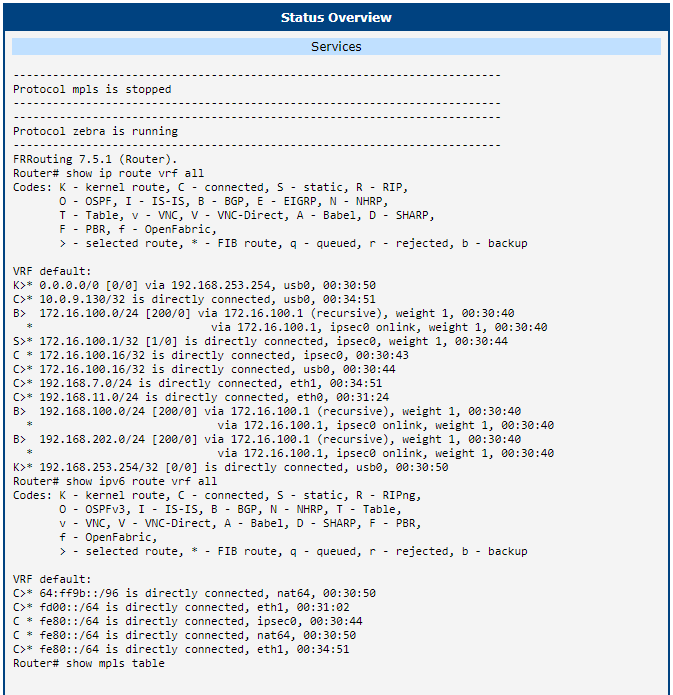
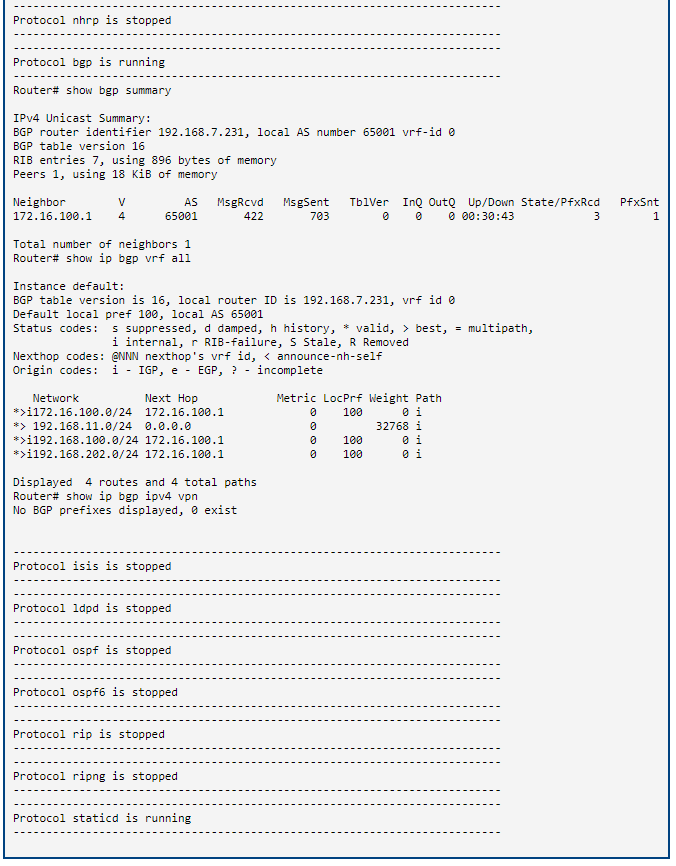
If configured correctly, you can see changes in the Route Tables of the routers. Here is the Route Table of Router B — on the Network page in the Status section of the router.
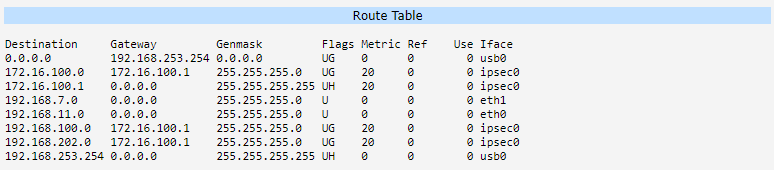
If you log in to the Cisco headquarters hub router and run the show crypto ikev2 sa detailed command, you can see the IKEv2 security associations with proper tunnel addresses and other information:
Router# show crypto ikev2 sa detailed
IPv4 Crypto IKEv2  SA

Tunnel-id Local                 Remote                fvrf/ivrf            Status
3         10.40.29.128/4500     10.0.9.130/4500       none/none            READY
Encr: AES-GCM, keysize: 256, PRF: SHA256, Hash: None, DH Grp:21, Auth sign: RSA, Auth verify: RSA
Life/Active Time: 86400/298 sec
CE id: 1066, Session-id: 39
Status Description: Negotiation done
Local spi: 1DA72387E58A1801       Remote spi: D778E23C4899E2E5
Local id: server.cisco
Remote id: client2@router
Local req msg id:  0              Remote req msg id:  6
Local next msg id: 0              Remote next msg id: 6
Local req queued:  0              Remote req queued:  6
Local window:      5              Remote window:      1
DPD configured for 0 seconds, retry 0
Fragmentation not  configured.
Dynamic Route Update: disabled
Extended Authentication not configured.
NAT-T is not detected
Cisco Trust Security SGT is disabled
Assigned host addr: 172.16.100.16
Initiator of SA : No

Tunnel-id Local                 Remote                fvrf/ivrf            Status
1         10.40.29.128/4500     10.0.6.60/4500        none/none            READY
Encr: AES-GCM, keysize: 256, PRF: SHA256, Hash: None, DH Grp:21, Auth sign: RSA, Auth verify: RSA
Life/Active Time: 86400/1023 sec
CE id: 1064, Session-id: 37
Status Description: Negotiation done
Local spi: 50DBD32498E87942       Remote spi: E73F2996CF9E9373
Local id: server.cisco
Remote id: client1@router
Local req msg id:  0              Remote req msg id:  18
Local next msg id: 0              Remote next msg id: 18
Local req queued:  0              Remote req queued:  18
Local window:      5              Remote window:      1
DPD configured for 0 seconds, retry 0
Fragmentation not  configured.
Dynamic Route Update: disabled
Extended Authentication not configured.
NAT-T is not detected
Cisco Trust Security SGT is disabled
Assigned host addr: 172.16.100.14
Initiator of SA : No

IPv6 Crypto IKEv2  SA

Router#show ip bgp
BGP table version is 11, local router ID is 172.16.100.1
Status codes: s suppressed, d damped, h history, * valid, > best, i - internal,
r RIB-failure, S Stale, m multipath, b backup-path, f RT-Filter,
x best-external, a additional-path, c RIB-compressed,
t secondary path,
Origin codes: i - IGP, e - EGP, ? - incomplete
RPKI validation codes: V valid, I invalid, N Not found

Network          Next Hop            Metric LocPrf Weight Path
*>   172.16.100.0/24  0.0.0.0                  0         32768 i
*>i  192.168.11.0     172.16.100.16            0    100      0 i
*>i  192.168.100.0    172.16.100.14            0    100      0 i
*>   192.168.202.0    0.0.0.0                  0         32768 i

Router#show ip route
Codes: L - local, C - connected, S - static, R - RIP, M - mobile, B - BGP
D - EIGRP, EX - EIGRP external, O - OSPF, IA - OSPF inter area
N1 - OSPF NSSA external type 1, N2 - OSPF NSSA external type 2
E1 - OSPF external type 1, E2 - OSPF external type 2
i - IS-IS, su - IS-IS summary, L1 - IS-IS level-1, L2 - IS-IS level-2
ia - IS-IS inter area, * - candidate default, U - per-user static route
o - ODR, P - periodic downloaded static route, H - NHRP, l - LISP
a - application route
+ - replicated route, % - next hop override, p - overrides from PfR

Gateway of last resort is 10.40.30.1 to network 0.0.0.0

S*    0.0.0.0/0 [1/0] via 10.40.30.1
is directly connected, GigabitEthernet0/0/0
10.0.0.0/8 is variably subnetted, 2 subnets, 2 masks
C        10.40.28.0/22 is directly connected, GigabitEthernet0/0/0
L        10.40.29.128/32 is directly connected, GigabitEthernet0/0/0
172.16.0.0/16 is variably subnetted, 4 subnets, 2 masks
S        172.16.100.0/24 is directly connected, Null0
C        172.16.100.1/32 is directly connected, Loopback2
S        172.16.100.14/32 is directly connected, Virtual-Access1
S        172.16.100.16/32 is directly connected, Virtual-Access3
B     192.168.11.0/24 [200/0] via 172.16.100.16, 00:07:49
B     192.168.100.0/24 [200/0] via 172.16.100.14, 00:10:16
192.168.202.0/24 is variably subnetted, 2 subnets, 2 masks
C        192.168.202.0/24 is directly connected, GigabitEthernet0/0/1.202
L        192.168.202.254/32 is directly connected, GigabitEthernet0/0/1.202

Router#ping 192.168.100.1
Type escape sequence to abort.
Sending 5, 100-byte ICMP Echos to 192.168.100.1, timeout is 2 seconds:
!!!!!
Success rate is 100 percent (5/5), round-trip min/avg/max = 59/61/67 ms
Router#ping 192.168.11.1
Type escape sequence to abort.
Sending 5, 100-byte ICMP Echos to 192.168.11.1, timeout is 2 seconds:
!!!!!
Success rate is 100 percent (5/5), round-trip min/avg/max = 217/245/298 ms
Router#ping 172.16.100.14
Type escape sequence to abort.
Sending 5, 100-byte ICMP Echos to 172.16.100.14, timeout is 2 seconds:
!!!!!
Success rate is 100 percent (5/5), round-trip min/avg/max = 60/76/128 ms
Router#ping 172.16.100.16
Type escape sequence to abort.
Sending 5, 100-byte ICMP Echos to 172.16.100.16, timeout is 2 seconds:
!!!!!
Success rate is 100 percent (5/5), round-trip min/avg/max = 136/228/285 ms
Router#
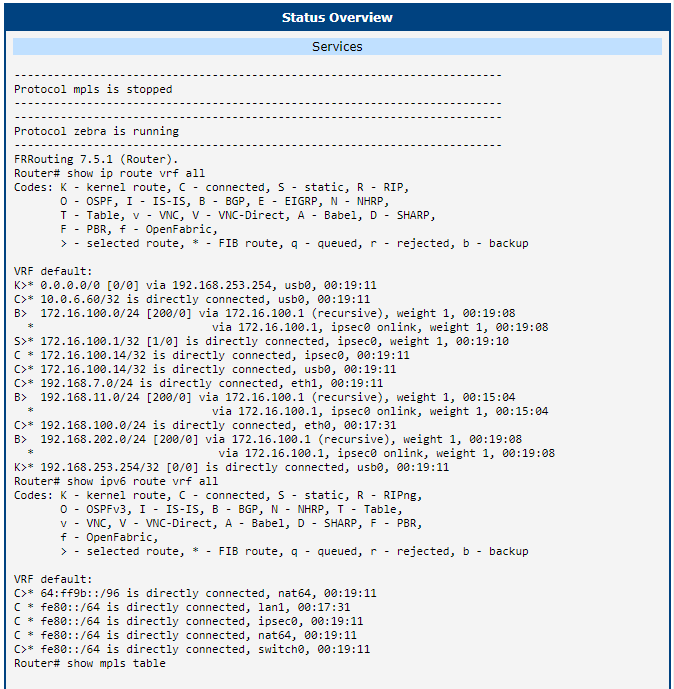
The FRR status of the first router looks like this:
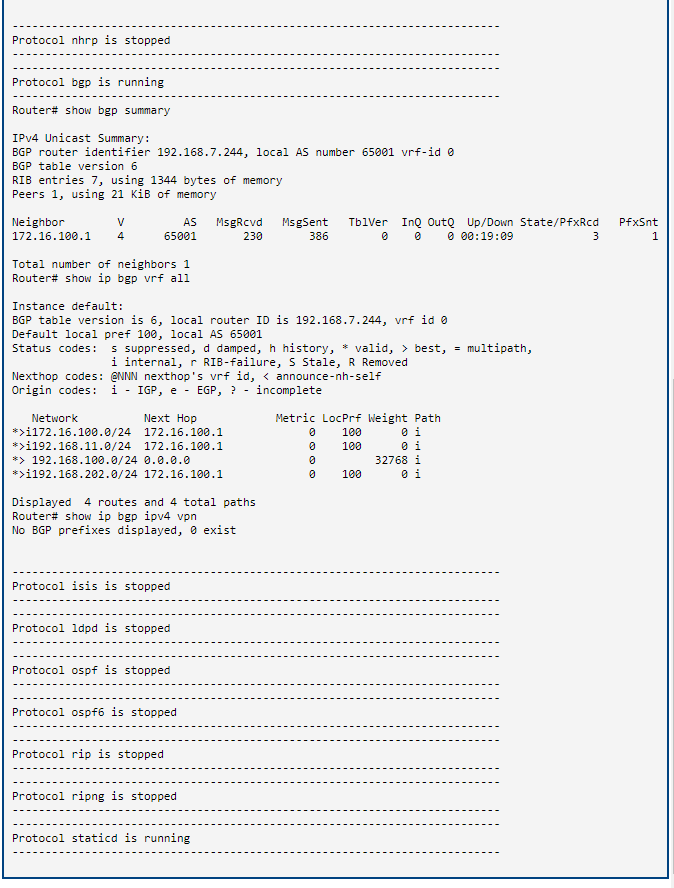
For the second router: