WireGuard Tunnel
WireGuard protocol
WireGuard is a secure network tunnel operating at layer 3. It is implemented as a kernel virtual network interface for Linux and is designed to replace IPsec for most use cases as well as popular user-space and TLS‐based solutions like OpenVPN by being more secure, more performant, and easier to use. The virtual tunnel interface is based on a fundamental principle of secure tunnels: an association between a peer’s public key and its tunnel source IP address. It uses a single round-trip key exchange based on NoiseIK and manages session creation transparently using an innovative timer state machine mechanism. Short pre-shared static keys — Curve25519 points — are used for mutual authentication in a manner similar to OpenSSH. The protocol provides strong perfect forward secrecy along with a high degree of identity hiding. Transport speed is achieved using ChaCha20Poly1305 authenticated encryption for UDP packet encapsulation. An improved IP-binding cookie mechanism mitigates denial-of-service attacks by enhancing the cookie mechanisms found in IKEv2 and DTLS with additional encryption and authentication. Overall, the design ensures that no resources are allocated in response to received packets and leverages several innovative Linux techniques for handling queues and parallelism.
How does WireGuard work?
WireGuard works by adding one or more network interfaces, similar to eth0 or wlan0, typically named wg0, wg1, wg2, etc. On the router, the four tunnels use the interfaces wg1 to wg4. Routes can be installed on these interfaces, and the WireGuard-specific parameters are configured using the wg(8) tool. This interface functions as a tunnel interface.
WireGuard associates tunnel IP addresses with public keys and remote endpoints. When the interface sends a packet to a peer, it performs the following steps:
- The packet is destined for
192.168.30.8. Which peer should handle it? The system determines that it is for peer ABCDEFGH (or, if no configured peer matches, the packet is dropped). - The entire IP packet is encrypted using peer ABCDEFGH’s public key.
- The system identifies the remote endpoint of peer ABCDEFGH—UDP port
53133on host216.58.211.110. - The encrypted packet is sent over the Internet to
216.58.211.110:53133via UDP.
When the interface receives a packet, the process is as follows:
- A packet is received from UDP port
7361on host98.139.183.24and is decrypted. - The decryption and authentication succeed for peer LMNOPQRS. The system records that peer LMNOPQRS’s most recent Internet endpoint is
98.139.183.24:7361via UDP. - After decryption, the plaintext packet originates from
192.168.43.89. The system checks whether peer LMNOPQRS is permitted to send packets from this IP. - If permitted, the packet is accepted on the interface; otherwise, it is dropped.
At the heart of WireGuard is the concept of Cryptokey Routing, which associates public keys with lists of tunnel IP addresses permitted within the tunnel. Each network interface has its own private key and list of peers, and each peer has a public key. These concise public keys are used to authenticate peers and can be shared via any out‑of‑band method—similar to sending an SSH public key to a friend for shell access.
For example, a server computer might have this configuration:
[Interface]
PrivateKey = yAnz5TF+lXXJte14tji3zlMNq+hd2rYUIgJBgB3fBmk=
ListenPort = 51820

[Peer]
PublicKey = xTIBA5rboUvnH4htodjb6e697QjLERt1NAB4mZqp8Dg=
AllowedIPs = 10.192.122.3/32, 10.192.124.1/24
And a client computer might have this simpler configuration:
[Interface]
PrivateKey = gI6EdUSYvn8ugXOt8QQD6Yc+JyiZxIhp3GInSWRfWGE=
ListenPort = 21841

[Peer]
PublicKey = HIgo9xNzJMWLKASShiTqIybxZ0U3wGLiUeJ1PKf8ykw=
Endpoint = 192.95.5.69:51820
AllowedIPs = 0.0.0.0/0
In the server configuration, each client can send packets to the network interface if its source IP matches the corresponding allowed IP list. For example, when a packet is received from peer xTIBA5rb..., if it decrypts and authenticates correctly and its source IP is 10.192.122.3, it is accepted; otherwise, it is dropped.
Likewise, when the server’s interface sends a packet to a client, it examines the packet’s destination IP and compares it with each client’s allowed IP list to determine the correct recipient. For instance, if a packet destined for 10.192.122.3 is sent, it is encrypted using the public key of peer xTIBA5rb... and forwarded to that peer’s most recent Internet endpoint.
In the client configuration, the single peer (the server) can send packets to the network interface regardless of source IP (since 0.0.0.0/0 serves as a wildcard). Thus, if a packet from peer HIgo9xNz... decrypts and authenticates correctly, it is accepted; if not, it is dropped.
Similarly, when the client sends a packet to its single peer (the server), it encrypts the packet regardless of its destination IP (again, because 0.0.0.0/0 is a wildcard) and forwards it to the server’s most recent Internet endpoint.
In summary, when sending packets, the allowed IP list functions as a routing table, and when receiving packets, it serves as an access control list. This straightforward association of public keys and allowed IPs is known as a Cryptokey Routing Table.
Any combination of IPv4 and IPv6 can be used in any field, and WireGuard is fully capable of encapsulating one protocol within the other if necessary.
Because all packets on the WireGuard interface are encrypted and authenticated—and because there is a tight coupling between a peer’s identity and its allowed IP address—system administrators do not need complex firewall extensions (as with IPsec). They can simply verify that a packet is from the correct IP on the designated interface, ensuring secure and authentic communication. This greatly simplifies network management and access control while providing confidence that iptables rules function as intended.
Configuration of WireGuard tunnel
Tips
- WireGuard is not supported on v1 and v2 router platforms.
- Routers allow the creation of only four WireGuard tunnels simultaneously.
- Each tunnel supports exactly one remote peer; the router cannot act as a hub for multiple peers on one tunnel.
The WireGuard tunnel enables the secure connection of up to four LAN networks to a single network. To open the WireGuard tunnel configuration page, click WireGuard in the Configuration section of the main menu. The menu item expands to reveal four separate configuration pages: 1st Tunnel, 2nd Tunnel, 3rd Tunnel, and 4th Tunnel.
For a description of every configuration item and a screenshot of the form, see the WireGuard chapter in the Configuration Pages of the router manual. Click Apply to apply the changes.
Configuration example
Advantech router on both sides of the WireGuard tunnel
In this example, the first router's LAN is 192.168.1.0/24 and the second router's LAN is 192.168.2.0/24. Each router's Remote Subnets value is set to the other router's LAN.
Configuration of the first router:
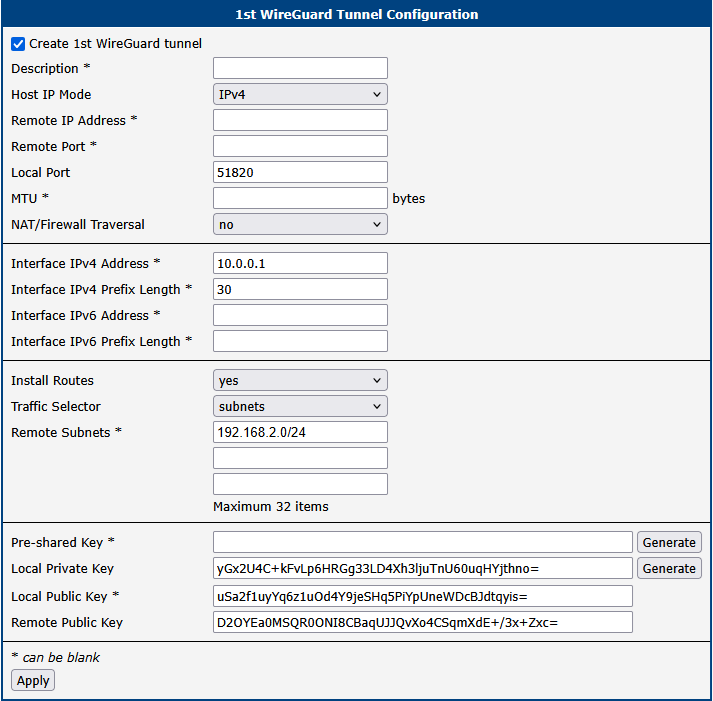
| Item | Value |
|---|---|
| Local Port | 51820 |
| NAT/Firewall Traversal | no |
| Interface IPv4 Address | 10.0.0.1 |
| Interface IPv4 Prefix Length | 30 |
| Install Routes | yes |
| Traffic Selector | subnets |
| Remote Subnets | 192.168.2.0/24 |
| Local Public Key | uSa2f1uyYq6z1uOd4Y9jeSHq5PiYpUneWDcBJdtqyis= |
| Remote Public Key | D2OYEa0MSQR0ONI8CBaqUJJQvXo4CSqmXdE+/3x+Zxc= |
Configuration of the second router:
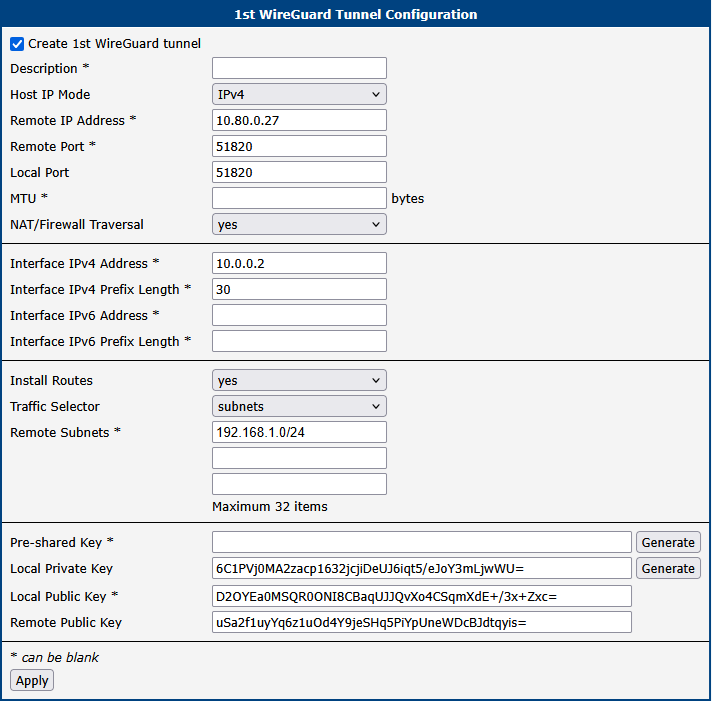
| Item | Value |
|---|---|
| Remote IP Address | 10.80.0.27 |
| Remote Port | 51820 |
| Local Port | 51820 |
| NAT/Firewall Traversal | yes |
| Interface IPv4 Address | 10.0.0.2 |
| Interface IPv4 Prefix Length | 30 |
| Install Routes | yes |
| Traffic Selector | subnets |
| Remote Subnets | 192.168.1.0/24 |
| Local Public Key | D2OYEa0MSQR0ONI8CBaqUJJQvXo4CSqmXdE+/3x+Zxc= |
| Remote Public Key | uSa2f1uyYq6z1uOd4Y9jeSHq5PiYpUneWDcBJdtqyis= |
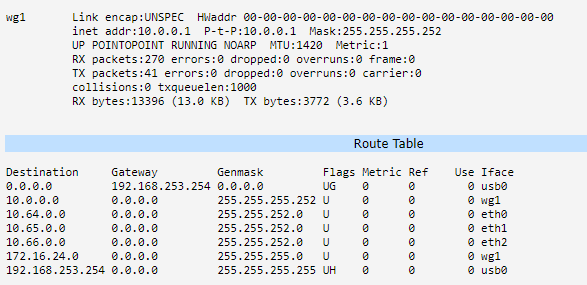
After establishing a WireGuard tunnel, an interface (e.g., wg1) and a corresponding route in the router’s routing table appear on the Network Status page.
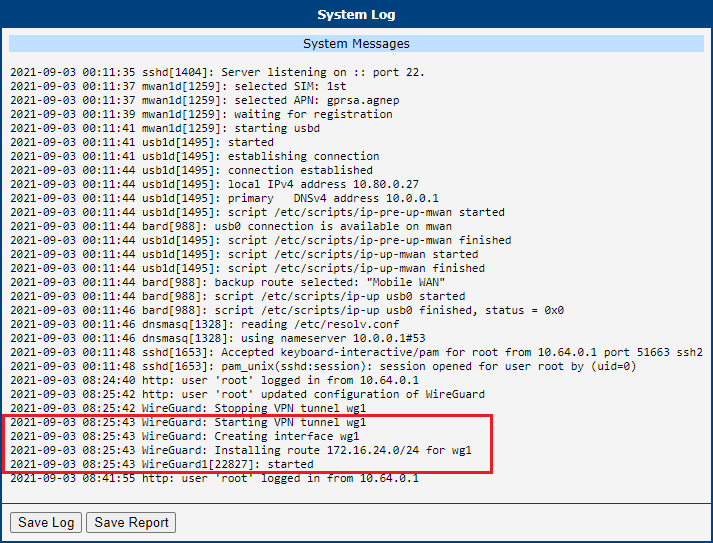
You can also verify the successful establishment of a WireGuard tunnel in the system log (found under System Log in the menu). The log entries should end with the word started.
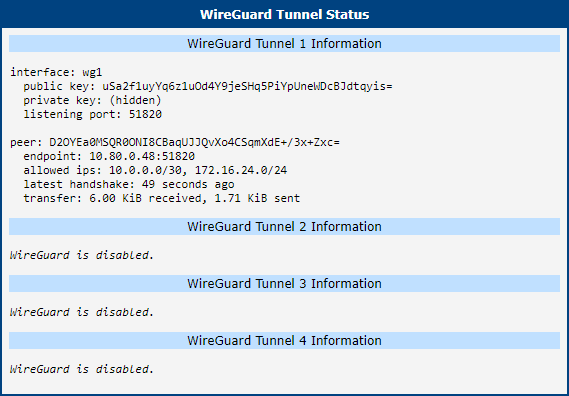
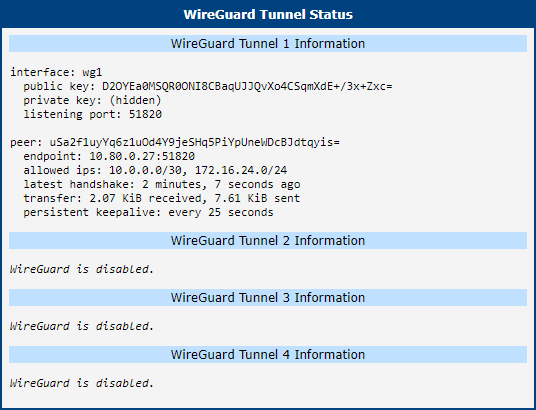
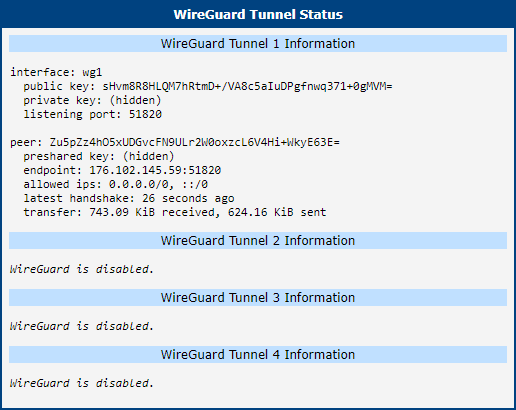
In the Status menu, the WireGuard Tunnel Status page confirms that the tunnel is functioning correctly on both sides.
WireGuard tunnel with FRR/BGP
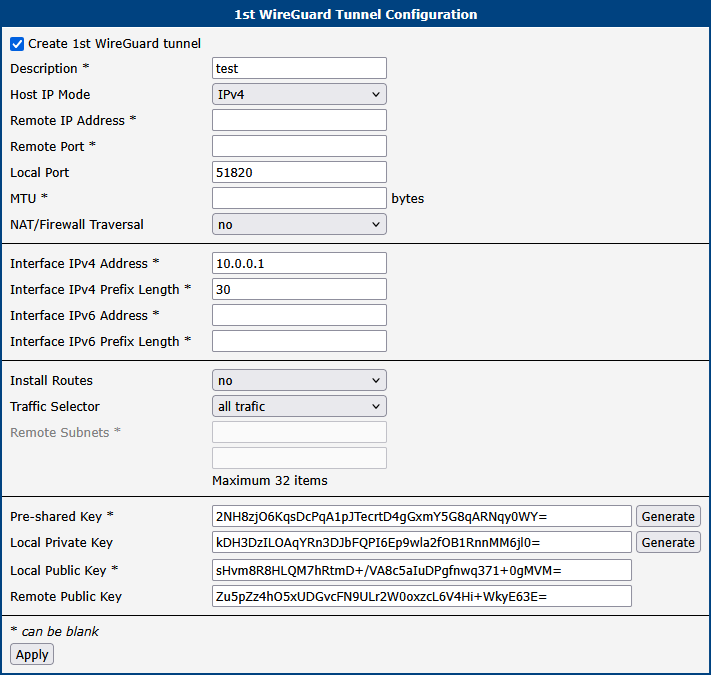
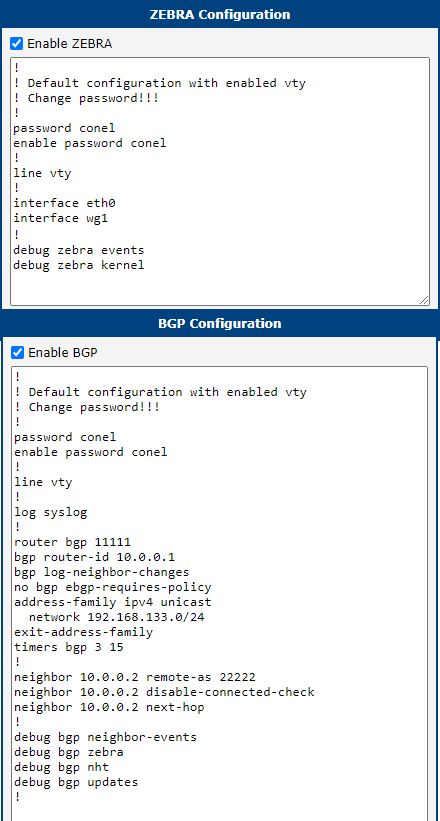
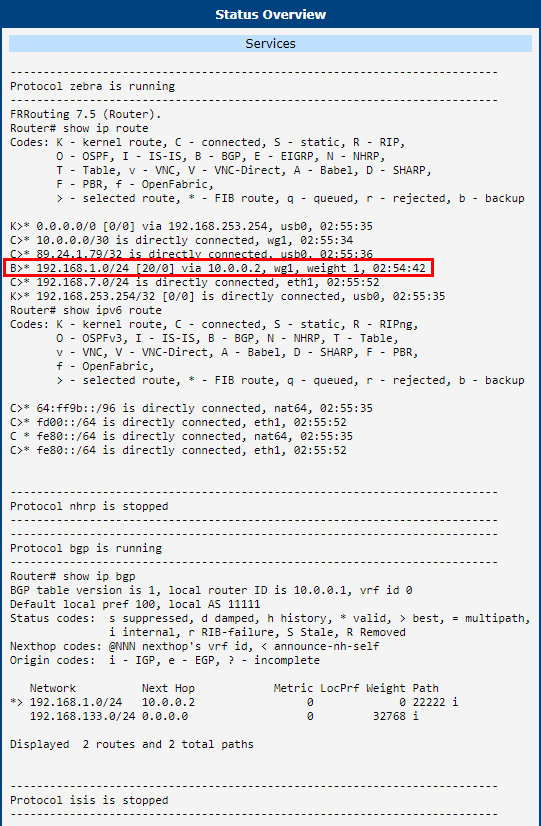
This example demonstrates how to run a WireGuard tunnel with FRR/BGP.
Tips
FRR is a Router App from Advantech and can be downloaded from the FRR Download Page.
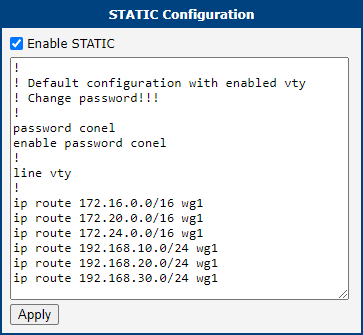
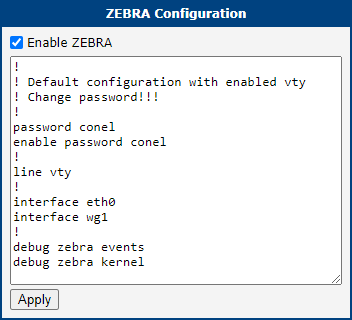
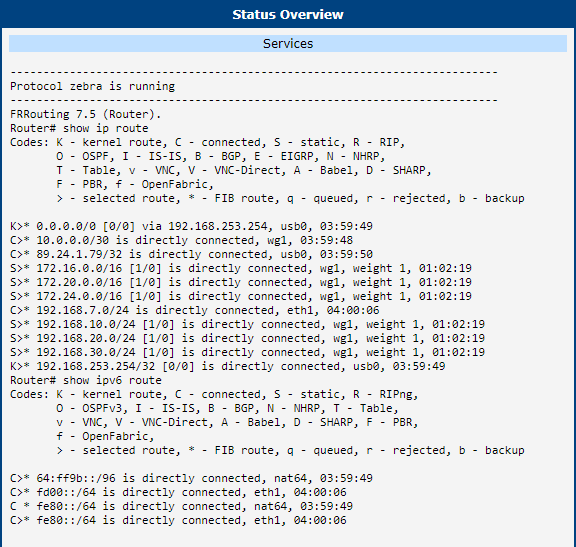
WireGuard with FRR/staticd
Some customers may require more than four static routes. In this case, you can use staticd.
Tips
FRR is a Router App from Advantech and can be downloaded from the FRR Download Page.