
SNMP Object Identifiers
Basics and MIB Files
SNMP OID Basics
OID (Object Identifier) is the name for a numeric identifier that is unique for every value in SNMP. This identifier consists of numbers separated by points. The identifier of each child is formed by appending a point and a new number to the identifier of its parent, which naturally produces a tree structure. This tree is stored in the MIB (Management Information Base), which contains names and descriptions of these numeric identifiers.
Warning
Information about the router can be found in the mgmt and private parts of the tree. The private tree for Advantech routers is defined by MIB files accessible in the public repository here: https://bitbucket.org/bbsmartworx/snmp-mib/ (Requires RFC1155-SMI and RFC-1212 modules). These files are up-to-date and determinant. They are readable by any SNMP MIB browser and can be analyzed for exact information on the carried Base Types (data format) of OIDs.
Tips
- All SNMP values are read-only by default, with the exception of two binary outputs: ioOut0 (.1.3.6.1.4.1.30140.2.3.2.0) and xccntOut1 (.1.3.6.1.4.1.30140.2.1.9.0). These two OIDs are read-write and may be modified via SNMP, provided that write access is enabled in the router's SNMP configuration settings.
- The router supports SNMP versions v1, v2c, and v3.
Tree Structure
The figure below shows the basic tree structure that is used for creating all OIDs.
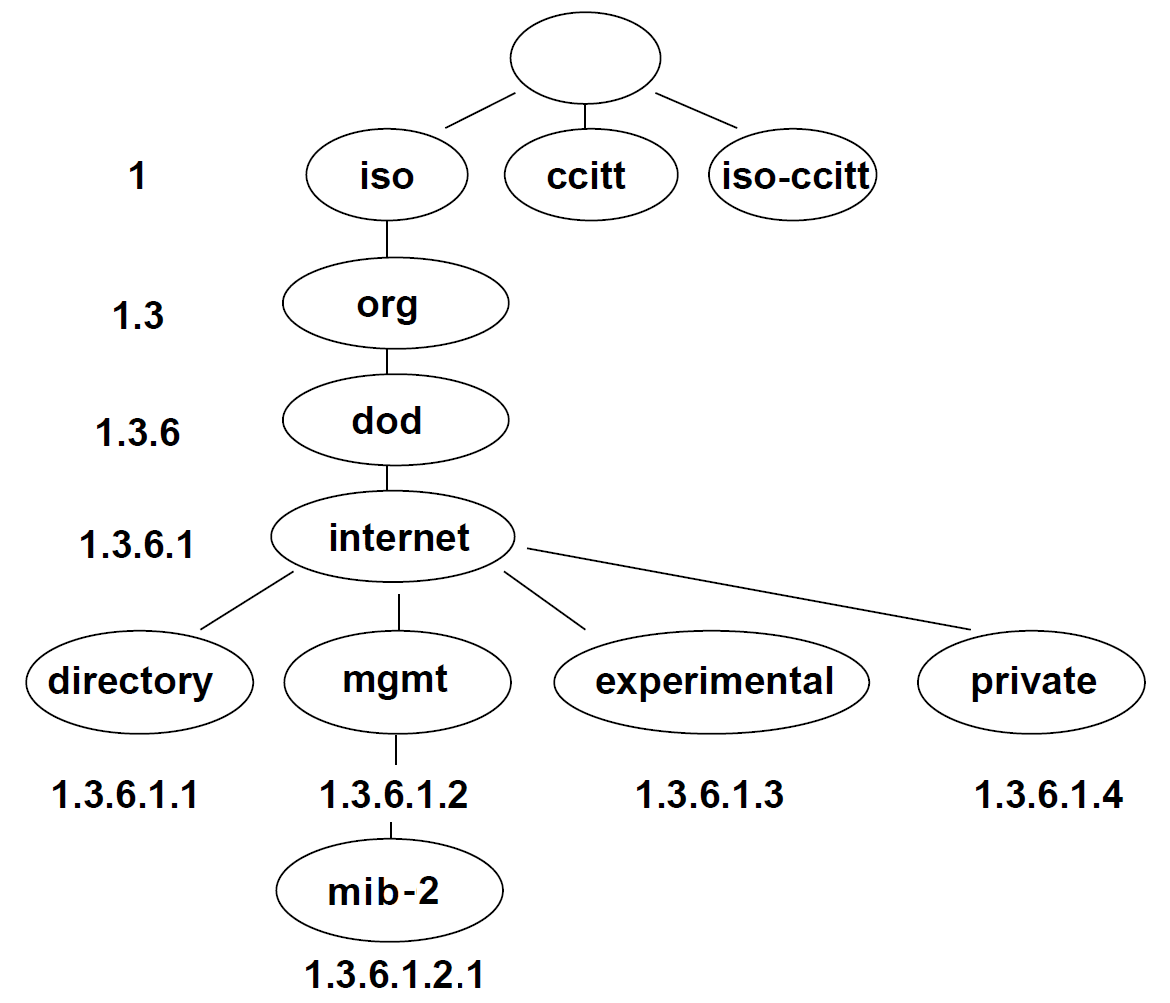
In the standard MIB tree, the mgmt item is further divided into the following groups:
| OID | Group name | Note |
|---|---|---|
| .1.3.6.1.2.1.1 | system | For more information, see section System |
| .1.3.6.1.2.1.2 | interfaces | For more information, see section Interfaces |
| .1.3.6.1.2.1.3 | at | Not supported by Advantech routers |
| .1.3.6.1.2.1.4 | ip | For more information, see section IP |
| .1.3.6.1.2.1.5 | icmp | For more information, see section ICMP |
| .1.3.6.1.2.1.6 | tcp | For more information, see section TCP |
| .1.3.6.1.2.1.7 | udp | For more information, see section UDP |
| .1.3.6.1.2.1.8 | egp | Not supported by Advantech routers |
| .1.3.6.1.2.1.9 | transmission | Not supported by Advantech routers |
| .1.3.6.1.2.1.10 | snmp | Not supported by Advantech routers |
System
| OID | Object | Description |
|---|---|---|
| .1.3.6.1.2.1.1.1 | sysDescr | A textual description of the entity. In Advantech routers, this includes the product name and firmware version. |
| .1.3.6.1.2.1.1.2 | sysObjectID | Identification of the network management subsystem contained in the entity. Contains the OID of the product type in the private tree (see table below). |
| .1.3.6.1.2.1.1.3 | sysUpTime | The time (in hundredths of a second) since the device was last re-initialized. |
| .1.3.6.1.2.1.1.4 | sysContact | The textual identification of the contact person, taken from the router’s Configuration (page Services, SNMP). If unknown, this is a zero-length string. |
| .1.3.6.1.2.1.1.5 | sysName | System name (from the SNMP configuration page). Otherwise, a zero-length string. |
| .1.3.6.1.2.1.1.6 | sysLocation | The physical location (from the SNMP configuration page). Otherwise, a zero-length string. |
| .1.3.6.1.2.1.1.7 | sysServices | A value indicating the set of services this entity primarily offers. In Advantech routers, the value is 4. |
Interfaces
| OID | Table | Description |
|---|---|---|
| .1.3.6.1.2.1.2.1 | ifNumber | The number of network interfaces (regardless of their current state). |
| .1.3.6.1.2.1.2.2 | ifTable | A list of interface entries. This table includes properties for every interface. The number of rows equals the value of ifNumber. |
ifTable is the parent element for the group ifEntry (OID .1.3.6.1.2.1.2.2.1), which includes scalar objects storing information about a particular interface. The interface types include:
- eth*x — Ethernet interface:
- eth0 — primary Ethernet interface,
- eth1 — secondary Ethernet interface,
- eth2 — tertiary Ethernet interface,
- lan*x — xth single Ethernet port of a switch (from left to right),
- mwan0 — primary Mobile WAN interface,
- mwan1 — secondary Mobile WAN interface,
- wlan*x — WiFi interface:
- wlan0 — primary Access Point interface,
- wlan02 — secondary Access Point interface,
- wlan1 — primary Station interface,
- wlan2 — tertiary Access Point interface,
- wlan22 — quaternary Access Point interface,
- wlan3 — secondary Station interface.
IP
| OID | Object | Description |
|---|---|---|
| .1.3.6.1.2.1.4.1 | ipForwarding | Indicates whether this entity is acting as an IP gateway for datagrams that are received but not addressed to it. |
| .1.3.6.1.2.1.4.2 | ipDefaultTTL | The default Time-To-Live value inserted into the IP header for datagrams originated by this entity when no TTL is supplied by the transport layer. |
| .1.3.6.1.2.1.4.3 | ipInReceives | The total number of input datagrams received from interfaces, including those received in error. |
| .1.3.6.1.2.1.4.4 | ipInHdrErrors | The number of input datagrams discarded due to errors in their IP headers (e.g., bad checksums or format errors). |
| .1.3.6.1.2.1.4.5 | ipInAddrErrors | The number of input datagrams discarded because the destination IP address was not valid for this entity. |
| .1.3.6.1.2.1.4.6 | ipForwDatagrams | The number of datagrams received that were not destined for this entity, prompting an attempt to forward them. |
| .1.3.6.1.2.1.4.7 | ipInUnknownProtos | The number of locally addressed datagrams that were discarded because the protocol was unknown or unsupported. |
| .1.3.6.1.2.1.4.8 | ipInDiscards | The number of IP datagrams discarded despite no encountered errors (for example, due to a lack of buffer space). |
| .1.3.6.1.2.1.4.9 | ipInDelivers | The total number of input datagrams successfully delivered to IP user-protocols (including ICMP). |
| .1.3.6.1.2.1.4.10 | ipOutRequests | The total number of IP datagrams that local IP user protocols (including ICMP) supplied for transmission. |
| .1.3.6.1.2.1.4.11 | ipOutDiscards | The number of output IP datagrams that were discarded (e.g., for lack of buffer space) even though no error was encountered. |
| .1.3.6.1.2.1.4.12 | ipOutNoRoutes | The number of IP datagrams discarded because no route could be found to transmit them. |
| .1.3.6.1.2.1.4.13 | ipReasmTimeout | The maximum number of seconds that received fragments are held while awaiting reassembly. |
| .1.3.6.1.2.1.4.14 | ipReasmReqds | The number of IP fragments received that required reassembly. |
| .1.3.6.1.2.1.4.15 | ipReasmOKs | The number of IP datagrams that were successfully reassembled. |
| .1.3.6.1.2.1.4.16 | ipReasmFails | The number of failures detected by the IP reassembly algorithm (due to timeouts or errors). |
| .1.3.6.1.2.1.4.17 | ipFragOKs | The number of IP datagrams that have been successfully fragmented. |
| .1.3.6.1.2.1.4.18 | ipFragFails | The number of IP datagrams discarded because they required fragmentation but could not be fragmented. |
| .1.3.6.1.2.1.4.19 | ipFragCreates | The number of IP datagram fragments generated due to fragmentation. |
| .1.3.6.1.2.1.4.20 | ipAddrTable | Not supported by Advantech routers. |
| .1.3.6.1.2.1.4.21 | ipRouteTable | Not supported by Advantech routers. |
| .1.3.6.1.2.1.4.22 | ipNetToMediaTable | Not supported by Advantech routers. |
| .1.3.6.1.2.1.4.23 | ipRoutingDiscards | Not supported by Advantech routers. |
ICMP
| OID | Object | Description |
|---|---|---|
| .1.3.6.1.2.1.5.1 | icmpInMsgs | The total number of ICMP messages received (including those with errors). |
| .1.3.6.1.2.1.5.2 | icmpInErrors | The number of ICMP messages received that contain errors (e.g., bad checksums, incorrect lengths). |
| .1.3.6.1.2.1.5.3 | icmpInDestUnreachs | The number of ICMP Destination Unreachable messages received. |
| .1.3.6.1.2.1.5.4 | icmpInTimeExcds | The number of ICMP Time Exceeded messages received. |
| .1.3.6.1.2.1.5.5 | icmpInParmProbs | The number of ICMP Parameter Problem messages received. |
| .1.3.6.1.2.1.5.6 | icmpInSrcQuenchs | The number of ICMP Source Quench messages received. |
| .1.3.6.1.2.1.5.7 | icmpInRedirects | The number of ICMP Redirect messages received. |
| .1.3.6.1.2.1.5.8 | icmpInEchos | The number of ICMP Echo Request messages received. |
| .1.3.6.1.2.1.5.9 | icmpInEchoReps | The number of ICMP Echo Reply messages received. |
| .1.3.6.1.2.1.5.10 | icmpInTimestamps | The number of ICMP Timestamp Request messages received. |
| .1.3.6.1.2.1.5.11 | icmpInTimestampReps | The number of ICMP Timestamp Reply messages received. |
| .1.3.6.1.2.1.5.12 | icmpInAddrMasks | The number of ICMP Address Mask Request messages received. |
| .1.3.6.1.2.1.5.13 | icmpInAddrMaskReps | The number of ICMP Address Mask Reply messages received. |
| .1.3.6.1.2.1.5.14 | icmpOutMsgs | The total number of ICMP messages attempted to be sent (including those with errors). |
| .1.3.6.1.2.1.5.15 | icmpOutErrors | The number of ICMP messages that were not sent due to errors (e.g., insufficient buffers). |
| .1.3.6.1.2.1.5.16 | icmpOutDestUnreachs | The number of ICMP Destination Unreachable messages sent. |
| .1.3.6.1.2.1.5.17 | icmpOutTimeExcds | The number of ICMP Time Exceeded messages sent. |
| .1.3.6.1.2.1.5.18 | icmpOutParmProbs | The number of ICMP Parameter Problem messages sent. |
| .1.3.6.1.2.1.5.19 | icmpOutSrcQuenchs | The number of ICMP Source Quench messages sent. |
| .1.3.6.1.2.1.5.20 | icmpOutRedirects | The number of ICMP Redirect messages sent (hosts typically send 0 redirects). |
| .1.3.6.1.2.1.5.21 | icmpOutEchos | The number of ICMP Echo Request messages sent. |
| .1.3.6.1.2.1.5.22 | icmpOutEchoReps | The number of ICMP Echo Reply messages sent. |
| .1.3.6.1.2.1.5.23 | icmpOutTimestamps | The number of ICMP Timestamp Request messages sent. |
| .1.3.6.1.2.1.5.24 | icmpOutTimestampReps | The number of ICMP Timestamp Reply messages sent. |
| .1.3.6.1.2.1.5.25 | icmpOutAddrMasks | The number of ICMP Address Mask Request messages sent. |
| .1.3.6.1.2.1.5.26 | icmpOutAddrMaskReps | The number of ICMP Address Mask Reply messages sent. |
TCP
| OID | Object | Description |
|---|---|---|
| .1.3.6.1.2.1.6.1 | tcpRtoAlgorithm | The algorithm used to determine the retransmission timeout for unacknowledged segments. |
| .1.3.6.1.2.1.6.2 | tcpRtoMin | The minimum retransmission timeout allowed (in milliseconds). |
| .1.3.6.1.2.1.6.3 | tcpRtoMax | The maximum retransmission timeout allowed (in milliseconds). |
| .1.3.6.1.2.1.6.4 | tcpMaxConn | The maximum number of TCP connections supported. A value of -1 indicates a dynamic limit. |
| .1.3.6.1.2.1.6.5 | tcpActiveOpens | The number of times TCP connections have actively opened (transitioning from CLOSED to SYN-SENT). |
| .1.3.6.1.2.1.6.6 | tcpPassiveOpens | The number of times TCP connections have been passively opened (transitioning from LISTEN to SYN-RCVD). |
| .1.3.6.1.2.1.6.7 | tcpAttemptFails | The number of failed attempts to establish a TCP connection. |
| .1.3.6.1.2.1.6.8 | tcpEstabResets | The number of TCP connections that have been reset from the ESTABLISHED or CLOSE-WAIT states. |
| .1.3.6.1.2.1.6.9 | tcpCurrEstab | The current number of TCP connections in the ESTABLISHED or CLOSE-WAIT states. |
| .1.3.6.1.2.1.6.10 | tcpInSegs | The total number of TCP segments received, including erroneous segments. |
| .1.3.6.1.2.1.6.11 | tcpOutSegs | The total number of TCP segments sent (excluding pure retransmissions). |
| .1.3.6.1.2.1.6.12 | tcpRetransSegs | The total number of TCP segments retransmitted. |
| .1.3.6.1.2.1.6.13 | tcpConnTable | Not supported by Advantech routers. |
| .1.3.6.1.2.1.6.14 | tcpInErrs | Not supported by Advantech routers. |
| .1.3.6.1.2.1.6.15 | tcpOutRsts | Not supported by Advantech routers. |
UDP
| OID | Object | Description |
|---|---|---|
| .1.3.6.1.2.1.7.1 | udpInDatagram | The total number of UDP datagrams delivered to UDP users. |
| .1.3.6.1.2.1.7.2 | udpNoPorts | The number of UDP datagrams received for which there was no application at the destination port. |
| .1.3.6.1.2.1.7.3 | udpInErrors | The number of UDP datagrams that could not be delivered for reasons other than the absence of an application. |
| .1.3.6.1.2.1.7.4 | udpOutDatagrams | The total number of UDP datagrams sent from this entity. |
| .1.3.6.1.2.1.7.5 | udpTable | Not supported by Advantech routers. |
Private Tree for Advantech Routers
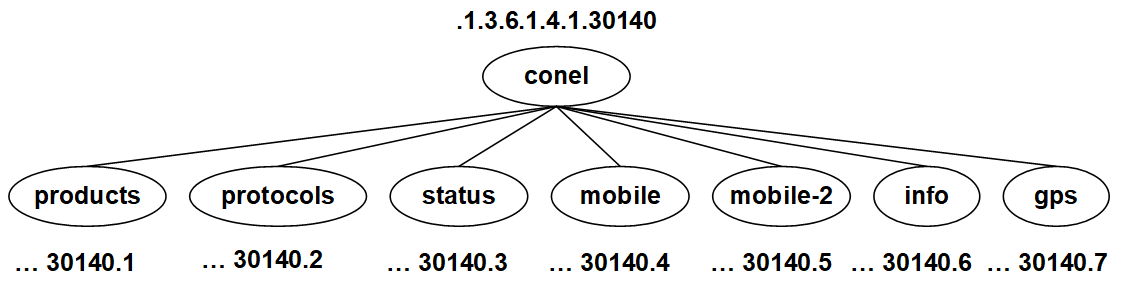
This chapter describes the SNMP values specific to the Advantech Czech company (formerly Conel). The tree starts at OID = .1.3.6.1.4.1.30140 and can be interpreted as:
iso.org.dod.internet.private.enterprises.conel
The figure below shows the tree used for creating Conel OIDs for Advantech routers.
Tips
Subtrees mobile and mobile-2 are not available for routers that do not have a cellular module.
Product OIDs
For products manufactured by Advantech Czech (formerly Conel), the following range of OIDs is used in sysObjectID (see section System):
Warning
Note on the OID Scheme (.1.3.6.1.4.1.30140.1.X):
The meaning of the last value (X) in the OID string depends on the product generation:
- Legacy Scheme (
X < 1000):Xis a sequential number assigned to older products (e.g.,X=42for the ICR-321x series). - New Scheme (
X > 1000): For newly introduced products and selected existing models,Xcorresponds directly to the numeric product identifier (e.g.,X=3211for the ICR-3211). In this new scheme, the OID name follows the formatrouterICRX.
| OID | Name | Product |
|---|---|---|
| .1.3.6.1.4.1.30140.1.1 | routerER75 | EDGE router ER75 |
| .1.3.6.1.4.1.30140.1.2 | routerER75i | EDGE router ER75i |
| .1.3.6.1.4.1.30140.1.3 | routerUR5 | UMTS router UR5 |
| .1.3.6.1.4.1.30140.1.4 | routerUR5i | UMTS router UR5i |
| .1.3.6.1.4.1.30140.1.5 | routerXR5i | Industrial router XR5i |
| .1.3.6.1.4.1.30140.1.6 | routerER75iV2 | EDGE router ER75i v2 |
| .1.3.6.1.4.1.30140.1.7 | routerUR5V2 | UMTS router UR5 v2 |
| .1.3.6.1.4.1.30140.1.8 | routerUR5iV2 | UMTS router UR5i v2 |
| .1.3.6.1.4.1.30140.1.9 | routerXR5iV2 | Industrial router XR5i v2 |
| .1.3.6.1.4.1.30140.1.10 | routerLR77V2 | LTE router LR77 v2 |
| .1.3.6.1.4.1.30140.1.11 | routerCR10V2 | CDMA router CR10 v2 |
| .1.3.6.1.4.1.30140.1.12 | routerUCR11V2 | CDMA/UMTS router UCR11 v2 |
| .1.3.6.1.4.1.30140.1.13 | routerUR5iV2L | HSPA+ router UR5i v2 Libratum |
| .1.3.6.1.4.1.30140.1.14 | routerSpectre3G | HSPA+ router UR5i v2 SL for US |
| .1.3.6.1.4.1.30140.1.15 | routerSpectreRT | Industrial router XR5i v2 SL for US |
| .1.3.6.1.4.1.30140.1.16 | routerRR75i | GSM-R router RR75i v2 |
| .1.3.6.1.4.1.30140.1.17 | routerSpectreLTEAT | LTE router LR77 v2 SL for US AT&T |
| .1.3.6.1.4.1.30140.1.18 | routerXR5iV2E | Industrial router XR5i v2 Libratum |
| .1.3.6.1.4.1.30140.1.19 | routerBiviasV2HC | Twin cellular module router Bivias v2 HC |
| .1.3.6.1.4.1.30140.1.20 | routerBiviasV2LC | Twin cellular module router Bivias v2 LC |
| .1.3.6.1.4.1.30140.1.21 | routerSpectreLTEVZ | LTE router LR77 v2 SL for US Verizon |
| .1.3.6.1.4.1.30140.1.22 | routerBiviasV2LL | Twin cellular module router Bivias v2 LL |
| .1.3.6.1.4.1.30140.1.23 | routerBiviasV2LH | Twin cellular module router Bivias v2 LH |
| .1.3.6.1.4.1.30140.1.24 | routerBiviasV2HH | Twin cellular module router Bivias v2 HH |
| .1.3.6.1.4.1.30140.1.25 | routerLR77V2L | LTE router LR77 v2 Libratum |
| .1.3.6.1.4.1.30140.1.26 | routerSpectreV3HSPA | not launched |
| .1.3.6.1.4.1.30140.1.27 | routerSpectreV3LTE | LTE router SmartFlex |
| .1.3.6.1.4.1.30140.1.28 | routerSpectreV3CDMA | not launched |
| .1.3.6.1.4.1.30140.1.29 | routerSpectreV3ERT | Industrial router SmartFlex SR300 |
| .1.3.6.1.4.1.30140.1.32 | routerSpectreV3TLTE | Twin module LTE router SmartMotion |
| .1.3.6.1.4.1.30140.1.35 | routerSpectreV3LTEUS | LTE router SmartFlex for US |
| .1.3.6.1.4.1.30140.1.36 | routerSpectreV3LLTE | LTE router SmartStart |
| .1.3.6.1.4.1.30140.1.37 | routerSpectreV3LLTEUS | LTE router SmartStart for US |
| .1.3.6.1.4.1.30140.1.38 | routerSpectreV3ERTUS | not launched |
| .1.3.6.1.4.1.30140.1.39 | routerSpectreV3LERT | not launched |
| .1.3.6.1.4.1.30140.1.40 | routerSpectreV3LERTUS | not launched |
| .1.3.6.1.4.1.30140.1.41 | routerSpectreV3TLTEUS | not launched |
| .1.3.6.1.4.1.30140.1.42 | routerICR321X | LTE router ICR-321x |
| .1.3.6.1.4.1.30140.1.43 | routerICR323X | LTE router ICR-323x |
| .1.3.6.1.4.1.30140.1.44 | routerICR324X | LTE router ICR-324x |
| .1.3.6.1.4.1.30140.1.45 | routerICR320X | LAN router ICR-320x |
| .1.3.6.1.4.1.30140.1.46 | routerICR383X | LTE industrial router ICR-383x |
| .1.3.6.1.4.1.30140.1.47 | routerICR213X | HSPA+ industrial router ICR-213x |
| .1.3.6.1.4.1.30140.1.48 | routerICR233X | LTE industrial router ICR-233x |
| .1.3.6.1.4.1.30140.1.49 | routerICR440X | LAN industrial router ICR-440x |
| .1.3.6.1.4.1.30140.1.50 | routerICR443X | LTE industrial router ICR-443x |
| .1.3.6.1.4.1.30140.1.51 | routerICR444X | LTE industrial router ICR-444x |
| .1.3.6.1.4.1.30140.1.52 | routerICR203X | LTE industrial router ICR-203x |
| .1.3.6.1.4.1.30140.1.53 | routerICR204X | LTE industrial router ICR-204x |
| .1.3.6.1.4.1.30140.1.54 | routerICR240X | LAN industrial router ICR-240x |
| .1.3.6.1.4.1.30140.1.55 | routerICR243X | LTE industrial router ICR-243x |
| .1.3.6.1.4.1.30140.1.56 | routerICR244X | LTE industrial router ICR-244x |
| .1.3.6.1.4.1.30140.1.57 | routerICR201X | LTE industrial router ICR-201X |
| .1.3.6.1.4.1.30140.1.58 | routerICR241X | LTE industrial router ICR-241X |
| .1.3.6.1.4.1.30140.1.59 | routerICR445X | LTE industrial router ICR-445X |
| .1.3.6.1.4.1.30140.1.60 | routerICR446X | LTE industrial router ICR-446X |
| .1.3.6.1.4.1.30140.1.61 | routerICR250X | LTE industrial router ICR-250X |
| .1.3.6.1.4.1.30140.1.62 | routerICR253X | LTE industrial router ICR-253X |
| .1.3.6.1.4.1.30140.1.63 | routerICR254X | LTE industrial router ICR-254X |
| .1.3.6.1.4.1.30140.1.64 | routerICR260X | LTE industrial router ICR-260X |
| .1.3.6.1.4.1.30140.1.65 | routerICR263X | LTE industrial router ICR-263X |
| .1.3.6.1.4.1.30140.1.66 | routerICR264X | LTE industrial router ICR-264X |
| .1.3.6.1.4.1.30140.1.67 | routerICR270X | LAN industrial router ICR-270X |
| .1.3.6.1.4.1.30140.1.68 | routerICR271X | LTE industrial router ICR-271X |
| .1.3.6.1.4.1.30140.1.69 | routerICR273X | LTE industrial router ICR-273X |
| .1.3.6.1.4.1.30140.1.70 | routerICR274X | LTE industrial router ICR-274X |
| .1.3.6.1.4.1.30140.1.71 | routerICR280X | LAN industrial router ICR-280X |
| .1.3.6.1.4.1.30140.1.72 | routerICR281X | LTE industrial router ICR-281X |
| .1.3.6.1.4.1.30140.1.73 | routerICR283X | LTE industrial router ICR-283X |
| .1.3.6.1.4.1.30140.1.74 | routerICR284X | LTE industrial router ICR-284X |
| .1.3.6.1.4.1.30140.1.75 | routerICR410X | LAN industrial router ICR-410X |
| .1.3.6.1.4.1.30140.1.76 | routerICR413X | LTE industrial router ICR-413X |
| .1.3.6.1.4.1.30140.1.77 | routerICR414X | LTE industrial router ICR-414X |
| .1.3.6.1.4.1.30140.1.78 | routerICR416X | 5G industrial router ICR-416X |
| .1.3.6.1.4.1.30140.1.79 | routerICR417X | 5G industrial router ICR-417X |
| .1.3.6.1.4.1.30140.1.80 | routerICR420X | LAN industrial router ICR-420X |
| .1.3.6.1.4.1.30140.1.81 | routerICR423X | LTE industrial router ICR-423X |
| .1.3.6.1.4.1.30140.1.82 | routerICR424X | LTE industrial router ICR-424X |
| .1.3.6.1.4.1.30140.1.83 | routerICR426X | 5G industrial router ICR-426X |
| .1.3.6.1.4.1.30140.1.84 | routerICR427X | 5G industrial router ICR-427X |
| .1.3.6.1.4.1.30140.1.85 | routerICR160X | LTE industrial router ICR-160X |
| .1.3.6.1.4.1.30140.1.86 | routerICR164X | LTE industrial router ICR-164X |
| .1.3.6.1.4.1.30140.1.87 | routerICR170X | 5G industrial router ICR-170X |
| .1.3.6.1.4.1.30140.1.88 | routerICR174X | 5G industrial router ICR-174X |
| .1.3.6.1.4.1.30140.1.89 | routerICR447X | 5G industrial router ICR-447X |
| .1.3.6.1.4.1.30140.1.2452 | routerICR2452 | LAN industrial router ICR-2452 |
| .1.3.6.1.4.1.30140.1.2701 | routerICR2701 | LAN industrial router ICR-2701 |
| .1.3.6.1.4.1.30140.1.2734 | routerICR2734 | LTE industrial router ICR-2734 |
| .1.3.6.1.4.1.30140.1.2834 | routerICR2834 | LTE industrial router ICR-2834 |
| .1.3.6.1.4.1.30140.1.3211 | routerICR3211 | LTE industrial router ICR-3211 |
| .1.3.6.1.4.1.30140.1.3231 | routerICR3231 | LTE industrial router ICR-3231 |
| .1.3.6.1.4.1.30140.1.3232 | routerICR3232 | LTE industrial router ICR-3232 |
| .1.3.6.1.4.1.30140.1.3241 | routerICR3241 | LTE industrial router ICR-3241 |
Protocols
XC-CNT
Tips
To use the xccnt part of the tree, you must use a v2 router with the XC-CNT interface (expansion board) installed and activated on the SNMP configuration page. See the manual for v2 Routers* for more details. It is possible to set the binary output xccntOut1 (.1.3.6.1.4.1.30140.2.1.9.0) via SNMP. Other values are read-only. The following range of OIDs is used for the CNT expansion port:
| OID | Name | Description |
|---|---|---|
| .1.3.6.1.4.1.30140.2.1.1.0 | xccntAn1 | Analogy input AN1 (range 0-4095) |
| .1.3.6.1.4.1.30140.2.1.2.0 | xccntAn2 | Analogy input AN2 (range 0-4095) |
| .1.3.6.1.4.1.30140.2.1.3.0 | xccntCnt1 | Counter input CNT1 (range 0-4294967295) |
| .1.3.6.1.4.1.30140.2.1.4.0 | xccntCnt2 | Counter input CNT2 (range 0-4294967295) |
| .1.3.6.1.4.1.30140.2.1.5.0 | xccntBin1 | Digital input BIN1 (values 0,1) |
| .1.3.6.1.4.1.30140.2.1.6.0 | xccntBin2 | Digital input BIN2 (values 0,1) |
| .1.3.6.1.4.1.30140.2.1.7.0 | xccntBin3 | Digital input BIN3 (values 0,1) |
| .1.3.6.1.4.1.30140.2.1.8.0 | xccntBin4 | Digital input BIN4 (values 0,1) |
| .1.3.6.1.4.1.30140.2.1.9.0 | xccntOut1 | Digital output OUT1 (values 0,1) |
M-BUS
Tips
The following range of OIDs is used for the M-BUS expansion port. It can be used only in v2 routers and requires enabling SNMP output on the SNMP configuration page (Enable M-BUS extension). There are 255 branches in the M-BUS tree. Each branch is defined by the M-BUS device address in hexadecimal (named mbus00 to mbusFF, corresponding to addresses 0 to 255). Every address branch carries the following range of OIDs:
| OID | Name | Description |
|---|---|---|
| .1.3.6.1.4.1.30140.2.2.<address>.1.0 | IdNumber | Number of meter |
| .1.3.6.1.4.1.30140.2.2.<address>.2.0 | Manufacturer | Manufacturer |
| .1.3.6.1.4.1.30140.2.2.<address>.3.0 | Version | Specified meter version |
| .1.3.6.1.4.1.30140.2.2.<address>.4.0 | Medium | Type of metered medium |
| .1.3.6.1.4.1.30140.2.2.<address>.5.0 | Status | Errors report |
| .1.3.6.1.4.1.30140.2.2.<address>.6.0 | VIF00 | Value information field |
| .1.3.6.1.4.1.30140.2.2.<address>.7.0 | Value00 | Output |
| .1.3.6.1.4.1.30140.2.2.<address>.8.0 | VIF01 | 1. VIF — value information field |
| .1.3.6.1.4.1.30140.2.2.<address>.9.0 | Value01 | 1. measured value |
| ... | ... | ... |
| .1.3.6.1.4.1.30140.2.2.<address>.100.0 | VIF2F | 47. VIF — value information field |
| .1.3.6.1.4.1.30140.2.2.<address>.101.0 | Value2F | 47. measured value |
Where <address> is a number from 0 to 255 (usable addresses are 0 to 250; the remainder are reserved or used for broadcast).
Digital Input and Output
Tips
It is necessary to activate I/O reading on the SNMP page in the router's web interface. One digital output, ioOut0 (.1.3.6.1.4.1.30140.2.3.2.0), can be set via SNMP. All other values are read-only. The following range of OIDs is used for digital input and output:
| OID | Name | Description |
|---|---|---|
| .1.3.6.1.4.1.30140.2.3.1.0 | ioBin0 | Digital input BIN0 (values 0,1) |
| .1.3.6.1.4.1.30140.2.3.2.0 | ioOut0 | Digital output OUT0 (values 0,1) |
| .1.3.6.1.4.1.30140.2.3.3.0 | ioBin1 | Digital input BIN1 (values 0,1) |
| .1.3.6.1.4.1.30140.2.3.4.0 | ioOut1 | Digital output OUT1 (values 0,1) |
| .1.3.6.1.4.1.30140.2.3.5.0 | ioBin2 | Digital input BIN2 (values 0,1) |
| .1.3.6.1.4.1.30140.2.3.6.0 | ioOut2 | Digital output OUT2 (values 0,1) |
| .1.3.6.1.4.1.30140.2.3.7.0 | ioBin3 | Digital input BIN3 (values 0,1) |
| .1.3.6.1.4.1.30140.2.3.8.0 | — | — |
Status
| OID | Name | Description |
|---|---|---|
| .1.3.6.1.4.1.30140.3.1.0 | statusMBusOverload1 | M-BUS overload 1 (values 0,1) |
| .1.3.6.1.4.1.30140.3.2.0 | statusMBusOverload2 | M-BUS overload 2 (values 0,1) |
| .1.3.6.1.4.1.30140.3.3.0 | statusTemperature | Internal temperature¹ |
| .1.3.6.1.4.1.30140.3.4.0 | statusVoltage | Power voltage (input power supply)¹ |
| .1.3.6.1.4.1.30140.3.5.0² | statusRTCBattery | RTC backup battery state: 0 = unknown, 1 = ok, 2 = empty |
| .1.3.6.1.4.1.30140.3.6.0 | statusCPUUsage | CPU Usage (in %) |
| .1.3.6.1.4.1.30140.3.7.0 | statusRAMUsage | RAM Usage (in %) |
| .1.3.6.1.4.1.30140.3.8.0 | statusRAMUsed | RAM Used (in bytes) |
| .1.3.6.1.4.1.30140.3.9.0 | statusRAMFree | RAM Free (in bytes) |
| .1.3.6.1.4.1.30140.3.10.0 | statusRAMTotal | RAM Total (in bytes) |
¹Information about power voltage and internal temperature is available only for routers with firmware 3.0.4 and later (and for v2 routers with an RB-v2-6 board or later). It is not supported by ICR-2[0|4|5|6]xx routers.
²Supported on routers of v3 platform only.
Mobile
| OID | Name | Description |
|---|---|---|
| .1.3.6.1.4.1.30140.4.1.0 | mobileTechnology | Values 0–24, see Mobile Technology Values |
| .1.3.6.1.4.1.30140.4.2.0 | mobilePLMN | Operator code |
| .1.3.6.1.4.1.30140.4.3.0 | mobileCell | Cell |
| .1.3.6.1.4.1.30140.4.4.0 | mobileChannel | Channel |
| .1.3.6.1.4.1.30140.4.5.0 | mobileSignalStrength | Signal strength for cell (dBm) |
| .1.3.6.1.4.1.30140.4.6.0 | mobileChannelN1 | Adjacent channel No. 1 |
| .1.3.6.1.4.1.30140.4.7.0 | mobileSignalStrengthN1 | Signal strength for adjacent channel No. 1 |
| .1.3.6.1.4.1.30140.4.8.0 | mobileChannelN2 | Adjacent channel No. 2 |
| .1.3.6.1.4.1.30140.4.9.0 | mobileSignalStrengthN2 | Signal strength for adjacent channel No. 2 |
| .1.3.6.1.4.1.30140.4.10.0 | mobileChannelN3 | Adjacent channel No. 3 |
| .1.3.6.1.4.1.30140.4.11.0 | mobileSignalStrengthN3 | Signal strength for adjacent channel No. 3 |
| .1.3.6.1.4.1.30140.4.12.0 | mobileChannelN4 | Adjacent channel No. 4 |
| .1.3.6.1.4.1.30140.4.13.0 | mobileSignalStrengthN4 | Signal strength for adjacent channel No. 4 |
| .1.3.6.1.4.1.30140.4.14.0 | mobileChannelN5 | Adjacent channel No. 5 |
| .1.3.6.1.4.1.30140.4.15.0 | mobileSignalStrengthN5 | Signal strength for adjacent channel No. 5 |
| .1.3.6.1.4.1.30140.4.16.0 | mobileUpTime | Time since the connection was established |
| .1.3.6.1.4.1.30140.4.17.0 | mobileConnect | Timestamp of the last connection (or 0) |
| .1.3.6.1.4.1.30140.4.18.0 | mobileDisconnect | Timestamp when the connection was lost |
| .1.3.6.1.4.1.30140.4.19.0 | mobileCard | SIM card number: primary (0), secondary (1), or tertiary (2) |
| .1.3.6.1.4.1.30140.4.20.0 | mobileIPAddress | Assigned IP address (or zeros) |
| .1.3.6.1.4.1.30140.4.21.0 | mobileLatency | Response time (valid only when sending a trap; otherwise 0) |
| .1.3.6.1.4.1.30140.4.22.0 | mobileReportPeriod | Reporting period to R-SeeNet |
| .1.3.6.1.4.1.30140.4.23.0 | mobileRegistration | Network registration state: unknown (0), idle (1), search (2), denied (3), home (4) or foreign (5) |
| .1.3.6.1.4.1.30140.4.24.0 | mobileOperator | Mobile network operator |
| .1.3.6.1.4.1.30140.4.25.0 | mobileLAC | Location Area Code |
| .1.3.6.1.4.1.30140.4.26.0 | mobileSignalQuality | Signal quality of the selected cell |
| .1.3.6.1.4.1.30140.4.27.0 | mobileCSQ | Signal strength number (0 to 31) |
| .1.3.6.1.4.1.30140.4.28.0 | mobilePNOffset | [obsolete] PN Offset (0 to 511) |
| .1.3.6.1.4.1.30140.4.29.0 | mobileBand | Cellular band |
| .1.3.6.1.4.1.30140.4.30.0 | mobileRSSI | RSSI signal strength |
| .1.3.6.1.4.1.30140.4.31.0 | mobileRSCP | RSCP signal strength |
| .1.3.6.1.4.1.30140.4.32.0 | mobileRSRP | RSRP signal strength |
| .1.3.6.1.4.1.30140.4.33.0 | mobileRSRQ | RSRQ signal strength |
| .1.3.6.1.4.1.30140.4.34.0 | mobileEcIo | Ec/Io signal strength |
| .1.3.6.1.4.1.30140.4.35.0 | mobileNRBand | NR Cellular band |
| .1.3.6.1.4.1.30140.4.36.0 | mobileNRChannel | NR channel |
| .1.3.6.1.4.1.30140.4.37.0 | mobileNRRSSI | NR RSSI signal strength |
| .1.3.6.1.4.1.30140.4.38.0 | mobileNRRSRP | NR RSRP signal strength |
| .1.3.6.1.4.1.30140.4.39.0 | mobileNRRSRQ | NR RSRQ signal strength |
| .1.3.6.1.4.1.30140.4.40.0 | mobileNRSINR | NR SINR signal strength |
| .1.3.6.1.4.1.30140.4.41.0 | mobileSINR | SINR signal strength |
| .1.3.6.1.4.1.30140.4.101.0 | mobile2Technology | Second cellular module: Values 0–24, see Mobile Technology Values |
| .1.3.6.1.4.1.30140.4.102.0 | mobile2PLMN | Second cellular module: Operator code |
| .1.3.6.1.4.1.30140.4.103.0 | mobile2Cell | Second cellular module: Cell |
| .1.3.6.1.4.1.30140.4.104.0 | mobile2Channel | Second cellular module: Channel |
| .1.3.6.1.4.1.30140.4.105.0 | mobile2SignalStrength | Second cellular module: Signal strength for cell (dBm) |
| .1.3.6.1.4.1.30140.4.106.0 | mobile2ChannelN1 | Second cellular module: Adjacent channel No. 1 |
| .1.3.6.1.4.1.30140.4.107.0 | mobile2SignalStrengthN1 | Second cellular module: Signal strength for adjacent channel No. 1 |
| .1.3.6.1.4.1.30140.4.108.0 | mobile2ChannelN2 | Second cellular module: Adjacent channel No. 2 |
| .1.3.6.1.4.1.30140.4.109.0 | mobile2SignalStrengthN2 | Second cellular module: Signal strength for adjacent channel No. 2 |
| .1.3.6.1.4.1.30140.4.110.0 | mobile2ChannelN3 | Second cellular module: Adjacent channel No. 3 |
| .1.3.6.1.4.1.30140.4.111.0 | mobile2SignalStrengthN3 | Second cellular module: Signal strength for adjacent channel No. 3 |
| .1.3.6.1.4.1.30140.4.112.0 | mobile2ChannelN4 | Second cellular module: Adjacent channel No. 4 |
| .1.3.6.1.4.1.30140.4.113.0 | mobile2SignalStrengthN4 | Second cellular module: Signal strength for adjacent channel No. 4 |
| .1.3.6.1.4.1.30140.4.114.0 | mobile2ChannelN5 | Second cellular module: Adjacent channel No. 5 |
| .1.3.6.1.4.1.30140.4.115.0 | mobile2SignalStrengthN5 | Second cellular module: Signal strength for adjacent channel No. 5 |
| .1.3.6.1.4.1.30140.4.116.0 | mobile2UpTime | Second cellular module: Elapsed time since the connection was established |
| .1.3.6.1.4.1.30140.4.117.0 | mobile2Connect | Second cellular module: Timestamp of the last connection (otherwise 0) |
| .1.3.6.1.4.1.30140.4.118.0 | mobile2Disconnect | Second cellular module: Timestamp of the last disconnection event |
| .1.3.6.1.4.1.30140.4.119.0 | mobile2Card | Second cellular module: SIM card number: primary (0), secondary (1) or tertiary (2) |
| .1.3.6.1.4.1.30140.4.120.0 | mobile2IPAddress | Second cellular module: Assigned IP address (or zeros) |
| .1.3.6.1.4.1.30140.4.121.0 | mobile2Latency | Second cellular module: Response time — valid only when sending trap (otherwise 0) |
| .1.3.6.1.4.1.30140.4.122.0 | mobile2ReportPeriod | Second cellular module: Period of sending reports to the R-SeeNet |
| .1.3.6.1.4.1.30140.4.123.0 | mobile2Registration | Second cellular module: State of the network registration: unknown (0), idle (1), search (2), denied (3), home (4) or foreign (5) |
| .1.3.6.1.4.1.30140.4.124.0 | mobile2Operator | Second cellular module: Mobile network (operator) the router is connected to |
| .1.3.6.1.4.1.30140.4.125.0 | mobile2LAC | Second cellular module: Location Area Code |
| .1.3.6.1.4.1.30140.4.126.0 | mobile2SignalQuality | Second cellular module: Signal quality of the selected cell |
| .1.3.6.1.4.1.30140.4.127.0 | mobile2CSQ | Second cellular module: Signal strength number (0 to 31) |
| .1.3.6.1.4.1.30140.4.128.0 | mobile2PNOffset | Second cellular module: PN Offset (0 to 511) |
| .1.3.6.1.4.1.30140.4.129.0 | mobile2Band | Second cellular module: Cellular band |
| .1.3.6.1.4.1.30140.4.130.0 | mobile2RSSI | Second cellular module: RSSI signal strength |
| .1.3.6.1.4.1.30140.4.131.0 | mobile2RSCP | Second cellular module: RSCP signal strength |
| .1.3.6.1.4.1.30140.4.132.0 | mobile2RSRP | Second cellular module: RSRP signal strength |
| .1.3.6.1.4.1.30140.4.133.0 | mobile2RSRQ | Second cellular module: RSRQ signal strength |
| .1.3.6.1.4.1.30140.4.134.0 | mobile2EcIo | Second cellular module: Ec/Io signal strength |
| .1.3.6.1.4.1.30140.4.135.0 | mobile2NRBand | Second cellular module: NR Cellular band |
| .1.3.6.1.4.1.30140.4.136.0 | mobile2NRChannel | Second cellular module: NR channel |
| .1.3.6.1.4.1.30140.4.137.0 | mobile2NRRSSI | Second cellular module: NR RSSI signal strength |
| .1.3.6.1.4.1.30140.4.138.0 | mobile2NRRSRP | Second cellular module: NR RSRP signal strength |
| .1.3.6.1.4.1.30140.4.139.0 | mobile2NRRSRQ | Second cellular module: NR RSRQ signal strength |
| .1.3.6.1.4.1.30140.4.140.0 | mobile2NRSINR | Second cellular module: NR SINR signal strength |
| .1.3.6.1.4.1.30140.4.141.0 | mobile2SINR | Second cellular module: SINR signal strength |
Mobile Technology Values
| Value | Meaning |
|---|---|
| 0 | none |
| 2 | gprs |
| 4 | edge |
| 6 | umts |
| 8 | hsdpa |
| 10 | hsupa |
| 12 | hspa |
| 14 | lte |
| 16 | cdma |
| 18 | evdo |
| 20 | evdo0 |
| 22 | evdoA |
| 24 | evdoB |
| 26 | nbiot |
| 28 | lteM |
| 30 | nr5gNSA |
| 32 | nr5gSA |
Mobile-2
These OIDs are statistical values for the cellular connection. They provide analytic data for various periods. The items listed below for MobileToday serve as a template for corresponding groups such as MobileYesterday, MobileThisWeek, MobileLastWeek, MobileThisPeriod, and MobileLastPeriod.
MobileToday
| OID | Name | Description |
|---|---|---|
| .1.3.6.1.4.1.30140.5.1.1.0 | mobileTodayRxPri | Received data — primary SIM card |
| .1.3.6.1.4.1.30140.5.1.2.0 | mobileTodayRxSec | Received data — secondary SIM card |
| .1.3.6.1.4.1.30140.5.1.3.0 | mobileTodayTxPri | Sent data — primary SIM card |
| .1.3.6.1.4.1.30140.5.1.4.0 | mobileTodayTxSec | Sent data — secondary SIM card |
| .1.3.6.1.4.1.30140.5.1.5.0 | mobileTodayConnectionsPri | Number of connections — primary SIM card |
| .1.3.6.1.4.1.30140.5.1.6.0 | mobileTodayConnectionsSec | Number of connections — secondary SIM card |
| .1.3.6.1.4.1.30140.5.1.7.0 | mobileTodayOnlinePri | Time online for primary SIM card |
| .1.3.6.1.4.1.30140.5.1.8.0 | mobileTodayOnlineSec | Time online for secondary SIM card |
| .1.3.6.1.4.1.30140.5.1.9.0 | mobileTodayOffline | Time in offline mode |
| .1.3.6.1.4.1.30140.5.1.10.0 | mobileTodayCells | Number of cells during the period |
| .1.3.6.1.4.1.30140.5.1.11.0 | mobileTodaySignalAvg | Average signal strength |
| .1.3.6.1.4.1.30140.5.1.12.0 | mobileTodaySignalMin | Minimum signal strength |
| .1.3.6.1.4.1.30140.5.1.13.0 | mobileTodaySignalMax | Maximum signal strength |
| .1.3.6.1.4.1.30140.5.1.14.0 | mobileTodayDateMin | Timestamp for minimum signal strength |
| .1.3.6.1.4.1.30140.5.1.15.0 | mobileTodayDateMax | Timestamp for maximum signal strength |
| .1.3.6.1.4.1.30140.5.1.101.0 | mobile2TodayRxPri | Second cellular module: Received data — primary SIM card |
| .1.3.6.1.4.1.30140.5.1.102.0 | mobile2TodayRxSec | Second cellular module: Received data — secondary SIM card |
| .1.3.6.1.4.1.30140.5.1.103.0 | mobile2TodayTxPri | Second cellular module: Sent data — primary SIM card |
| .1.3.6.1.4.1.30140.5.1.104.0 | mobile2TodayTxSec | Second cellular module: Sent data — secondary SIM card |
| .1.3.6.1.4.1.30140.5.1.105.0 | mobile2TodayConnectionsPri | Second cellular module: Number of connections — primary SIM card |
| .1.3.6.1.4.1.30140.5.1.106.0 | mobile2TodayConnectionsSec | Second cellular module: Number of connections — secondary SIM card |
| .1.3.6.1.4.1.30140.5.1.107.0 | mobile2TodayOnlinePri | Second cellular module: Time online — primary SIM card |
| .1.3.6.1.4.1.30140.5.1.108.0 | mobile2TodayOnlineSec | Second cellular module: Time online — secondary SIM card |
| .1.3.6.1.4.1.30140.5.1.109.0 | mobile2TodayOffline | Second cellular module: Time in offline mode |
| .1.3.6.1.4.1.30140.5.1.110.0 | mobile2TodayCells | Second cellular module: Number of cells during the period |
| .1.3.6.1.4.1.30140.5.1.111.0 | mobile2TodaySignalAvg | Second cellular module: Average signal strength |
| .1.3.6.1.4.1.30140.5.1.112.0 | mobile2TodaySignalMin | Second cellular module: Minimum signal strength |
| .1.3.6.1.4.1.30140.5.1.113.0 | mobile2TodaySignalMax | Second cellular module: Maximum signal strength |
| .1.3.6.1.4.1.30140.5.1.114.0 | mobile2TodayDateMin | Second cellular module: Timestamp for minimum signal strength |
| .1.3.6.1.4.1.30140.5.1.115.0 | mobile2TodayDateMax | Second cellular module: Timestamp for maximum signal strength |
MobileYesterday, MobileThisWeek, MobileLastWeek, MobileThisPeriod, and MobileLastPeriod use the same set of items with different OID base numbers.
Info
This group of OIDs stores the basic information about the router.
| OID | Name | Description |
|---|---|---|
| .1.3.6.1.4.1.30140.6.1.0 | infoProduct | Designation of the product |
| .1.3.6.1.4.1.30140.6.2.0 | infoFirmware | Information about the firmware |
| .1.3.6.1.4.1.30140.6.3.0 | infoSN | Serial number of the product |
| .1.3.6.1.4.1.30140.6.4.0 | infoIMEI | IMEI number of the cellular module |
| .1.3.6.1.4.1.30140.6.5.0 | infoESN | [obsolete] ESN number of the cellular module |
| .1.3.6.1.4.1.30140.6.6.0 | infoMEID | [obsolete] MEID number of the cellular module |
| .1.3.6.1.4.1.30140.6.7.0 | infoICCID | ICCID number of the SIM card used on the first cellular module |
| .1.3.6.1.4.1.30140.6.8.0 | infoIMSI | IMSI number of the SIM card used on the first cellular module |
| .1.3.6.1.4.1.30140.6.9.0 | infoRevision | Product revision, e.g. 2.0 for a product revision printed on the product as Rev.2.0. |
| .1.3.6.1.4.1.30140.6.10.0 | infoProfile | Current active configuration profile (possible values: standard, alt1, alt2, alt3) |
| .1.3.6.1.4.1.30140.6.11.0 | infoCustom | A custom field for user-defined purposes |
| .1.3.6.1.4.1.30140.6.12.0 | infoPN | Part Number of the product |
| .1.3.6.1.4.1.30140.6.104.0 | info2IMEI | IMEI number of the second cellular module |
| .1.3.6.1.4.1.30140.6.105.0 | info2ESN | ESN number of the second cellular module |
| .1.3.6.1.4.1.30140.6.106.0 | info2MEID | MEID number of the second cellular module |
| .1.3.6.1.4.1.30140.6.107.0 | info2ICCID | ICCID number of the SIM card used on the second cellular module |
| .1.3.6.1.4.1.30140.6.108.0 | info2IMSI | IMSI number of the SIM card used on the second cellular module |
GPS
Warning
To use the GPS part of the SNMP tree, the router must support GPS functionality:
- Starting with firmware version 6.6.0, GPS functionality is included as a standard feature. It can be configured via Configuration → Services → GNSS and partially through Configuration → Services → SNMP.
- For firmware versions prior to 6.6.0, the GPS router app must be installed on the router. The app is available for download — see the GPS Router App page.
The following range of OIDs is used for sending GPS messages:
| OID | Name | Description |
|---|---|---|
| .1.3.6.1.4.1.30140.7.1.0 | gpsTimeUTC | Current time in hhmmss format (based on Coordinated Universal Time) |
| .1.3.6.1.4.1.30140.7.2.0 | gpsLatitude | Geographic coordinate specifying the north–south position (in degrees) |
| .1.3.6.1.4.1.30140.7.3.0 | gpsLongitude | Geographic coordinate specifying the east–west position (in degrees) |
| .1.3.6.1.4.1.30140.7.4.0 | gpsAltitude | Altitude above sea level (in meters) |
| .1.3.6.1.4.1.30140.7.5.0 | gpsSatellites | Number of satellites visible to the router |
| .1.3.6.1.4.1.30140.7.6.0 | gpsFixStatus | Indicates data availability and quality; 0 means no data, nonzero indicates valid data |
| .1.3.6.1.4.1.30140.7.7.0 | gpsSpeedOverGround | Current speed relative to Earth’s surface (in knots) |
| .1.3.6.1.4.1.30140.7.8.0 | gpsCourseOverGround | The current course of movement relative to Earth’s surface (in degrees) |
| .1.3.6.1.4.1.30140.7.9.0 | gpsDate | Current date in ddmmyy format |
Usage on Advantech Routers
SNMP Configuration
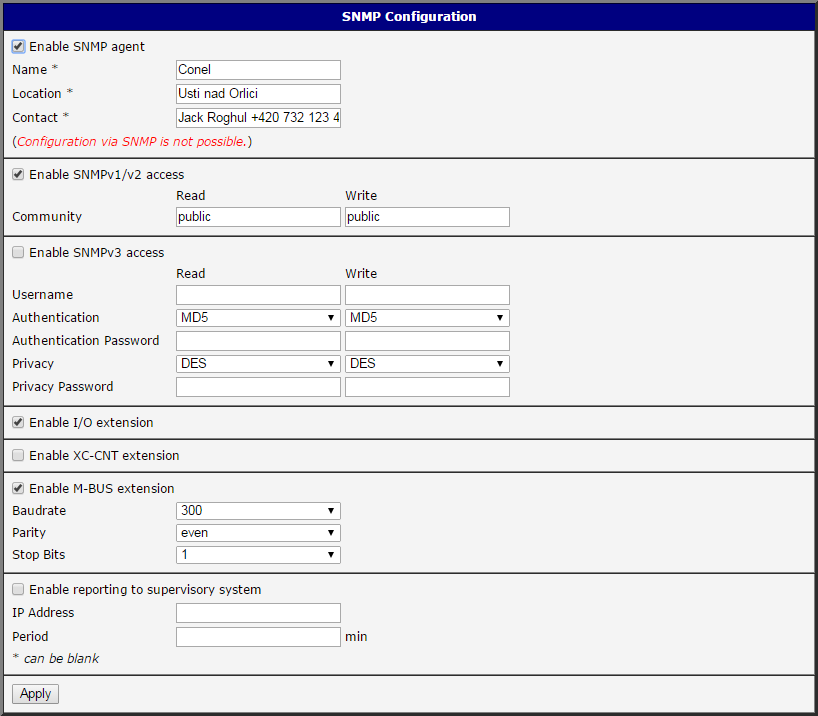
This example shows basic SNMP configuration of the router. The SNMP Configuration page (see figure below) is accessible via the router’s Web interface under the Configuration section → Services. To enable SNMP, check the Enable SNMP agent box and click the Apply button. Optionally, you can fill in the Name, Location, and Contact information and configure other details.
OIDs in SNMP Trap
It is possible to enable the continuous, regular sending of SNMP traps to a supervisory system. On the SNMP page in the router, select Enable reporting to supervisory system, enter the IP address and time interval, and click Apply. The SNMP traps are sent at the configured interval, with a larger trap (containing more information) sent every 24 hours.
Every SNMP trap contains these OIDs:
- .1.3.6.1.2.1.2.2.1.6.1 (ifPhysAddress)
- .1.3.6.1.2.1.2.2.1.10.2 (ifInOctets)
- .1.3.6.1.2.1.2.2.1.16.2 (ifOutOctets)
- .1.3.6.1.4.1.30140.4.1.0 (mobileTechnology)
- .1.3.6.1.4.1.30140.4.2.0 (mobilePLMN)
- .1.3.6.1.4.1.30140.4.3.0 (mobileCell)
- .1.3.6.1.4.1.30140.4.4.0 (mobileChannel)
- .1.3.6.1.4.1.30140.4.5.0 (mobileSignalStrength)
- .1.3.6.1.4.1.30140.4.6.0 (mobileChannelN1)
- .1.3.6.1.4.1.30140.4.7.0 (mobileSignalStrengthN1)
- .1.3.6.1.4.1.30140.4.8.0 (mobileChannelN2)
- .1.3.6.1.4.1.30140.4.9.0 (mobileSignalStrengthN2)
- .1.3.6.1.4.1.30140.4.10.0 (mobileChannelN3)
- .1.3.6.1.4.1.30140.4.11.0 (mobileSignalStrengthN3)
- .1.3.6.1.4.1.30140.4.12.0 (mobileChannelN4)
- .1.3.6.1.4.1.30140.4.13.0 (mobileSignalStrengthN4)
- .1.3.6.1.4.1.30140.4.14.0 (mobileChannelN5)
- .1.3.6.1.4.1.30140.4.15.0 (mobileSignalStrengthN5)
- .1.3.6.1.4.1.30140.4.16.0 (mobileUpTime)
- .1.3.6.1.4.1.30140.4.17.0 (mobileConnect)
- .1.3.6.1.4.1.30140.4.18.0 (mobileDisconnect)
- .1.3.6.1.4.1.30140.4.19.0 (mobileCard)
- .1.3.6.1.4.1.30140.4.21.0 (mobileLatency)
- .1.3.6.1.4.1.30140.4.22.0 (mobileReportPeriod)
- .1.3.6.1.4.1.30140.4.26.0 (mobileSignalQuality)
- .1.3.6.1.4.1.30140.4.27.0 (mobileCSQ)
- .1.3.6.1.4.1.30140.5.1.10.0 (mobileTodayCells)
- .1.3.6.1.4.1.30140.3.3.0 (statusTemperature)
- .1.3.6.1.4.1.30140.3.4.0 (statusVoltage)
The larger SNMP trap sent every 24 hours also contains these OIDs:
- .1.3.6.1.4.1.30140.6.3.0 (infoSN)
- .1.3.6.1.4.1.30140.6.4.0 (infoIMEI)
- .1.3.6.1.4.1.30140.6.5.0 (infoESN)
- .1.3.6.1.4.1.30140.6.6.0 (infoMEID)
- .1.3.6.1.2.1.1.1.0 (sysDescr)
- .1.3.6.1.2.1.1.5.0 (sysName)
- .1.3.6.1.2.1.1.6.0 (sysLocation)
SNMP Capturing
You can access the router's SNMP tree using any SNMP MIB browser (for example, MG-SOFT or SnmpB shown on the figure below). Simply set the router's IP address in the browser, load the MIB files from the repository, and explore the SNMP OIDs and their corresponding values.
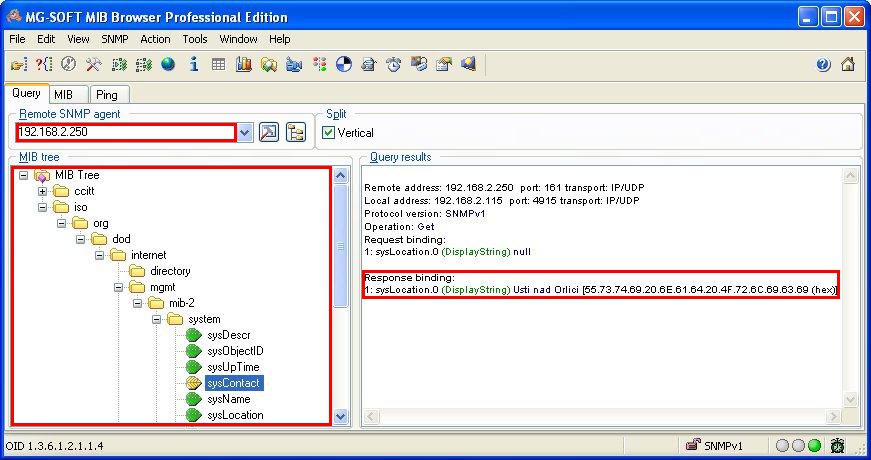
The path to private (Advantech routers) objects is:
iso → org → dod → internet → private → enterprises → conelThe path to basic information about the router is:
iso → org → dod → internet → mgmt → mib-2 → system