
DHCP Based on MAC OUI
 Installation files
 Description of the Router App
Caution
- This Router App has been tested on a router with firmware version 6.3.10. After updating the router firmware to a later version, check whether a newer version of the Router App is available and update it if necessary to maintain compatibility.
The DHCP Based on MAC OUI Router App assigns IP addresses to devices according to their MAC OUI.
Tips
For the DHCP Based on MAC OUI Router App to work, you must disable the router's own DHCP server on the corresponding interface.
What is MAC OUI?
The MAC OUI (Organizationally Unique Identifier) is the first 24 bits (first three octets) of a MAC address. It identifies the manufacturer of the network device. The IEEE assigns these unique OUIs to companies that need to include them in their networking products.
By looking up the OUI portion of a MAC address, you can determine the manufacturer of the device. This information can be useful for network configuration, troubleshooting, and security profiling. For example, you can use the OUI to identify the vendor of devices on your network and apply appropriate security policies.
The manufacturer assigns the remaining 24 bits (last three octets) of the 48-bit MAC address to uniquely identify each network interface card (NIC). The full MAC address therefore provides both the manufacturer information (OUI) and a unique identifier for that specific device.
Web Interface
After installation, access the Router App's web interface by clicking the Router App name on the Router Apps page of the router's web interface.
The left panel of the web interface contains a menu with a Status section and an Administration section. The Administration section contains only the Return item, which switches back to the router's web configuration pages. The main menu is shown in the figure below.

Configuration
Global
Configure all DHCP Based on MAC OUI Router App settings by clicking the Global item in the main menu.
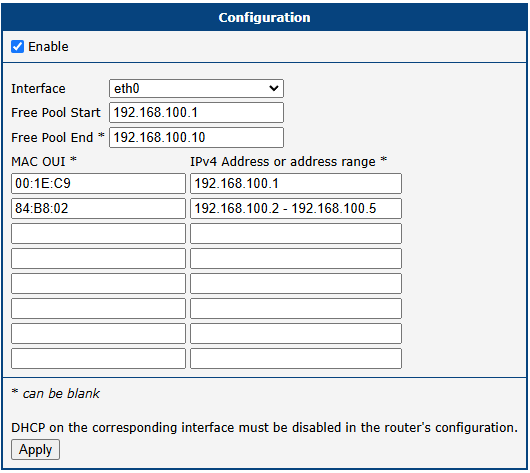
| Item | Description |
|---|---|
| Enable | Enables the DHCP Based on MAC OUI feature. If enabled, disable the DHCP server on the corresponding interface in the router configuration. |
| Free Pool Start | Enter the first IP address of the range. |
| Free Pool End | Enter the last IP address of the range. |
| MAC OUI | Enter up to eight rules for IP address assignment according to MAC OUI. The expected format is three octets separated by colons (FF:FF:FF). |
| IPv4 Address or address range | Enter an IPv4 address or address range (from the range defined above) for the corresponding MAC OUI. |
DHCP Based on MAC OUI configuration items