
WiFi STA Relay
 Installation files
 Caution
- This Router App has been tested on a router with firmware version 6.3.10. After updating the router firmware to a higher version, check whether a newer version of the Router App has also been released and update it accordingly for compatibility.
Introduction
The WiFi STA Relay Router App relays and dynamically redirects incoming connections to a target host. Its main purpose is to extend the wireless network. For example, when a router is in STA (Wireless Station) mode, it can bridge the WAN and LAN interfaces to create a larger wireless network. This type of configuration connects devices from different networks into a single network, enabling them to communicate with each other while also providing Internet access.
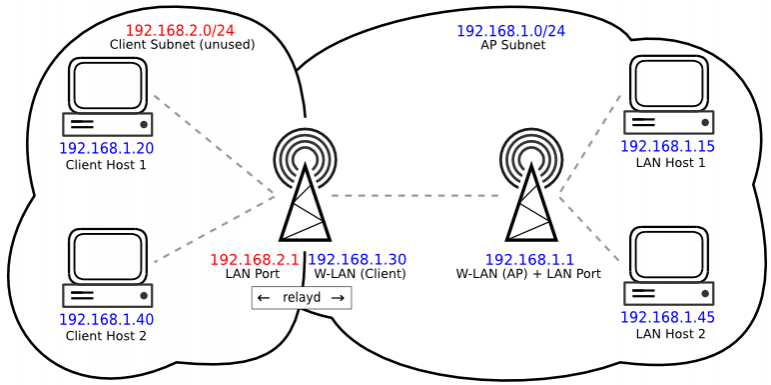
The figure above shows an example setup. The LAN interface of the Wi-Fi STA device must be on a different subnet for relayd to work, because relayd routes traffic between two distinct subnets.
Because both Ethernet ports and the Access Point Wi-Fi network share the same LAN interface, relayd routes all clients connecting to the Ethernet ports or to the Access Point Wi-Fi network and connects them to the main network.
The LAN interface subnet serves only as a "management" interface — devices connecting to the Wi-Fi repeater are placed on the main network's subnet instead.
Web Interface
Once the Router App is installed, access its interface by clicking the Router App name on the Router Apps page of the router's web interface. The left menu provides access to Status, Configuration, and Information sections. The Return item in the Customization section switches back to the router's main web configuration pages.

Configuration
Global
All WiFi STA Relay settings are configured on the Global page in the Configuration section.
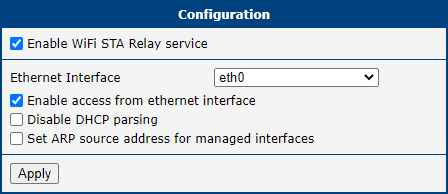
| Item | Description |
|---|---|
| Enable WiFi STA Relay service | Enables the WiFi STA Relay service. |
| Ethernet Interface | Selects the Ethernet interface to use. |
| Enable access from ethernet interface | Grants clients on the Ethernet interface access to the router. |
| Disable DHCP parsing | Disabling DHCP option parsing prevents a default route from being added. Traffic addressed to unmanaged local networks is then routed using the main routing table. |
| Set ARP source address for managed interfaces | Uses the specified address as the ARP source address for managed interfaces. |
Configuration items
Information
Licenses
Open-source license information for the components used by this Router App is available on the Licenses page in the Information section.
