
IO Control
 Installation files
 Warning
Important Notice Regarding Firmware Version 6.6.0 and above
- Feature Integration: Starting with router firmware version 6.6.0, the features of this Router App are included in the firmware as standard. You can access them via Configuration → Services → SMS.
- Recommendation: On routers running version 6.6.0 or newer, use the native firmware feature and uninstall this app to prevent potential conflicts.
- Migration Advisory: When transitioning from this Router App to the integrated firmware feature, review the new settings carefully. Default values and available options may differ, and failing to adjust them could cause unexpected behavior.
The IO Control Router App provides a simple interface for monitoring and controlling the state of digital inputs and outputs (I/O) on Advantech routers. Digital I/O ports are used to interact with external devices, allowing the router to read simple on/off states (e.g., from a switch or sensor) and to control external devices (e.g., activate a light or relay). This Router App specifically sends SMS notifications when the state of a digital input changes.
Installation
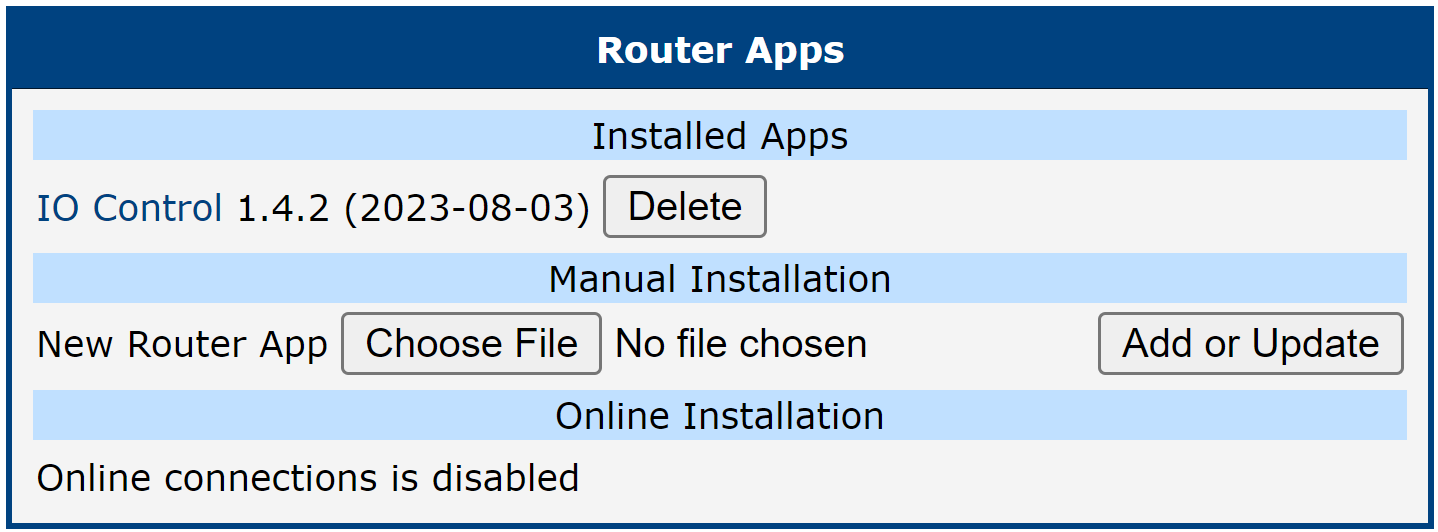
The IO Control Router App is installed via the router's web interface. Navigate to Customization → Router Apps. Use the Manual Installation section to upload and install the app package file (*.tgz).
Once the installation is complete, the IO Control Router App appears in the Installed Apps list. Click its name to open the Router App's web interface, which includes the Overview, System Log, and Configuration pages detailed in the following sections.
Usage and Configuration
Overview
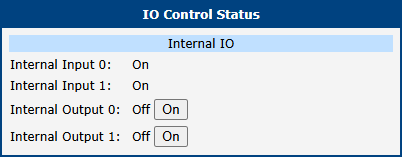
The Overview page displays the current state of the router's digital inputs and outputs. By default, inputs are active (On) to monitor external signals. Outputs are inactive (Off) by default but can be manually activated by clicking the corresponding On button.
The figure below shows an example of the Overview page for a router with two digital inputs and two digital outputs.
System Log
The System Log section displays system-level messages from the router, which can be useful for diagnostics and monitoring the behavior of the IO Control app. This is the same log that is available in the main router menu at Status → System Log.
Configuration
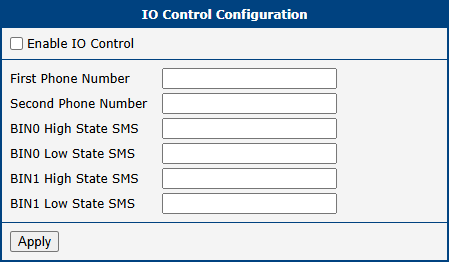
The Configuration page allows you to enable and configure SMS notifications for digital input state changes. These settings determine which phone numbers receive alerts and the content of those messages.
| Item | Description |
|---|---|
| Enable IO Control | Check this box to enable IO Control. When it is enabled, the router sends an SMS notification when the state of a monitored digital input changes. |
| First Phone Number | The primary phone number to which an informational SMS is sent upon a digital input state change. |
| Second Phone Number | An optional secondary phone number to which an informational SMS is sent. |
| BINx High State SMS | Define the text of the SMS message to be sent when binary input number x changes to a high (active) state. |
| BINx Low State SMS | Define the text of the SMS message to be sent when binary input number x changes to a low (inactive) state. |
Configuration settings
Tips
This Router App is designed to send SMS notifications based on changes to digital input states. For direct remote control of digital outputs or for more advanced I/O automation, consider using shell scripts or other dedicated Router Apps.