
DHCP Relay
 Installation files
 Description
Caution
- This Router App has been tested on a router with firmware version 6.3.10. After updating the router firmware to a higher version, check whether a newer version of the Router App has also been released and update it accordingly for compatibility.
This Router App provides a DHCP relay agent to enable communication from a DHCP server to DHCP clients on subnets other than the one the server resides on. The DHCP server can also reside on a virtual interface such as IPsec or OpenVPN. The DHCP relay agent transfers DHCP messages from clients located on a subnet without a DHCP server to other subnets, and relays answers from DHCP servers back to the clients. The functional scheme is shown in the figure below.
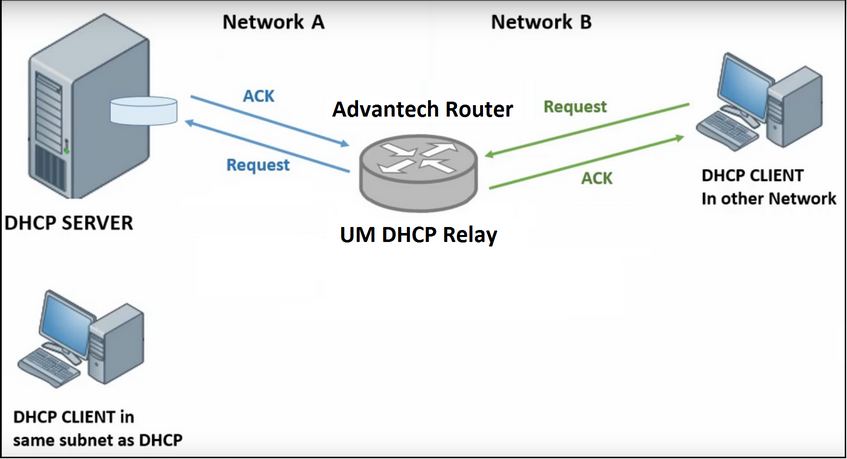
The DHCP relay agent is transparent to both the client and the server — neither side is aware of the communications passing through it. When DHCP clients broadcast requests, the relay agent receives the packets and forwards them to the DHCP server, increasing the hop count by one. The DHCP server includes this hop count in the response it returns to the client.
Installation
In the router's web interface, navigate to Customization → Router Apps. Select the downloaded installation file and click Add or Update.
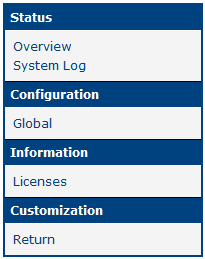
Once the installation is complete, access the Router App's web interface by clicking the Router App name on the Router Apps page. The main menu contains a Status section, followed by Configuration, Information, and General sections. To return to the router's web interface, click Return.
Module Configuration
Configure the Router App on the Global page under the Configuration menu section. You can configure up to six rules. The configuration form is shown in the figure below.
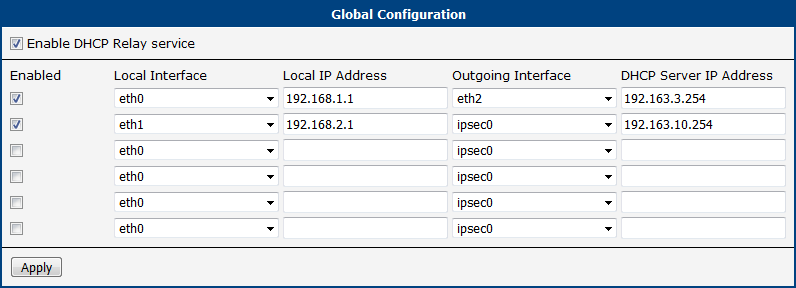
The example above shows two DHCP Relay rules:
- The first rule forwards DHCP requests from the 192.168.1.0/24 network on the ETH0 interface to the DHCP server at 192.163.3.254 on the ETH2 interface.
- The second rule forwards DHCP requests from the 192.168.2.0/24 network on the ETH1 interface to the DHCP server at 192.163.10.254 on the remote network connected through the first IPsec tunnel (ipsec0).
| Item | Description |
|---|---|
| Enable DHCP Relay service | Enables the DHCP relay agent. |
| Enabled | Enables the rule configured in the corresponding row. |
| Local Interface | The incoming interface connected to the network without a DHCP server. |
| Local IP Address | IP address of the local interface. |
| Outgoing Interface | The outgoing interface connected to the network where the DHCP server resides. |
| DHCP Server IP Address | IP address of the DHCP server in the network connected to the outgoing interface. |
Configuration items
Other Pages
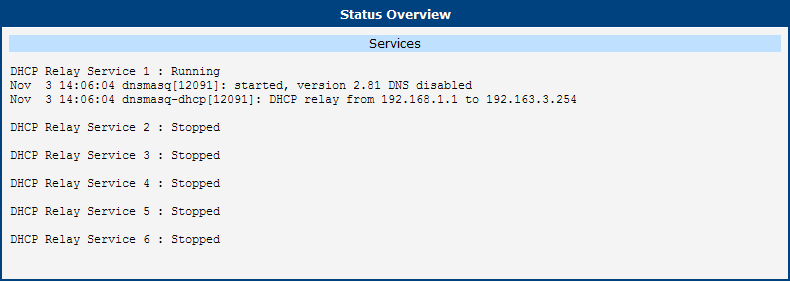
The Overview page under the Status menu section shows the status of all DHCP Relay services, as illustrated in the figure below.
The System Log page under the Status menu section contains the full system log, not just messages from this Router App.
The Licenses page under the Information menu section contains license information related to this Router App.
Licenses
The Licenses page summarizes the Open-Source Software (OSS) licenses used by this Router App.
