PLMN Whitelist
 Installation files
 Important Notice Regarding Firmware Version 6.6.0 and Above
- Feature Integration: As of firmware version 6.6.0, the function of this Router App is included as a standard firmware feature, accessible via Configuration → Mobile WAN → Operator.
- Recommendation: On routers running firmware version 6.6.0 or newer, we strongly recommend using the native firmware feature and uninstall this Router App to prevent potential conflicts.
- Migration Advisory: When transitioning from this Router App to the integrated firmware feature, review the new settings carefully. Default values and available options may differ, and failing to adjust them could cause unexpected behavior.
Basic Information
PLMN
In telecommunications, a Public Land Mobile Network (PLMN) is a combination of wireless communication services offered by a specific operator in a specific country. A PLMN is identified by a globally unique PLMN code consisting of an MCC (Mobile Country Code) and an MNC (Mobile Network Code) — a five- or six-digit number, typically written in the form 001-01 or 001-001.
The MCC of the Czech Republic is 230. MNC values for Czech operators are listed in the table below.
| MNC | Operator |
|---|---|
| 01 | T-Mobile |
| 02 | O2 |
| 03 | Vodafone |
| 04 | Nordic Telecom |
MNC values for Czech GSM operators
In this Router App, the PLMN representation omits the separating dash — for example, the T-Mobile PLMN code is 23001.
Blacklist vs. Whitelist
Blacklisting (denylisting) is a security measure that prevents specific entities — people, websites, or programs — from accessing a computer or network. A blacklist is a list of hosts denied access to a service and is commonly used by antivirus software and firewalls.
Whitelisting (allowlisting) is a defensive measure that restricts access to only pre-approved content. All other content is blocked by default; only specifically permitted items are allowed to run or access the system.
Router App Description
Web Interface
After the Router App is installed, access its web interface by clicking the Router App name on the Router Apps page of the router's web interface.
The left pane contains Customization, Troubleshoot, and Administration menu sections. The Administration section contains only the Return item, which returns to the router's main web configuration interface. The menu is shown in the figure below.

PLMN Whitelist
All settings for this Router App are configured in the PLMN Whitelist item in the Customization section.

| Item | Description |
|---|---|
| Enable PLMN Whitelist | Enables the PLMN whitelist. |
| PLMN | List of whitelisted PLMN entries. |
PLMN whitelist configuration items
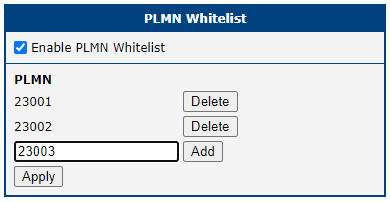
To add a PLMN entry, type the PLMN code into the text field and click Add, then click Apply. Multiple PLMNs can be whitelisted. The figure below shows an example where T-Mobile and O2 have been added and Vodafone is being added.
System Log
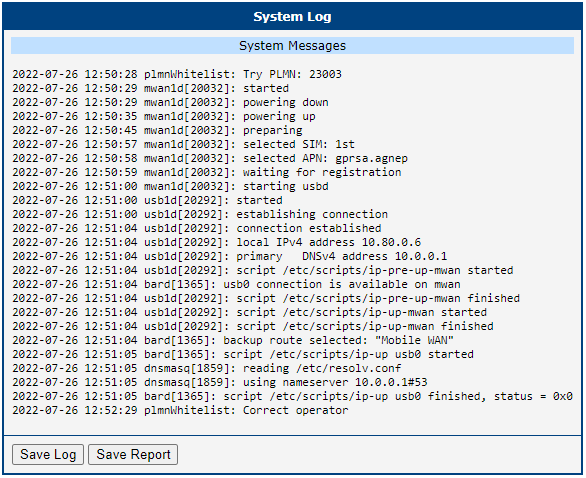
The System Log section displays log messages related to the PLMN Whitelist Router App.