NetFlow/IPFIX
 Installation files
 Description
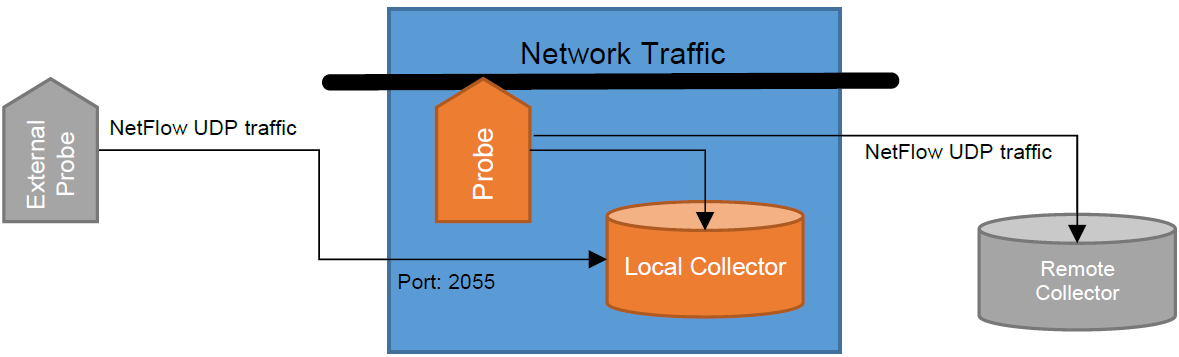
The NetFlow/IPFIX Router App monitors network traffic. Routers with NetFlow enabled run a probe that collects IP traffic information and submits it to a NetFlow collector and analyzer.
This Router App provides:
- A NetFlow probe that can send flow information to a compatible network collector or analyzer (e.g., PRTG).
- A NetFlow collector that stores collected flow data in files. It can also receive and store NetFlow traffic from other devices.
Web Interface
Once the Router App is installed, access its web interface by clicking the Router App name on the Router Apps page of the router's web interface.
The left pane of the web interface contains the Configuration, Information, and Customization sections. The Customization section contains only the Return item, which returns to the router's web interface. The menu is shown in the figure below.

Configuration
Global
To configure all Router App settings, click the Global item in the main menu.
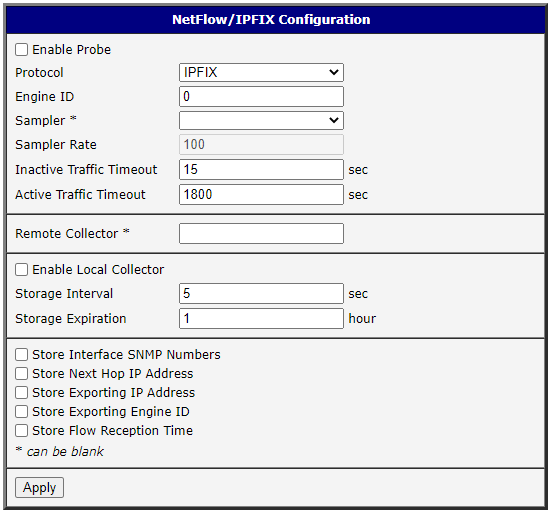
| Item | Description |
|---|---|
| Enable Probe | Starts submitting NetFlow information to a remote collector (when defined) or to the local collector (when enabled). |
| Protocol | Protocol to use: NetFlow v5, NetFlow v9, or IPFIX (NetFlow v10). |
| Engine ID | Sets the Observation Domain ID for IPFIX, Source ID for NetFlow v9, or Engine ID for NetFlow v5. Helps the collector distinguish between multiple exporters. See Engine ID Interoperability. |
| Sampler | (empty): submit every observed flow. deterministic: submit each N-th observed flow. random: randomly select one out of N flows. hash: select hash-randomly one out of N flows. |
| Sampler Rate | The value of N for the selected sampling method. |
| Inactive Traffic Timeout | Submits a flow after it has been inactive for the specified number of seconds. Default: 15 seconds. |
| Active Traffic Timeout | Submits a flow after it has been active for the specified number of seconds. Default: 1800 (30 minutes). See Traffic Timeouts. |
| Remote Collector | IP address of a NetFlow collector or analyzer to which collected flow information is submitted. The port is optional (default: 2055). Specify a comma-separated list of multiple IP addresses (and ports) to mirror NetFlow data to multiple collectors. |
| Enable Local Collector | Enables receiving NetFlow information from the local probe (when enabled) or from a remote probe. |
| Storage Interval | Time interval in seconds for rotating storage files. Default: 300 seconds (5 minutes). |
| Storage Expiration | Maximum lifetime for files in the storage directory. A value of 0 disables the lifetime limit. |
| Store Interface SNMP Numbers | If checked, stores the SNMP index of the input/output interface (%in, %out). |
| Store Next Hop IP Address | If checked, stores the IP address of the next hop for outbound traffic (%nh). |
| Store Exporting IP Address | If checked, stores the IP address of the exporting router (%ra). |
| Store Exporting Engine ID | If checked, stores the Engine ID of the exporting router (%eng). |
| Store Flow Reception Time | If checked, stores the timestamp when the flow information was received (%tr). |
Configuration items
Information
Licenses
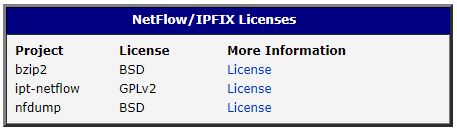
This section summarizes the Open-Source Software (OSS) licenses used by this Router App.
Usage Instructions
Warning
Do not send NetFlow data over a WAN unless you use a VPN. The data are not inherently encrypted or obfuscated, so unauthorized persons may intercept and view the information.
Collected Information
The following standard set of information is always sent by the probe and stored by the collector:
- Timestamp when the traffic was first seen (
%ts) and last seen (%te), using the probe's clock - Number of bytes (
%byt) and packets (%pkt) - Protocol used (
%pr) - TOS (
%tos) - TCP flags (
%flg) - Source IP address (
%sa,%sap) and port (%sp) - Destination IP address (
%da,%dap) and port (%dp) - ICMP type (
%it)
The following data are also sent but stored only if enabled in the configuration:
- SNMP index of the input/output interface (
%in,%out) - IP address of the next hop for outbound traffic (
%nh) - IP address (
%ra) and Engine ID (%eng) of the exporting router (probe) - Timestamp when the flow information was received (
%tr), using the collector's clock
Tips
The value in parentheses (%xx) indicates the formatter to use with nfdump to display that value (see the following section).
Retrieval of Stored Information
Data are stored in /tmp/netflow/nfcapd.yyyymmddHHMM, where yyyymmddHHMM is the creation time. The directory also includes the .nfstat file used to monitor expiration — do not alter this file. Configure the expiration with the Storage Expiration item in the web interface.
To read the files, use the nfdump command with the syntax nfdump [options] [filter]. Examples:
Display UDP packets sent by 192.168.88.100:
nfdump -r nfcapd.202006011625 'proto udp and src ip 192.168.88.100'Display all flows between 16:25 and 17:25, aggregating bidirectional flows (-B):
nfdump -R /tmp/netflow/nfcapd.202006011625:nfcapd.202006011725 -BDisplay the Engine Type/ID, source address and port, and destination address and port for all flows:
nfdump -r /tmp/netflow/nfcapd.202006011625 -o "fmt:%eng %sap %dap"Engine ID Interoperability
NetFlow v5 defines two 8-bit identifiers: Engine Type and Engine ID. The probe on Advantech routers sends only Engine ID (0–255); Engine Type is always zero. A flow sent with Engine ID = 513 (0x201) is received as Engine Type/ID = 0/1.
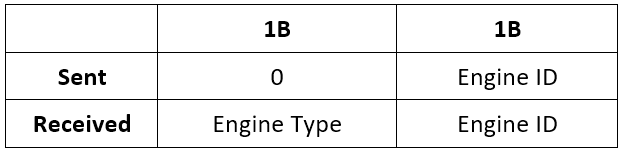
NetFlow v9 defines one 32-bit identifier. The probe on Advantech routers can send any 32-bit number; however, other manufacturers (e.g., Cisco) split the identifier into two reserved bytes followed by Engine Type and Engine ID, and the local collector follows the same approach. A flow sent with Engine ID = 513 (0x201) is received as Engine Type/ID = 2/1.

IPFIX defines one 32-bit identifier. The probe on Advantech routers can send any 32-bit number, but the local collector does not store this value yet. Therefore, any flow is received as Engine Type/ID = 0/0.

Tips
To store Engine ID in the local collector, enable Store Exporting Engine ID in the configuration, use an Engine ID less than 256, and avoid using the IPFIX protocol.
Traffic Timeouts
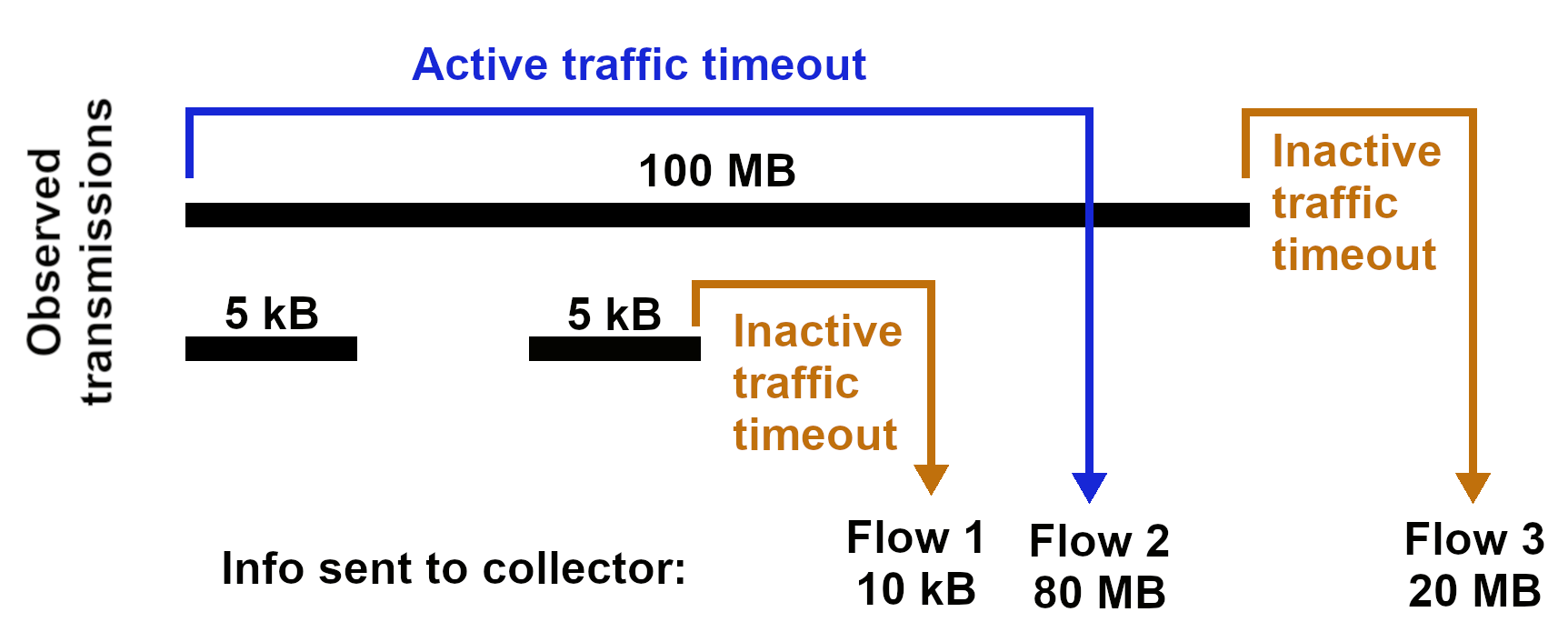
The probe exports whole flows — all packets that belong together. If no packets are observed for a given period (Inactive Traffic Timeout), the flow is considered complete and the probe sends the traffic information to the collector.
Information about a file transfer appears in the collector once the transfer is complete, which may take a significant amount of time. If a transmission remains active longer than the Active Traffic Timeout, it appears as multiple shorter flows. For example, with a 30-minute active traffic timeout, a 45-minute communication appears as two flows: one 30-minute and one 15-minute flow.