
SCEP Client
 Installation files
 Basic Information
What is SCEP?
SCEP (Cisco Systems' Simple Certificate Enrollment Protocol) is a PKI communication protocol that leverages existing technology using PKCS#7 and PKCS#10. SCEP evolved from the enrollment protocol developed by Verisign, Inc. for Cisco Systems, Inc., and is now widely supported in both client and CA implementations.
The goal of SCEP is to support the secure issuance of certificates to network devices in a scalable manner, using existing technology wherever possible. The protocol supports the following operations:
- CA and RA public key distribution
- Certificate enrollment
- Certificate and CRL query
You can access certificates and CRLs using LDAP or the query messages defined in SCEP.
Web Interface
Once installation is complete, the Router App's web interface is accessible by clicking the Router App name on the Router Apps page of the router's web interface.
The left menu contains a Configuration section and an Information section. The Customization section contains only Return, which switches back to the router's main web interface.

Configuration
Global
All SCEP Router App settings can be configured via the Global item in the main menu.
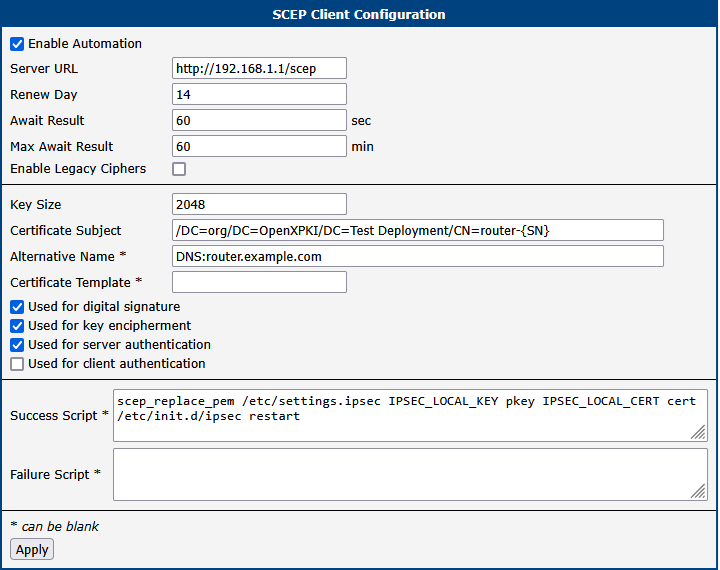
| Item | Description |
|---|---|
| Enable Automation | Enable for automatic certificate enrollment. |
| Server URL | Address of the SCEP server. |
| Renew Day | Start automatic renewal when the certificate lifetime is less than this number of days. |
| Await Result [sec] | How long the client waits before requesting the issued certificate. Useful when certificate issuance requires manual approval. |
| Max Await Result [min] | Maximum time the client waits and retries before giving up. |
| Enable Legacy Ciphers | Enables interoperability with servers that support legacy ciphers. |
| Key Size | Length of the RSA key in bits. |
| Certificate Subject | Requested X.509 subject of the certificate, formatted as /type0=value0/type1=value1/type2=value2/.... Keyword characters may be escaped with \ (backslash); whitespace is retained. The wildcard SN is replaced by the router serial number. Example: /DC=org/DC=OpenXPKI/DC=Test Deployment/CN=router-SN |
| Alternative Name | Requested subject alternative name. Comma-separated list of prefixed items: email:, URI:, DNS:, RID:, IP:, dirName:, otherName:. Examples: DNS:one.domain.com,DNS:other.domain.org or email:my@other.address,RID:1.2.3.4 |
| Certificate Template | Microsoft proprietary extension 1.3.6.1.4.1.311.20.2. Your CA (e.g., OpenXPKI) may use this value to choose the certificate type to issue. Other CAs may not support this extension. |
| Used for digital signature | Requests the digitalSignature usage. Depending on the CA configuration, this value may be ignored. For example, OpenXPKI ignores all usage requests by default; to let clients choose the intended usage, use certificate templates. |
| Used for key encipherment | Requests the keyEncipherment usage. |
| Used for server authentication | Requests the serverAuth extended usage. |
| Used for client authentication | Requests the clientAuth extended usage. |
| Success Script | Shell commands to execute upon successful certificate deployment. See also the Certificate Distribution section. |
| Failure Script | Shell commands to execute upon deployment failure. |
Configuration items
Enrolled certificates are stored in /var/data/scepClient. Each private key (.key) and its corresponding certificate (.crt) are stored under the certificate serial number. The directory also contains the CA certificate chain files ca.crt-0, ca.crt-1, etc. — one file per certificate in the chain.
The symbolic links latest.key and latest.crt point to the most recent active certificate.
When the router (re)starts or when you click Apply, the Router App checks latest.crt. If the certificate does not exist or expires in fewer than Renew Day days, enrollment starts.
Certificate Distribution
The generated key and certificate must be explicitly distributed to router services using a Success Script with the scep_replace_pem command. The command takes the following parameters:
- Full path to the configuration file to be modified, e.g.,
/etc/settings.ipsec - A list of values to modify, as pairs:
- Name of the configuration parameter to change, e.g.,
IPSEC_LOCAL_KEY - Information type to replace:
pkey(private key fromlatest.key) orcert(certificate fromlatest.crt)
- Name of the configuration parameter to change, e.g.,
For example, to use the enrolled key and certificate as the Local Private Key and Local Certificate of an IPsec tunnel:
scep_replace_pem /etc/settings.ipsec \
IPSEC_LOCAL_KEY pkey IPSEC_LOCAL_CERT cert
After modifying a service configuration, restart the service or reload its configuration. For example, to restart IPsec:
/etc/init.d/ipsec restartStatus
Certificate enrollment may require manual server-side approval and can take several minutes. This does not block router startup. To check the status, click the Status menu item.

The first line shows the module process state:
Module scepClient disabled— Enable Automation is disabled.Module scepClient running— Enable Automation is enabled and enrollment is in progress.Module scepClient not running— Enable Automation is enabled and enrollment has finished (either succeeded or failed).
The second line shows the enrollment state:
Certificate not enrolled— Enrollment failed or has not been started yet.Certificate enrollment— Initial enrollment is in progress.Certificate re-enrollment— Re-enrollment is in progress.Certificate enrolled xxxxxxxxxxxxxxxxxxxx— Enrollment succeeded (the x-string represents the certificate serial number).
Periodic Checks
To schedule regular validity checks, create or modify /var/scripts/crontab to periodically invoke /opt/scepClient/bin/check-cert.sh (without arguments) and (re)start crond.
For example, to check certificates for renewal every day at 5 minutes after midnight:
5 0 * * * root /opt/scepClient/bin/check-cert.shCommand-Line Tool
Tips
You can also use the sscep client directly as a command-line tool.
Running sscep without any arguments displays a list of arguments and options. For more information, see the sscep documentation.
Caution
Usage: /opt/scepClient/bin/sscep Operation [Options]
Available Operations:
| Operation | Description |
|---|---|
getca | Get CA/RA certificate(s). |
enroll | Enroll certificate. |
getcert | Query certificate. |
getcrl | Query CRL. |
getcaps | Query SCEP capabilities. |
Available operations
General Options:
| Option | Description |
|---|---|
-u <url> | SCEP server URL. |
-p <host:port> | Use proxy server at host:port. |
-g <engine> | Use the given cryptographic engine. |
-f <file> | Use configuration file. |
-c <file> | CA certificate file or -n-suffixed files (written if the operation is getca). |
-E <name> | PKCS#7 encryption algorithm: des|3des|blowfish|aes[128]|aes192|aes256 |
-S <name> | PKCS#7 signature algorithm: md5|sha1|sha224|sha256|sha384|sha512 |
-v | Verbose output (for debugging configuration). |
-d | Debug output (more verbose, for debugging the implementation). |
General options
Options for operation getca:
| Option | Description |
|---|---|
-i <string> | CA identifier string. |
-F <name> | Fingerprint algorithm: md5|sha1|sha224|sha256|sha384|sha512 |
Options for getca
Options for operation enroll:
| Option | Description |
|---|---|
-k <file> | Private key file. |
-r <file> | Certificate request file. |
-K <file> | Signature private key file (use with -O). |
-O <file> | Signature certificate (used instead of a self-signed certificate). |
-l <file> | Write enrolled certificate to file. |
-e <file> | Use a different CA certificate for encryption. |
-L <file> | Write self-signed certificate to file. |
-t <secs> | Polling interval in seconds. |
-T <secs> | Maximum polling time in seconds. |
-n <count> | Maximum number of GetCertInitial requests. |
-R | Resume interrupted enrollment. |
Options for enroll
Options for operation getcert:
| Option | Description |
|---|---|
-k <file> | Signature private key file. |
-l <file> | Signature local certificate file. |
-s <number> | Certificate serial number (decimal). |
-w <file> | Write certificate to file. |
Options for getcert
Options for operation getcrl:
| Option | Description |
|---|---|
-k <file> | Private key file. |
-l <file> | Local certificate file. |
-w <file> | Write CRL to file. |
Options for getcrl
Licenses
This section summarizes the Open-Source Software (OSS) licenses used by this Router App.
