Secure Syslog
 Installation files
 Tips
The features of this Router App are integrated into firmware version 6.5.0 and later, except for the v2 and v2i product families.
Caution
- This Router App has been tested on a router with firmware version 6.3.10. After updating the router firmware to a higher version, check whether a newer version of the Router App has also been released and update it accordingly for compatibility.
Introduction
The System Logging (syslog) protocol is used to send router event information to a specific server, such as Graylog or PRTG Network Monitor. The default syslog service provided by router firmware supports the UDP transport protocol only, which is suitable for secure private networks.
This Router App implements an enhanced syslog client (sender) that can forward syslog messages to a server (receiver) over the secure TLS protocol, as defined in RFC 5425. This authenticated and encrypted communication is suitable for transmission over the public internet. The insecure plain UDP and TCP transport protocols are also supported but not recommended.
Web Interface
Once installation is complete, the Router App's web interface is accessible by clicking the Router App name on the Router Apps page of the router's web interface.
The left menu contains a Configuration section and an Information section. The Customization section contains only Return, which switches back to the router's main web interface.

Configuration
Global
All Secure Syslog Router App settings can be configured via the Global item in the main menu.
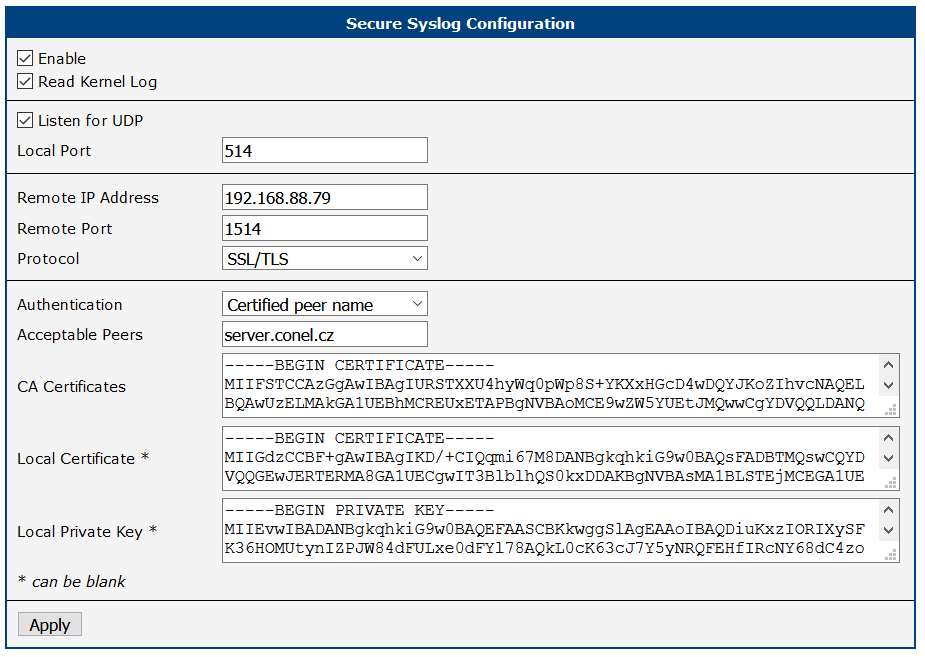
| Item | Description |
|---|---|
| Enable | Enables the Secure Syslog service. |
| Read Kernel Log | Retrieves new log messages from /dev/kmsg. Enable this to also forward kernel messages, such as device mounting information or firewall LOG target messages. After a service (re)start, all existing kernel log entries are sent to the remote server (the server may receive duplicate messages); the system then waits for new messages. |
| Listen for UDP | Listens for syslog messages arriving via UDP. Messages can be sent by the local syslog service, any remote system, or both. After a service (re)start, the system immediately starts listening for new messages; prior syslog traffic is not forwarded. |
| Local Port | UDP port on which incoming syslog messages are received. The standard port number is 514. |
| Remote IP Address | Forward all messages to this IP address. |
| Remote Port | Forward to this port (e.g., 514). |
| Protocol | Forwarding protocol: • UDP • TCP • SSL/TLS |
| Authentication | Method used to authenticate the syslog server when the SSL/TLS protocol is selected: • None (encryption only) — Skip transport receiver authentication. Communication is still encrypted. • Certificate fingerprint — Check the fingerprint of the received certificate against the Acceptable Peers list. • Certificate validity — Accept any server with a valid certificate signed by the specified CA. • Certified peer name — Check certificate validity and match the certified DNS names in the subjectAltName extension, or the Common Name, against the Acceptable Peers list. Note: the server may independently implement its own transport sender authentication, regardless of this setting. |
| Acceptable Peers | Accepted certificate fingerprint (SHA1) or DNS/Common Name of the remote peer. DNS names may use wildcards, e.g., *.example.net. Required when Authentication is set to Certificate fingerprint or Certified peer name. |
| CA Certificates | The full certificate chain (sequence of CA certificates in PEM format) used to validate remote certificates. Not required when Authentication is set to None. |
| Local Certificate | Certificate in PEM format. The extended key usage must permit TLS client authentication. |
| Local Private Key | Private key for the Local Certificate. The local key and certificate do not need to be configured if the server does not enforce transport sender authentication. |
Configuration items
Integration with Local Syslog Service
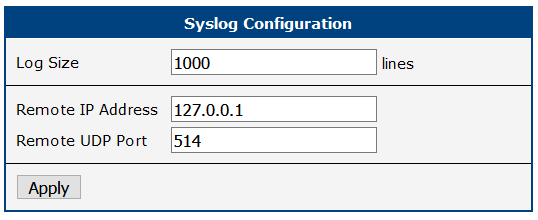
To receive syslog messages from the local syslog service, set Remote IP Address in the router's Syslog service configuration to 127.0.0.1. This forwards syslog traffic to the Secure Syslog Router App. The Remote UDP Port must match the Local Port configured above.
Integration with Graylog Server
First, install the Graylog server — either download the Open Source Edition or purchase the Enterprise Edition. For example, download the OVA image and import the appliance into your virtual environment.
Run the imported appliance. On first start, the console displays the Web login and Shell login credentials (username:password). Write down these credentials, because they are not displayed again.

Use these credentials to log in to the Graylog administration interface. In the menu, select System – Inputs, then select the Syslog TCP input and click Launch new input. In the configuration dialog:
- Give the input a name.
- Set a port number, e.g., 1514 (in the default configuration, the number must be greater than 1024).
- Enable TLS.
- Optionally, set a full path to a TLS cert file and private key file. Place the
.crtand.keyfiles on the Graylog server in/etc/graylog/server/ssl. - Optionally, set TLS client authentication to "optional" or "required". When set, define a full path to a directory for TLS Client Auth Trusted Certs and place your CA certificate(s) there, e.g.,
/etc/graylog/server/ssl/cacerts.
Once the input is created, it should display as RUNNING and received data should appear under Streams – All Messages.
Caution
Verify in Time configuration under System – Overview that the clocks of your routers match the clock of the Graylog server. Messages may be lost if the clocks do not match.
Troubleshooting
Generic tlsv1 alert internal error messages in the router System Log (see below) can be caused by server-initiated session termination. Set the server log level to Debug and inspect the server-side log for more details. Often the Local Certificate is missing or is not permitted for TLS client authentication.
rsyslogd: SSL_ERROR_SSL Error in 'osslHandshakeCheck Client': 'error:00000001:lib(0):func(0):reason(1)(1)' with ret=0 [v8.2010.0]
rsyslogd: OpenSSL Error Stack: error:14094438:SSL routines:ssl3_read_bytes:tlsv1 alert internal error [v8.2010.0]
Licenses
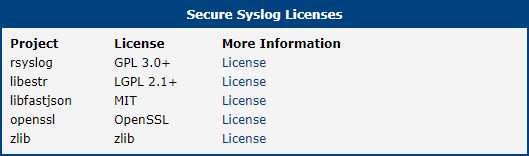
This section summarizes the Open-Source Software (OSS) licenses used by this Router App.