Sleep Mode
 Installation files
 Tips
This Router App is compatible with the following Advantech router platforms only: v3 (SmartStart, SmartFlex, SmartMotion, ICR-3200, ICR-3800), ICR-2700, ICR-2800, v4 (ICR-4400), and v4i (ICR-4100, ICR-4200).
Description
The Sleep Mode Router App puts supported routers into Low Power Mode (LPM) and wakes them up based on various parameters. It provides a graphical interface for the LPM command supported by these routers.
Control parameters for entering sleep (low power mode) and waking up include binary inputs or time-based triggers, such as a countdown interval expiration or a specific time of day.
The Router App web interface is accessible by clicking the Router App name on the Router Apps page. The left menu contains a Return link under the Customization section, which navigates back to the router's main web interface.

Configuration
Caution
- Exercise caution when configuring the Sleep section. Improper settings can cause the router to remain in low power mode for an extended period or, in some configurations, prevent it from waking up at all. If the router cannot be woken up, perform a factory reset to restore normal operation.
- The binary inputs available vary by router model. For details on binary inputs, refer to the I/O Port chapter of the User Manual for your router model.
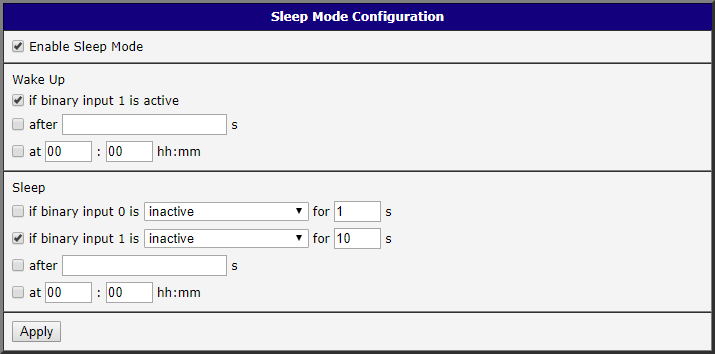
Enable the Sleep Mode Router App and configure the Wake Up and Sleep settings as needed. The figure below shows an example configuration for a SmartFlex router, configured to wake up the router when binary input 1 becomes active and to put it into sleep mode after 10 seconds of inactivity on binary input 1.
| Item | Description |
|---|---|
| Enable Sleep Mode | Activates the Router App. |
| Wake Up if binary input # is active | Wakes the router from low power mode when the specified binary input signal becomes active (switched on). The binary input number and total number of available inputs vary by platform. |
| Wake Up after ___ s | Countdown interval in seconds to wake the router from low power mode. Minimum: 5 seconds. |
| Wake Up at HH:MM | Hour and minute at which the router wakes from low power mode automatically every day. |
| Sleep if binary input # is inactive/active for ___ s | Puts the router into sleep mode after the specified duration of binary input inactivity or activity. The binary input number and total number of available inputs vary by platform. |
| Sleep after ___ s | Countdown interval in seconds to switch to low power mode. Minimum: 5 seconds. |
| Sleep at HH:MM | Hour and minute at which the router enters low power mode automatically every day. |
Sleep Mode configuration parameters
Click Apply to confirm all changes.
Tips
Multiple Wake Up/Sleep events can be active simultaneously. In such cases, the event that occurs first takes precedence. For example, if both Wake Up if binary input # and Wake Up at HH:MM are active, the router wakes either at the specified time or when the binary input becomes active, whichever occurs first. Once the router is awake, the other event has no effect.
Example
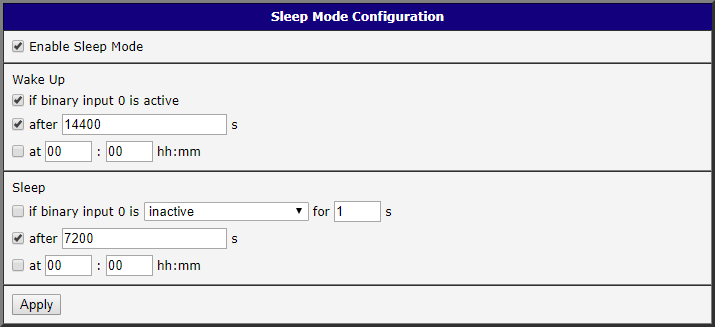
The figure below shows a configuration for SmartStart/ICR-3200 routers. Wake-up via binary input 0 is enabled. The router automatically enters sleep mode 2 hours (7200 seconds) after waking up. The router wakes up when binary input 0 becomes active, or automatically after 4 hours (14400 seconds) if the binary input remains inactive.