
Protocol MODBUS-TCP2RTU
 Installation files
 Caution
- This Router App has been tested on a router with firmware version 6.3.10. After updating the router firmware to a later version, check whether a newer version of the Router App is available and update it if necessary to maintain compatibility.
Description
The Modbus TCP2RTU Router App converts the MODBUS TCP protocol to the MODBUS RTU protocol for use on a serial line. The router can use an RS-232 or RS-485/422 interface, or a USB converter, for serial communication.
Only interfaces actually present in the router are shown in the configuration menu, each labeled with its real name (for example, RS-232 or RS-485/422). Automatic recognition of RS-485 vs. RS-422 is supported.
The Router App also supports Modbus wake-up, a proprietary mechanism for communicating with RTU devices that use a power-saving sleep mode, and Modbus TCP Security, which secures the MODBUS TCP connection using TLS encryption. Both features are configured per port; see Serial Interface Configuration for details.
Protocol Frame Format
Tips
Understanding the MODBUS frame format described in this section is not required to use the Router App; it is provided as background information.
Both protocols share a common part — the Protocol Data Unit (PDU). An MBAP header is used for identification when sending a MODBUS ADU over TCP/IP. Port 502 is reserved for MODBUS TCP ADU.
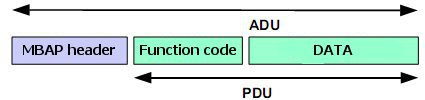
When sending a PDU to the serial line, the destination unit address (obtained from the MBAP header as the Unit ID) is prepended to the PDU along with a checksum.

Web Interface
To open the web interface, click the Router App name on the Router Apps page of the router's web interface.
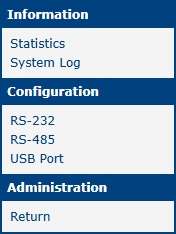
The left menu contains three sections: Information, Configuration, and Administration.
Information contains Statistics, which shows statistical information, and System Log, which shows only log messages related to this Router App.
Configuration contains one item for every serial port physically present in the router, labeled with the port's real name, regardless of whether a USB-to-serial converter is connected. Ports that are not present in the router do not appear in the menu.
Administration contains only Return, which switches back to the router's main web interface.
Tips
Configuration settings can be changed only by users with the Admin role. Users with the User role can view the configuration, but the Apply button is not available to them.
Configuration
Serial Interface Configuration
Each port is configured using a separate form. The figure below shows the form for a serial port (RS-232 in this example).
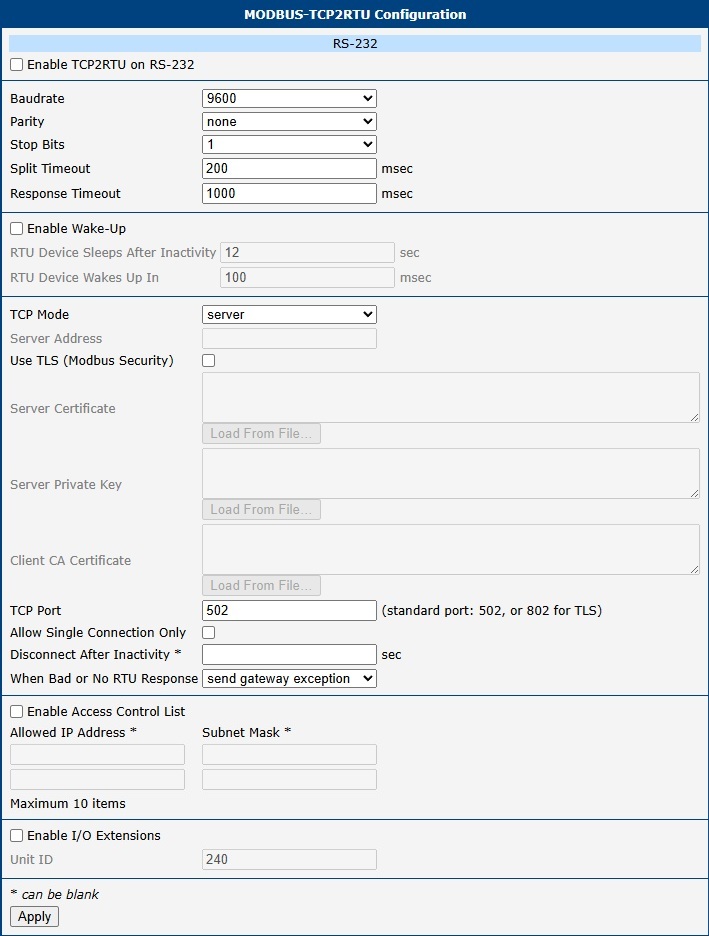
The configuration form is the same for every serial port and for the USB port; only the USB form additionally shows a read-only USB-Serial Converter status (connected or unavailable now).
Tips
- USB configuration is only available on products equipped with a USB port.
- Fields that do not apply to the current configuration (for example, Server Address in Server mode, or the wake-up, TLS, and Access Control List items when their respective checkboxes are cleared) are grayed out automatically.
| Item | Description |
|---|---|
| Enable | Enables conversion of MODBUS TCP/IP protocol to MODBUS RTU on this port. The item label includes the port's real name, for example Enable TCP2RTU on RS-232. |
| USB-Serial Converter | If displayed, indicates whether a converter is currently connected to the USB interface. |
| Baudrate | Applied communication speed. |
| Parity | Parity bit setting: • none — No parity. • even — Even parity. • odd — Odd parity. |
| Stop Bits | Number of stop bits. |
| Split Timeout | Time for delimiting a message (see note below). |
| Response Timeout | Time interval, in milliseconds, in which a response from the RTU device is expected. The router's reaction to a missing or invalid response is set by the When Bad or No RTU Response item below. |
| Enable Wake-Up | Enables the Modbus wake-up mechanism for RTU devices that use a power-saving sleep mode. When enabled, before sending a request to a device that may be asleep, the Router App first sends a single dummy byte, waits for the time set in RTU Device Wakes Up In, discards any data received in the meantime, and only then sends the actual request. This mechanism is proprietary and is not part of the MODBUS standard. |
| RTU Device Sleeps After Inactivity | Time, in seconds, of inactivity on the serial line after which the RTU device is assumed to have gone to sleep. Applicable only if Enable Wake-Up is selected. |
| RTU Device Wakes Up In | Time, in milliseconds, that the RTU device needs to wake up after receiving the wake-up byte. Applicable only if Enable Wake-Up is selected. |
| TCP Mode | Selection of operating mode: • Server — TCP server mode. • Client — TCP client mode. Typically, the router acts as the server. Client mode is useful when the router is behind NAT. |
| Server Address | Server address when Client is selected in TCP Mode. |
| Use TLS (Modbus Security) | Enables Modbus TCP Security, which secures the MODBUS TCP connection using TLS encryption. If selected, the Certificate, Private Key, and CA Certificate items below must also be filled in. |
| Certificate | Certificate of the Router App, in PEM format. If it was issued through one or more intermediate CAs, append their certificates after it in the same field (do not include the root CA certificate). Labeled Server Certificate in Server mode or Client Certificate in Client mode. Applicable only if Use TLS is selected. |
| Private Key | Private key belonging to the Certificate, in PEM format. Labeled Server Private Key in Server mode or Client Private Key in Client mode. Applicable only if Use TLS is selected. |
| CA Certificate | Root CA certificate, in PEM format, used to verify the certificate chain presented by the remote side. Only a single certificate is accepted here; any intermediate CA certificate must instead be appended to the remote side's own Certificate. Labeled Client CA Certificate in Server mode or Server CA Certificate in Client mode. Applicable only if Use TLS is selected. |
| TCP Port | TCP port on which the router listens for MODBUS TCP connection requests (Server mode) or to which it connects (Client mode). The standard port is 502 for unsecured Modbus, or 802 for secured Modbus (when Use TLS is selected). |
| Allow Single Connection Only | When enabled, the router rejects any other connection attempts while a connection is already active — the router no longer supports multiple simultaneous connections. Applicable only in Server mode. Regardless of this item, the router accepts at most 256 simultaneous connections in Server mode. |
| Disconnect After Inactivity | Time, in seconds, after which the TCP connection is terminated due to inactivity. Can be left blank to disable. |
| When Bad or No RTU Response | Selects the router's reaction when the RTU device does not respond in time or replies with an invalid checksum: • ignore (let TCP timeout) — No MODBUS error is sent back over TCP; the TCP client must rely on its own timeout. • send gateway exception — The router sends MODBUS exception code 0x0B (Gateway Target Device Failed to Respond) back to the TCP client. |
| Enable Access Control List | Enables filtering of incoming TCP connections by IP address. Up to 10 rules can be defined below, each consisting of an Allowed IP Address and an optional Subnet Mask. If Subnet Mask is left blank, the rule matches only the exact IP address; otherwise, it matches the whole subnet. A connection is accepted only if the client's IP address matches at least one rule. Applicable only in Server mode. |
| Enable I/O Extensions | Enables direct communication with the router's binary inputs, outputs, and internal information registers over MODBUS. For more information, see Address Space of Router. |
| Unit ID | ID for direct communication with the router. Range: 1 to 255. Value 0 (broadcast) is also accepted for communication with MODBUS/TCP or MODBUS/UDP devices. Default: 240. |
Serial interface configuration items
Click Apply to apply all configuration changes.
Tips
- TCP Mode above only controls which side opens the TCP connection — it has no effect on the MODBUS roles. In this Router App, the device on the serial line is always the MODBUS slave (also called the MODBUS server), and whatever connects to it over TCP (typically a SCADA system) is always the MODBUS master (also called the MODBUS client), regardless of the TCP Mode setting. If you need the opposite arrangement — the serial-line device acting as the MODBUS master — use the Modbus RTU2TCP Router App instead.
- The Certificate field must contain the Router App's own certificate. If it was issued through one or more intermediate CAs, append their certificates after it in the same field, one PEM block after another. Do not include the root CA certificate here.
- The CA Certificate field accepts only a single certificate: the root CA certificate that ultimately signs the remote side's certificate chain. Any additional certificates included in this field are ignored.
- If the gap between two received characters exceeds the Split Timeout value (in milliseconds), a message is assembled from all received data and sent.
I/O Extensions
Basic Characteristic
The I/O protocol is a router communication protocol used with the Modbus TCP2RTU Router App, based on the router's I/O interface (see Enable I/O Extensions in Serial Interface Configuration). The router provides the current state of inputs in real time. The system reads this state using message code 0x03 (read multiple registers). Using message code 0x10 (write multiple registers), the system can control digital outputs and set counter states. Messages with other codes (e.g., 0x06 for writing a single register) are not supported.
Address Space of Router
Tips
Addresses in the tables start from 0. If the implementation uses register numbers starting from 1, increment the register address by 1.
The following table lists the registers used for direct access to the router's binary inputs, outputs, and counters.
| Address | Access | Description |
|---|---|---|
| 0x0400 | R/- | upper 16 bits of temperature in router [°C] (with sign) |
| 0x0401 | R/- | lower 16 bits of temperature in router [°C] (with sign) |
| 0x0402 | R/- | upper 16 bits of the supply voltage [mV] |
| 0x0403 | R/- | lower 16 bits of the supply voltage [mV] |
| 0x0404 | R/- | state of upper 16 bits of BIN2, always 0 |
| 0x0405 | R/- | state of lower 16 bits of BIN2 |
| 0x0406 | R/- | state of upper 16 bits of BIN3, always 0 |
| 0x0407 | R/- | state of lower 16 bits of BIN3 |
| 0x0408 | R/- | state of upper 16 bits of BIN0, always 0 |
| 0x0409 | R/- | state of lower 16 bits of BIN0: • bit 0 — level at the input BIN0 • bits 1 to 15 — not used, always 0 |
| 0x040A | R/- | state of upper 16 bits of BOUT0, always 0 |
| 0x040B | R/W | state of lower 16 bits of BOUT0: • bit 0 — level at the output BOUT0 • bits 1 to 15 — not used, always 0 |
| 0x040C | R/- | state of upper 16 bits of BIN1, always 0 |
| 0x040D | R/- | state of lower 16 bits of BIN1: • bit 0 — level at the input BIN1 • bits 1 to 15 — not used, always 0 |
| 0x040E | R/- | state of upper 16 bits of BOUT1, always 0 |
| 0x040F | R/W | state of lower 16 bits of BOUT1: • bit 0 — level at the output BOUT1 • bits 1 to 15 — not used, always 0 |
I/O
The following table lists additional, read-only information registers.
| Address | Access | Description |
|---|---|---|
| 0x0430 | R/- | upper 16 bits of serial number |
| 0x0431 | R/- | lower 16 bits of serial number |
| 0x0432 | R/- | 1st and 2nd byte of MAC address |
| 0x0433 | R/- | 3rd and 4th byte of MAC address |
| 0x0434 | R/- | 5th and 6th byte of MAC address |
| 0x0435 | R/- | 1st and 2nd byte of MWAN IP address |
| 0x0436 | R/- | 3rd and 4th byte of MWAN IP address |
| 0x0437 | R/- | number of active SIM |
| 0x0438 | R/- | 1st and 2nd byte of MWAN Rx Data |
| 0x0439 | R/- | 3rd and 4th byte of MWAN Rx Data |
| 0x043A | R/- | 5th and 6th byte of MWAN Rx Data |
| 0x043B | R/- | 7th and 8th byte of MWAN Rx Data |
| 0x043C | R/- | 1st and 2nd byte of MWAN Tx Data |
| 0x043D | R/- | 3rd and 4th byte of MWAN Tx Data |
| 0x043E | R/- | 5th and 6th byte of MWAN Tx Data |
| 0x043F | R/- | 7th and 8th byte of MWAN Tx Data |
| 0x0440 | R/- | 1st and 2nd byte of MWAN Uptime |
| 0x0441 | R/- | 3rd and 4th byte of MWAN Uptime |
| 0x0442 | R/- | 5th and 6th byte of MWAN Uptime |
| 0x0443 | R/- | 7th and 8th byte of MWAN Uptime |
| 0x0444 | R/- | MWAN Registration |
| 0x0445 | R/- | MWAN Technology |
| 0x0446 | R/- | MWAN PLMN |
| 0x0447 | R/- | MWAN Cell |
| 0x0448 | R/- | MWAN Cell |
| 0x0449 | R/- | MWAN LAC |
| 0x044A | R/- | MWAN TAC |
| 0x044B | R/- | MWAN Channel |
| 0x044C | R/- | MWAN Band |
| 0x044D | R/- | MWAN Signal Strength |
| 0x044E | R/- | CRC32 value of router configuration |
| 0x044F | R/- | CRC32 value of router configuration |
Other information
Notes:
- The serial number at addresses 0x0430 and 0x0431 is present only for 7-digit serial numbers; otherwise, these addresses are empty.
- Addresses 0x0410 to 0x042F are not used and always read as 0.
- Writing to all registers is technically possible. Writing to a read-only register always succeeds but has no physical effect.
- Registers 0x0437–0x044D (active SIM and Mobile WAN status) are available on all router platforms. Their values come from the router's Mobile WAN status. If the router has no cellular module or the Mobile WAN connection is not active, these registers read as 0 (MWAN Registration reads as 4, N/A).