
Layer 2 Firewall (L2FW)
 Installation files
 Caution
- This Router App has been tested on a router with firmware version 6.3.10. After updating the router firmware to a higher version, check whether a newer version of the Router App has also been released and update it accordingly for compatibility.
Module Usage
Description
The Layer 2 Firewall Router App lets you specify filtering rules for incoming data based on the source MAC address. The rules are processed on the Data Link layer (Layer 2 of the OSI model) and are applied to all interfaces, not just the WAN interface.
Web Interface
Once the installation is complete, access the Router App's web interface by clicking the Router App name on the Router Apps page of the router's web interface.
The left panel of the web interface contains a menu with a Status section, followed by a Configuration section that contains the Rules page for defining filtering rules. The Customization section contains only the Return item, which switches back from the Router App's web page to the router's web interface. The main menu of the Router App's web interface is shown in the figure below.

Rules Configuration
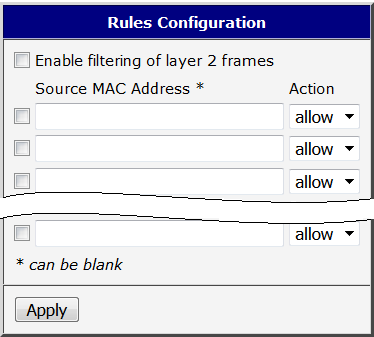
Rules are configured on the Rules page under the Configuration menu section. The page provides 25 rows for rule definitions.
Each row consists of a checkbox, a Source MAC Address field, and an Action field. Checking the checkbox enables the rule on that row. The source MAC address must be entered in colon-separated notation (for example, 00:11:22:33:44:55) and is case-insensitive. If the field is left blank, the rule matches all MAC addresses. The action can be set to allow or deny, permitting or blocking incoming packets accordingly. Rules are processed from top to bottom. When the MAC address of an incoming packet matches a rule, that rule is evaluated and processing stops.
Checking the Enable filtering of layer 2 frames checkbox at the top of the page enables the entire filtering process. Click the Apply button at the bottom of the page to save any changes.
Caution
Denying incoming packets for all MAC addresses (using an empty source address field) blocks all administrative access to the router. The only solution is to perform a hardware reset, which restores the router to its default state, including the settings of this Router App.
Configuration Example
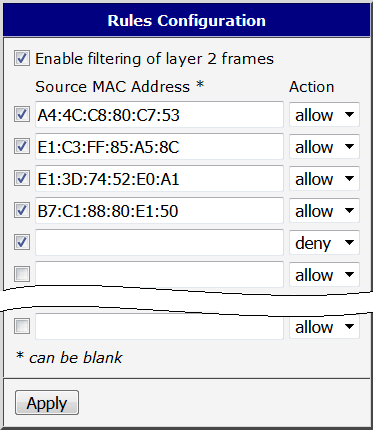
The figure below shows an example configuration where incoming communication is permitted from only four specific MAC addresses. A fifth rule with a deny action and an empty source address field is required to block traffic from all other MAC addresses.
Module Status
The Global page under the Status section shows the current global status of the Router App.
