L2TP Pseudowire
 Installation files
 Caution
This Router App has been tested on a router with firmware version 6.3.10. After updating the router firmware to a higher version, check whether a newer version of the Router App has also been released and update it accordingly for compatibility.
Basic Information
L2TP Pseudowire
In networking, a pseudowire (PW) is a mechanism that encapsulates and forwards one type of network traffic over another type of network. L2TP pseudowire specifically refers to the use of L2TP (Layer 2 Tunneling Protocol) to establish a virtual connection between two endpoints over an IP or MPLS (Multiprotocol Label Switching) network, emulating the behavior of a point-to-point or multipoint Layer 2 circuit.
L2TP pseudowire is often used in service provider networks to provide Layer 2 connectivity between geographically dispersed customer sites. It enables the transport of Ethernet, Frame Relay, or ATM (Asynchronous Transfer Mode) frames over an IP or MPLS network. The use of L2TP pseudowires allows service providers to offer Layer 2 VPN services to their customers without dedicated physical circuits between customer sites.
In summary, L2TP pseudowire is a technique that uses L2TP to create virtual Layer 2 connections over IP or MPLS networks, providing a flexible and cost-effective way to extend Layer 2 networks across different locations.
Router App Description
Web Interface
After installing the Router App, access the Router App's web interface by clicking the Router App name on the Router Apps page of the router's web interface.
The left panel of the web interface contains a menu with Status, Configuration, and Customization sections. The Customization section contains only the Return item, which switches back from the Router App's web page to the router's web configuration pages. The main menu of the Router App's web interface is shown in the figure below.

L2TP
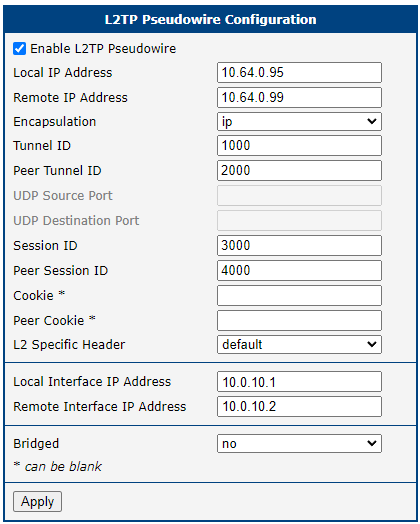
The Configuration menu section contains the L2TP item where all settings of this Router App are configured.
| Item | Description |
|---|---|
| Enable L2TP Pseudowire | Enables the L2TP pseudowire. |
| Local IP Address | The IP address of the local router, configured with a subnet mask of /30. |
| Remote IP Address | The IP address of the remote router, configured with a subnet mask of /30. |
| Encapsulation | • udp — enables UDP Source port and UDP Destination port • ip — disables UDP Source port and UDP Destination port |
| Tunnel ID | Numerical ID of the local tunnel |
| Peer Tunnel ID | Numerical ID of the peer (remote) tunnel |
| UDP Source Port | Local UDP port |
| UDP Destination Port | Remote UDP port |
| Session ID | Local Session ID |
| Peer Session ID | Remote Session ID |
| Cookie | Local cookie value, 8 or 16 characters long (only characters 0–9, A–F; not case sensitive) |
| Peer Cookie | Remote cookie value |
| L2 Specific Header | • default • none |
| Local Interface IP Address | IP address of the local interface |
| Remote Interface IP Address | IP address of the remote interface |
| Bridged | Select whether the connection should be bridged |
L2TP Pseudowire configuration items
System Log
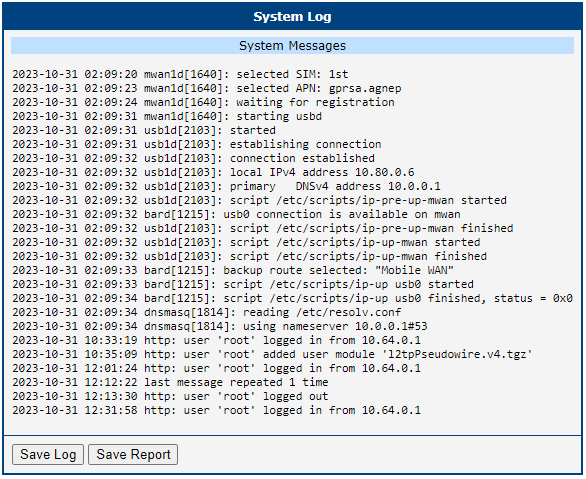
The System Log section displays log messages from the Router App.
Example
To create an L2TP pseudowire between two routers, both must have this Router App installed and their configurations must mirror each other.
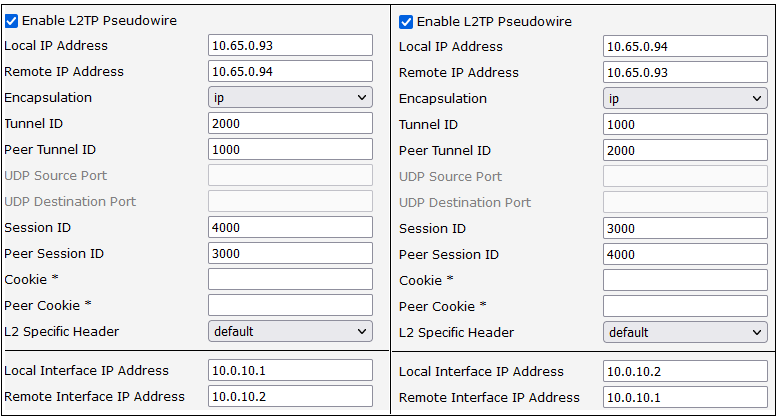
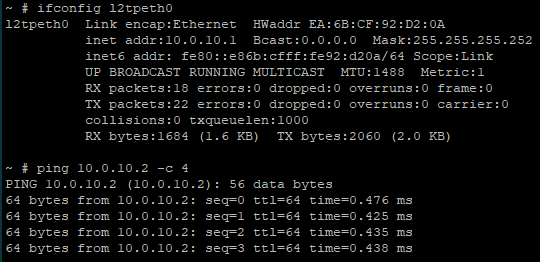
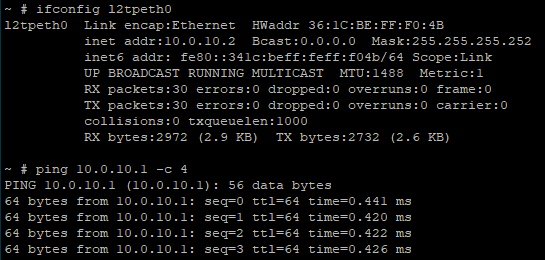
After configuring both sides, the L2TP tunnel is established. To verify it, ping the other router.