
Protocol PIM-SM
 Installation files
 Caution
The Protocol PIM-SM Router App has been deprecated, and its features have been integrated into the FRR Router App. We strongly recommend installing the FRR Router App because Protocol PIM-SM is no longer maintained or supported.
Caution
- This Router App has been tested on a router with firmware version 6.3.10. After updating the router firmware to a higher version, check whether a newer version of the Router App has also been released and update it accordingly for compatibility.
Description
This Router App makes the PIM-SM (Protocol Independent Multicast — Sparse Mode) protocol available. PIM-SM is the most commonly used multicast routing protocol, designed on the assumption that receivers for any particular multicast group are sparsely distributed throughout the network. To receive multicast data, routers must explicitly inform their upstream neighbors of their interest in specific groups and sources. PIM-SM uses shared trees by default — multicast distribution trees rooted at a selected node called the Rendezvous Point (RP), shared by all sources sending to the multicast group.
To access the Router App web interface, click the Router App name on the Router Apps page of the router's web interface. The left menu has three sections. Status contains Pimd (status of the pimd daemon) and System Log. Configuration contains PIM-SM. Administration contains only Return, which switches back to the router's main interface.
The configuration page includes the following items:
- Enable PIM-SM — Activates the Router App (runs the
pimddaemon implementing the PIM-SM protocol). - Network Interfaces — List of network interfaces (
ethXandgreX) on which PIM-SM is activated. Theallmultiflag is set forethXinterfaces (e.g.,eth0) and themulticastflag forgreXinterfaces (e.g.,gre1). The TTL value is 64. Reverse path filtering is disabled for all listed interfaces by setting the appropriaterp_filterentry in the proc filesystem (e.g.,echo 0 > /proc/sys/net/ipv4/conf/eth0/rp_filter). Example:eth0 gre1 - Disable Vifs — Corresponds to
-N/--disable-vifsin the pimd daemon. If checked, all network interfaces are inactive for PIM-SM and must be enabled selectively using theenableoption of thephyintcommand in the Configuration section. If unchecked, all interfaces are active and those that should not have PIM-SM enabled (e.g.,ppp0) must be explicitly disabled. - Timer Hello Period — Period at which PIM hello messages are sent on each PIM-enabled interface. Default: 30 seconds.
- Timer Join/Prune Period — Interval at which the router sends PIM join/prune messages to the upstream RPF (Reverse Path Forwarding) neighbor. Default: 60 seconds.
- Timer Bootstrap Period — Period at which bootstrap messages are sent. Default: 60 seconds.
- pimd.conf — Configuration file for the pimd daemon.
Click Apply to apply all changes.
Configuration
You can use the following commands in the pimd.conf file (entered via the pimd.conf field in the web interface):
default_source_preference <preference>— Sets the preference value used when selecting a forwarder and upstream router for the LAN. A lower value increases the likelihood of this router being selected. For dedicated applications such as pimd, we recommend a somewhat higher value (e.g., 101).default_source_metric <metric>— Sets the cost for sending data through this router. The recommended default value is 1024.phyint <local-addr|ifname> [disable/enable] [altnet <network> masklen <masklen>] [scoped <network> masklen <masklen>] [threshold thr] [preference pref] [metric cost]— Specifies interfaces by IP address or name. Entering the command without additional options activates the interface with default values.cand_rp [<local-addr>] [priority <number>] [time <number>]— The Rendezvous Point (RP) is the key element in PIM-SM networks, bringing together data from multicast sources and recipient requests. RP selection can be static or dynamic. For dynamic selection, the bootstrap mechanism selects one BSR from multiple Candidate Bootstrap Routers (CBSR), which then selects one RP from a set of Candidate Rendezvous Points (CRP). Ifcand_rpis used inpimd.conf, the router becomes a CRP. Parameters are: the network interface address used for CRP reporting, CRP priority (lower number = higher priority), and reporting period.cand_bootstrap_router [<local-addr>] [priority <number>]— If used inpimd.conf, the router becomes a CBSR. Parameters are similar to those ofcand_rp.rp_address <rp-addr> [<group-addr> [masklen <masklen>] [priority <number>]]— Used for static RP selection. The required parameter is the unicast IP address of the RP. Optional parameters (multicast group address, mask length, and priority) restrict the use of this RP to specific groups.group_prefix <group-addr> [masklen <masklen>] [priority <number>]— Used for dynamic RP selection. Specifies the multicast group for which this router acts as RP if selected from the set of CRPs. Thepimd.conffile can contain up to 255 entries.switch_data_threshold [rate <number> interval <number>]— PIM-SM uses several forwarding topologies (shared tree / RPT, source-specific tree, source-specific shortest-path tree) ordered by increasing maintenance overhead and typically increasing throughput. This command sets the threshold for switching to a topology with higher throughput.switch_register_threshold [rate <number> interval <number>]— Opposite ofswitch_data_threshold.
Configuration Example — Static Selection of RP
The following example configures PIM-SM with a static Rendezvous Point. Enter this in the pimd.conf field in the Router App web interface.
default_source_preference 101

phyint eth1 enable
phyint gre1 enable preference 102
rp_address 10.168.254.1
switch_data_threshold rate 60000 interval 10
switch_register_threshold rate 60000 interval 10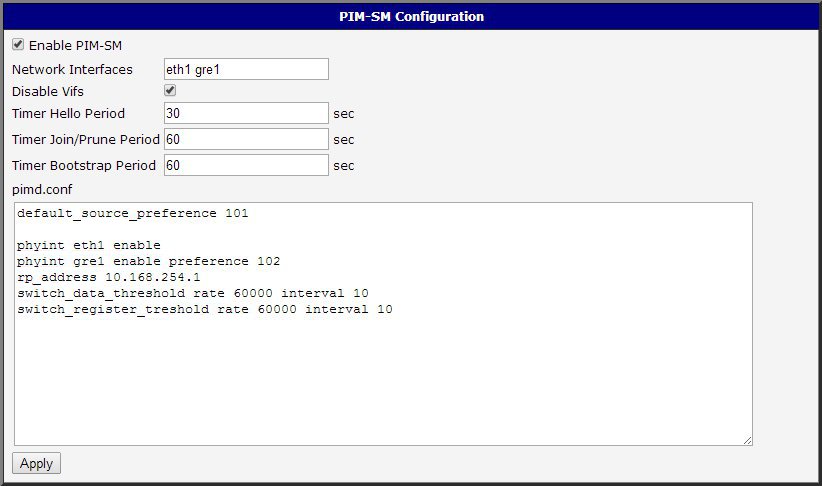
Configuration Example — Dynamic Selection of RP
The following example configures PIM-SM with dynamic Rendezvous Point selection. Enter this in the pimd.conf field in the Router App web interface.
default_source_preference 101

phyint eth1 enable
phyint gre1 enable preference 102
cand_rp 10.168.254.1 priority 10
cand_bootstrap_router 10.168.254.1 priority 10
group_prefix 239.0.0.0 masklen 8 priority 10
switch_data_threshold rate 60000 interval 10
switch_register_threshold rate 60000 interval 10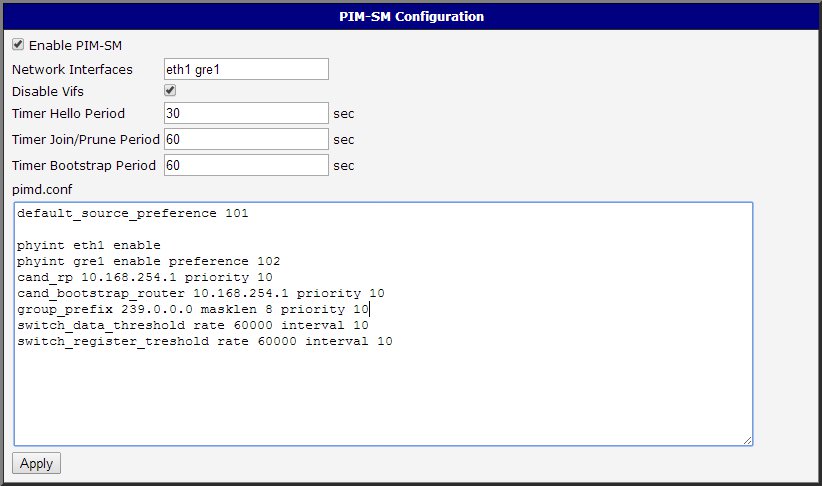
System Log
If problems occur, view the system log by clicking the System Log menu item. It shows messages related to the PIM-SM Router App and the pimd daemon.
Interoperability
pimd can interoperate with other software products that comply with the PIM-SM specification. The exceptions are some older versions of Cisco IOS, which do not meet the specification for the checksum calculation of PIM_REGISTER messages. This issue has been resolved in newer IOS versions.
Licenses
This section summarizes the open-source software (OSS) licenses used by this Router App.
