
Protocol IEC101-104
 Installation files
 Caution
- This Router App is not compatible with the v4 platform.
- A serial expansion port must be installed in the router, or a USB-to-serial converter must be connected to the router's USB port.
- Only unbalanced serial communication mode is supported: the router is the master and the connected IEC 60870-5-101 telemetry device is the slave. SCADA initiates the first connection with the router on the IEC 60870-5-104 side. The Router App then regularly requests events and data from the connected IEC 60870-5-101 telemetry.
Description
IEC 60870-5-101 is a standard for power system monitoring, control, and associated communications for telecontrol, teleprotection, and telecommunications in electric power systems. IEC 60870-5-104 is an analog of IEC 60870-5-101 with changes to the transport, network, link, and physical layer services to enable full TCP/IP network access.
This Router App performs bidirectional conversion between IEC 60870-5-101 and IEC 60870-5-104, as specified by the IEC 60870-5 standard. IEC 60870-5-101 serial communication is converted to IEC 60870-5-104 TCP/IP communication and vice versa. You can configure selected parameters for both protocols.
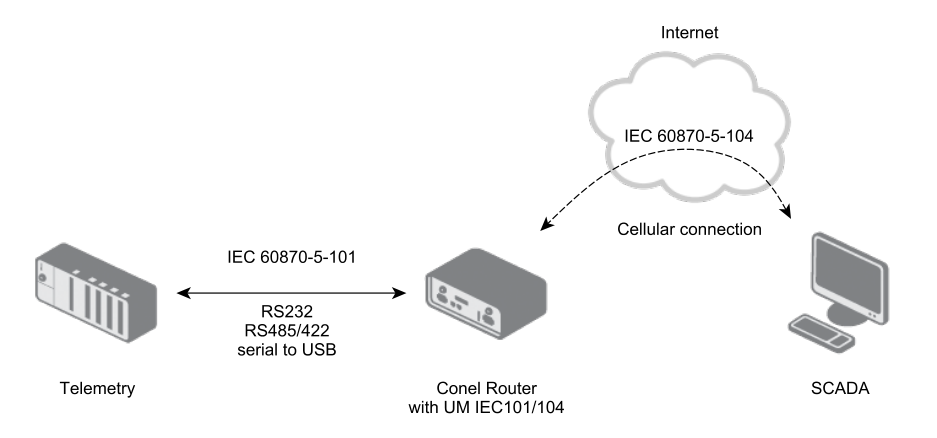
IEC 60870-5-101 serial communication parameters can be configured independently for each serial port of the router, including the USB port (with a USB-to-serial converter). When multiple serial ports are used, multiple independent IEC 60870-5-101/IEC 60870-5-104 conversions can run simultaneously.
On the IEC 60870-5-104 side, only the TCP Port parameter can be configured — it is the port the TCP server listens on when conversion is active. Data for the IEC 60870-5-101 side is sent as soon as it arrives from SCADA. The IEC 60870-5-101 side polls for data periodically according to the Data Polling Time parameter, starting when the first test frame arrives from SCADA.
Tips
IEC 60870-5-101 defines an Application Service Data Unit (ASDU) containing an ASDU identifier (with ASDU type) and information objects. When converting from IEC 60870-5-104 to IEC 60870-5-101, all ASDU types in the standard compatible range 1–127 are converted accordingly. Proprietary types in the private range 128–255 are not converted.
Both commands and data payload in ASDUs are converted. ASDUs for control and monitoring with time tags — which differ between IEC 60870-5-101 and IEC 60870-5-104 — can be individually configured: dropped, mapped to the equivalent ASDU in the opposite protocol, or mapped to the same ASDU type. The number of unknown ASDUs is logged and shown on the Module Status page.
The Router App is accessible in the Customization section under Router Apps in the router's web interface. The menu is shown in the figure below.
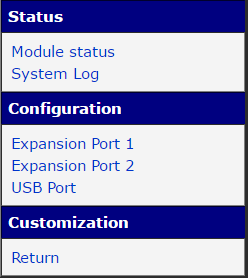
The Status section provides the Module Status page with running communication information and the System Log page with logged messages. Configuration of serial port parameters and IEC 60870-5-101/IEC 60870-5-104 conversion settings is available in the Configuration section. The Return item returns to the router's main web interface.
Status
Module Status
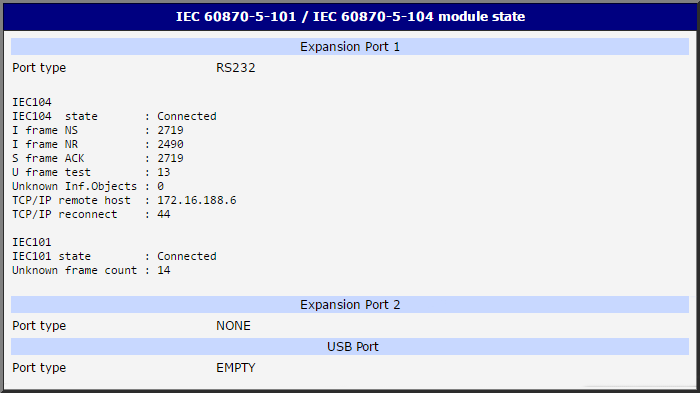
The Module Status page displays protocol information about the running communication, shown individually for each serial port. The detected port type is shown in the Port Type field. IEC 60870-5-104 and IEC 60870-5-101 status parameters are described in the tables below.
| Item | Description |
|---|---|
| IEC104 state | Connection state to the IEC 60870-5-104 server. |
| I frame NS | Sent — sequence number of the last sent frame. |
| I frame NR | Received — sequence number of the last received frame. |
| S frame ACK | Acknowledgment — sequence number of the last acknowledged sent frame. |
| U frame test | Number of test frames. |
| Unknown Inf. Objects | Number of unknown information objects (discarded). |
| TCP/IP remote host | IP address of the last connected IEC 60870-5-104 server. |
| TCP/IP reconnect | Number of TCP/IP reconnections. |
IEC 60870-5-104 status items
| Item | Description |
|---|---|
| IEC101 state | IEC 60870-5-101 connection state. |
| Unknown frame count | Number of unknown frames received. |
IEC 60870-5-101 status items
System Log
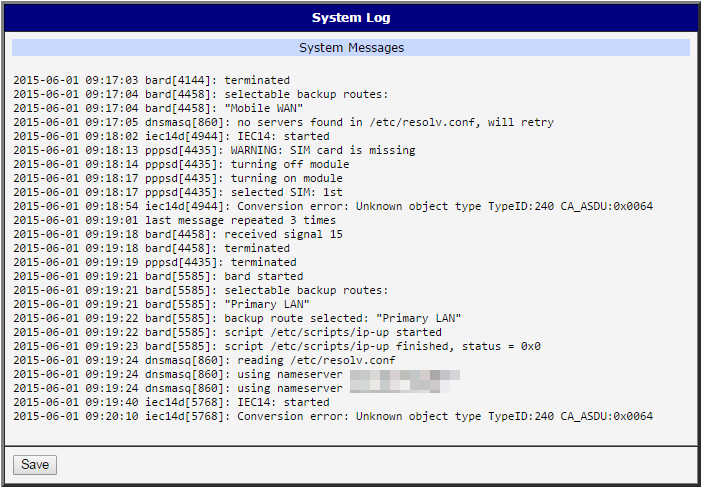
The System Log page displays log messages — the same system log as in the router's main menu. Messages from the Router App are prefixed with iec14d (from the running iec14d daemon). Use this page to verify correct operation and to diagnose configuration or connection issues.
The type and verbosity of messages logged for each port can be configured in the Debug Parameters section at the bottom of each configuration page. Click the Save button to download the log as a text file.
Conversion Configuration
Configuration of IEC 60870-5-101 and IEC 60870-5-104 parameters is accessible via the Expansion Port 1, Expansion Port 2, and USB Port items in the Configuration section. Independent conversions can be configured for each port. The configuration items are the same for all expansion and USB ports.
Enable conversion for the required port by checking the Enable conversion module checkbox at the top of the page. Click Apply to apply any changes.
The configuration page contains four conversion configuration sections, followed by time conversion settings and Debug Parameters:
- IEC 60870-5-101 parameters
- IEC 60870-5-104 parameters
- ASDU conversions in monitoring direction (IEC 60870-5-101 → IEC 60870-5-104)
- ASDU conversions in control direction (IEC 60870-5-104 → IEC 60870-5-101)
Caution
The parameters of both the Protocol IEC101/104 Router App and the connected telemetry system must match for communication to work correctly.
IEC 60870-5-101 Parameters
The Port Type field shows the detected type of the expansion port. The upper part of the configuration contains serial line parameters; the lower part contains IEC 60870-5-101 protocol parameters. Configure these parameters to match the IEC 60870-5-101 telemetry used in the system. All other IEC 60870-5-101 parameters are static and cannot be changed.
| Item | Description |
|---|---|
| Baudrate | Serial communication speed. Range: 9600 to 57600. |
| Data Bits | Number of data bits. Fixed at 8. |
| Parity | Control parity bit: none, even, or odd. |
| Stop Bits | Number of stop bits: 1 or 2. |
| Link address length | Length of the link address: 1 or 2 bytes. |
| Link address | Address of the connected serial device. |
| COT transmission length | Cause of Transmission length — length of the "cause of transmission" field (spontaneous, periodical, etc.): 1 or 2 bytes. |
| COT MSB source | Cause of Transmission Most Significant Byte. Optionally includes the data originator's source address: 0 = standard address, 1–255 = specific address. |
| CA ASDU length | Common Address of ASDU (Application Service Data Unit) length: 1 or 2 bytes. |
| IOA length | Information Object Address length. Range: 1 to 3 bytes. |
| Data polling time | Interval for regular data requests from the router to the IEC 60870-5-101 telemetry device (in milliseconds). Default: 1000 ms. |
| Send Delay | Experimental additional delay for messages in the 104 → 101 direction (SCADA to device). Not recommended for standard use — only for non-standard IEC-101 devices. |
IEC 60870-5-101 configuration items
IEC 60870-5-104 Parameters
Only one parameter is available for IEC 60870-5-104 configuration: IEC-104 TCP Port. This is the port the TCP server listens on when the conversion is active. The default value for Expansion Port 1 is 2404 (the official IEC 60870-5-104 TCP port reserved for this service). Expansion Port 2 defaults to 2405 and the USB Port to 2406.
All other IEC 60870-5-104 parameters are fixed according to the standard. If IOA lengths differ between the two sides, bytes are added or removed automatically. Conflict situations are always logged.
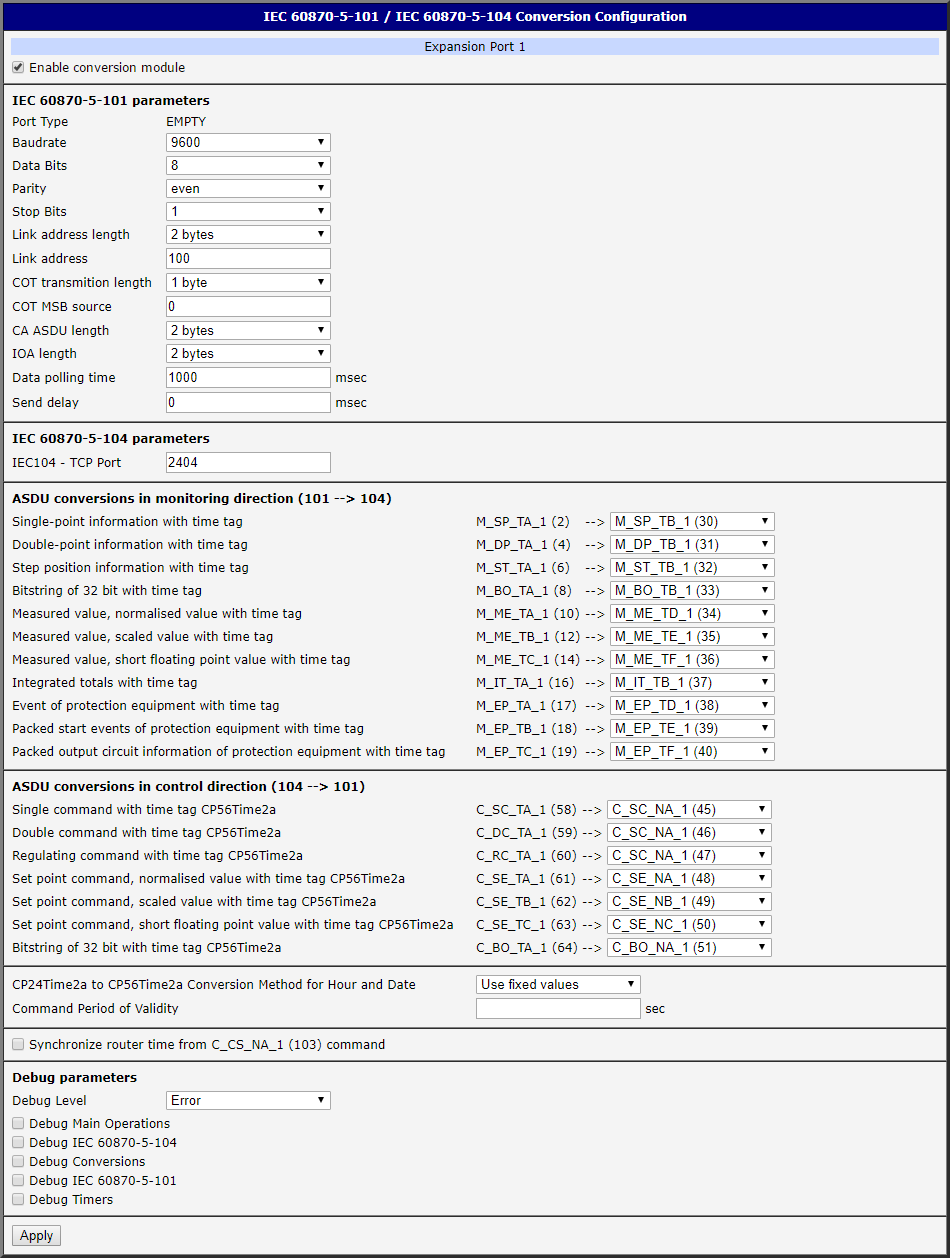
ASDU Conversions in Monitoring Direction (101 → 104)
This section configures the conversion of ASDUs from IEC 60870-5-101 to IEC 60870-5-104. These ASDUs use a 24-bit time tag in IEC 60870-5-101 (milliseconds, seconds, minutes), while IEC 60870-5-104 uses a 56-bit time tag (milliseconds, seconds, minutes, hours, days, months, years). The conversion behavior can therefore be configured per ASDU listed on the configuration page.
For each listed ASDU, select one of the following conversion modes:
DROP — The ASDU is dropped and no conversion is performed.
Convert to same ASDU — The ASDU is mapped to the same ASDU type in the opposite protocol. No time tag conversion is performed — the IEC 60870-5-104 application receives the original shorter 24-bit time tag from the IEC 60870-5-101 device.
Convert to equivalent ASDU (default) — The ASDU is mapped to the equivalent ASDU type in the opposite protocol. The 24-bit time tag must be extended to 56 bits. The extension method is configured via the CP24Time2a to CP56Time2a Conversion Method for Hour and Date item at the bottom of the page:
- Use fixed values (default) — The original 24-bit time tag is extended with fixed values: 0 hours, 1st day, 1st month, year 2000.
- Use router time values — The original 24-bit time tag is extended with the router's current hours, day, month, and year. Depends on the router's time configuration (manual or NTP).
Caution
The Use router time values option carries a risk of unintentional time jumps in the converted data. For example, if a monitoring ASDU is sent at 23:59:59.095 but passes through the router just after midnight due to network latency, the completed time tag becomes 00:59:59.095 of the next day — an unintentional one-hour jump. Use this option only if you understand and accept this risk.
Note: If the IEC 60870-5-101 device supports long 56-bit time tags, it sends ASDUs that IEC 60870-5-104 applications can read directly — no time tag conversion is performed.
ASDU Conversions in Control Direction (104 → 101)
This section configures the conversion of ASDUs from IEC 60870-5-104 to IEC 60870-5-101. Here the long time tags are truncated for the IEC 60870-5-101 device.
For each listed ASDU, select one of the following conversion modes:
DROP — The ASDU is dropped and no conversion is performed.
Convert to same ASDU — The ASDU is mapped to the same ASDU type in the opposite protocol. No time tag conversion is performed — the IEC 60870-5-101 device receives the unchanged long time tag from the IEC 60870-5-104 application. Some IEC 60870-5-101 devices support long time tags.
Convert to equivalent ASDU (default) — The ASDU is mapped to the equivalent ASDU type in the opposite protocol. The 56-bit time tag is truncated to 24 bits — only minutes, seconds, and milliseconds are retained.
Tips
You can synchronize the router's clock from SCADA IEC-104 telemetry by enabling the Synchronize router time from C_CS_NA_1 (103) command checkbox. This sets the router's real-time clock to match the SCADA time via the incoming IEC-104 command.
An optional validity check can be enabled by filling in the Command Period of Validity field (e.g., 30 seconds). When set, the time tag received from SCADA is compared with the router's current time. If the difference exceeds the validity period, the command is considered irrelevant and is not forwarded to the IEC-101 side. No validity check is performed by default (field empty).
Click Apply to apply all configuration changes.