
NTP
 Installation files
 Tips
The features of this Router App are integrated into firmware version 6.5.0 and later, except for the v2 and v2i product families.
Caution
- This Router App has been tested on a router with firmware version 6.3.10. After updating the router firmware to a higher version, check whether a newer version of the Router App has also been released and update it accordingly for compatibility.
Description
The Network Time Protocol (NTP) is widely used to synchronize computer clocks on the Internet. NTPv4 includes a modified protocol header to accommodate the IPv6 address family. NTPv4 also includes fundamental improvements in the mitigation and discipline algorithms that extend the potential accuracy to tens of microseconds with modern workstations and fast LANs.
Tips
The ntpq and ntpdc commands are supported from Router App version 1.2.0.
Web Interface
Once the Router App is installed, access its web interface by clicking the Router App name on the Router Apps page of the router's web interface.
The left pane of the web interface contains Configuration and Information menu sections. The Customization section contains only the Return item, which returns to the router's main web configuration interface. The menu is shown in the figure below.

Configuration
NTP
Configure this Router App on the NTP page in the Configuration section. All configuration items are described in the table below.
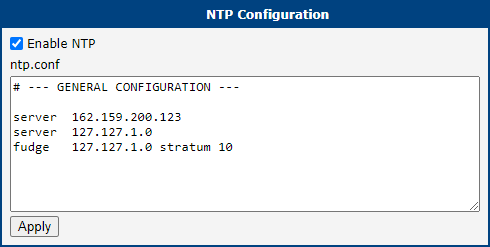
| Item | Description |
|---|---|
| Enable NTP | Enables the NTP service of this Router App. |
Configuration items
Information
Licenses
You can view the OSS licenses used by this Router App on the Licenses page in the Information section.
