
Modbus to MQTT
 Installation files
 Tips
For an overview of the Modbus protocol, communication modes, and how to connect Modbus devices to Advantech routers, see the Modbus Application Guide.
Warning
- This Router App is compatible only with firmware version 6.4.x or higher.
Router App Introduction
Function and Scope
The Modbus to MQTT Router App enables communication between Modbus TCP devices and an MQTT broker. The app operates in two modes:
- Modbus TCP Master — Communicates with field devices (PLCs, sensors).
- MQTT Client — Acts as a publisher or subscriber to exchange data with a broker.
This architecture enables bidirectional data exchange between industrial field devices and cloud or IT systems using the MQTT protocol.
Web Interface
After installing the Router App, open its web interface by selecting the Router App name on the Router Apps page of the router's web interface.
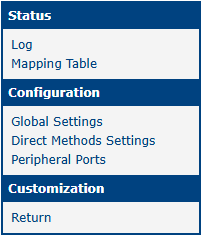
The left side of the web interface contains a navigation menu with three main sections:
- Status — Includes Log and Mapping Table.
- Configuration — Includes Global Settings, Direct Methods Settings, and Peripheral Ports.
- Customization — Includes the Return item to switch back to the main router configuration.
The main menu is shown in the figure below.
Status
Log
This section displays log messages generated by this Router App, including connection status and error reports.
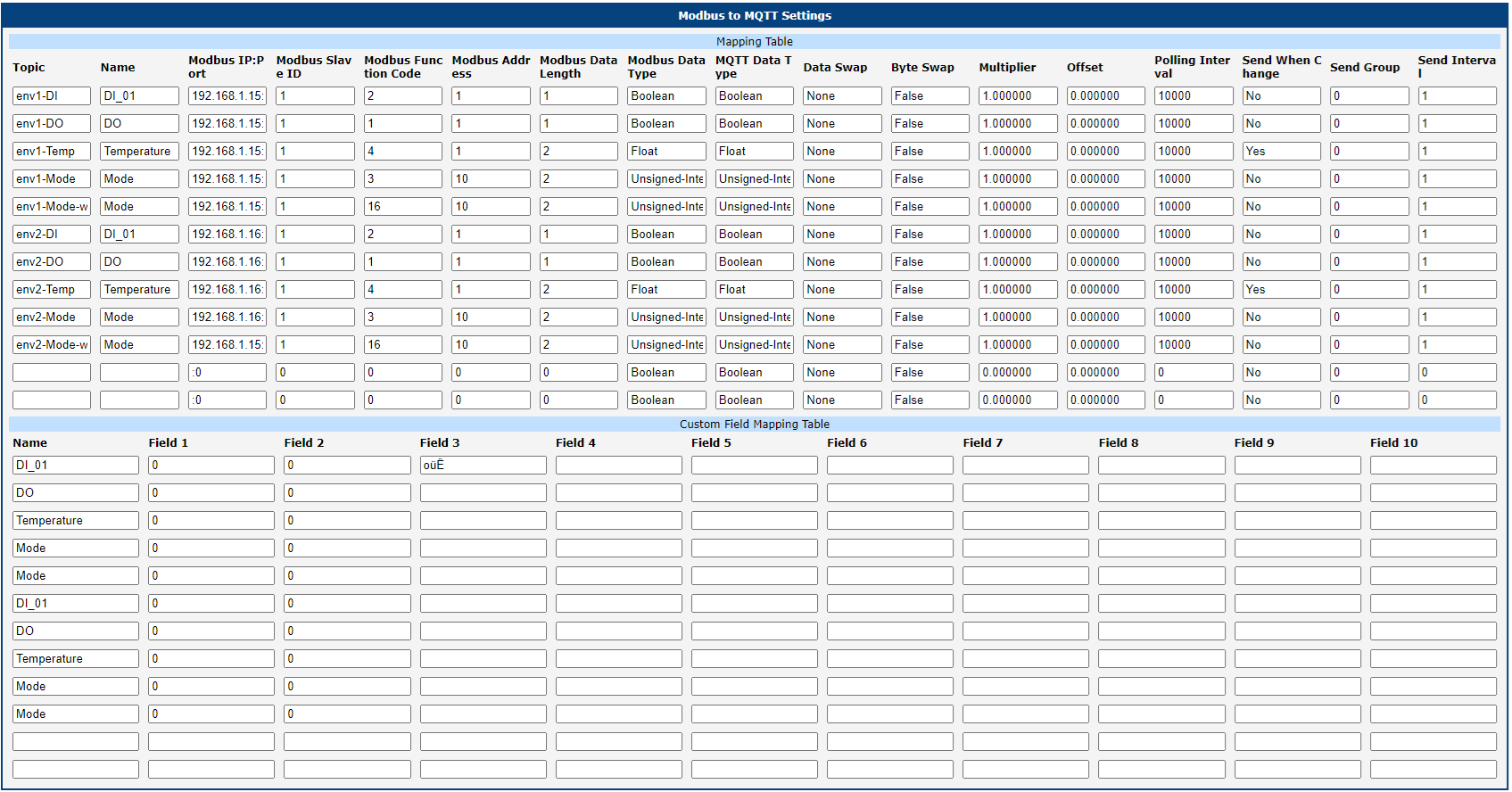
Mapping Table
After the Router App is configured, the Mapping Table displays the active Modbus-to-MQTT mapping rules.
Configuration
Global Settings
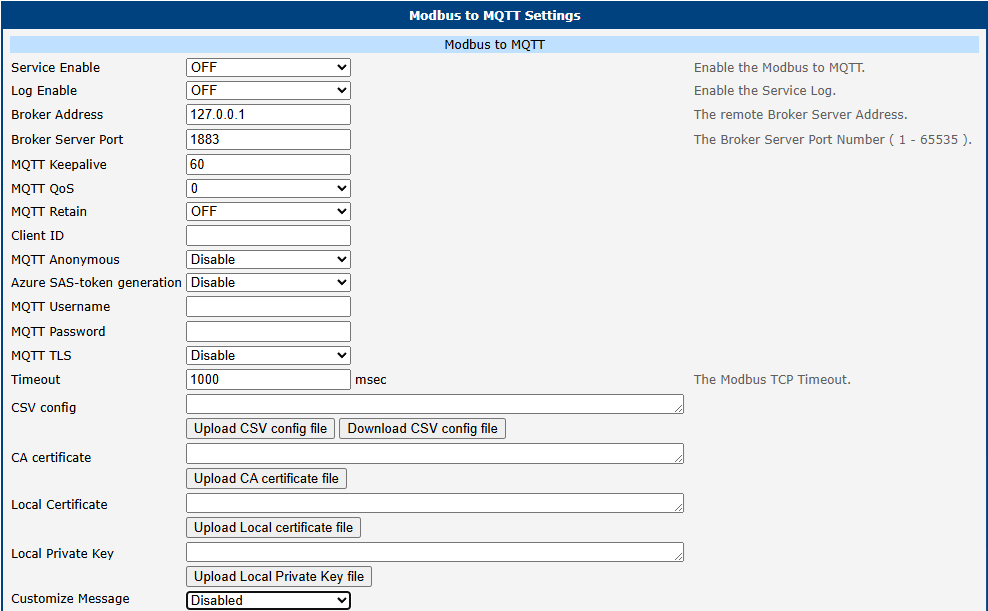
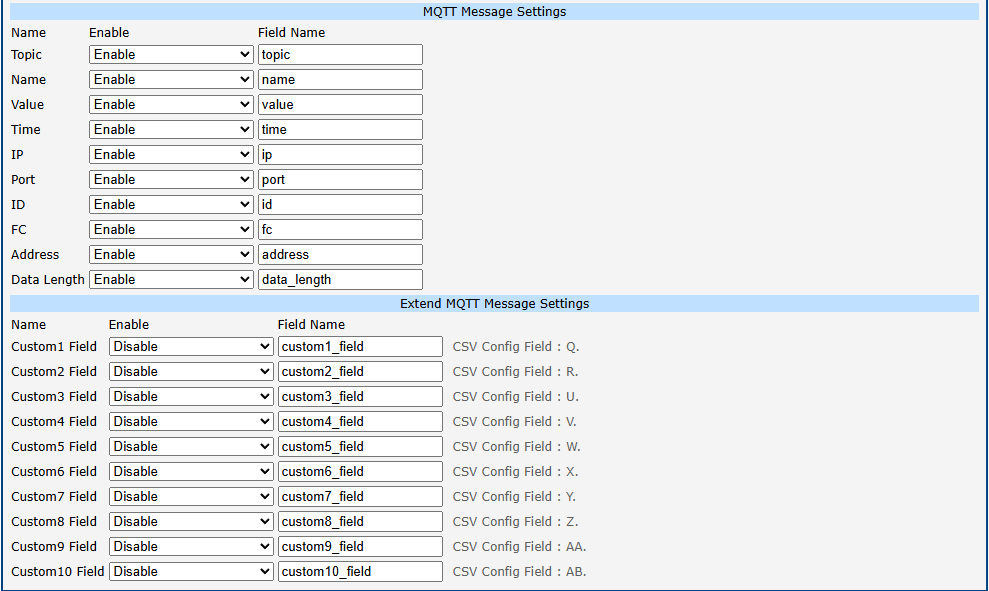
Configure the Router App on the Global Settings page under the Configuration menu. All configuration parameters are shown in the figures below and described in the table.
| Item | Description |
|---|---|
| Service Enable | Enables or disables the Modbus to MQTT service. |
| Log Enable | Enables logging for this Router App. |
| Broker Address | IP address or hostname of the remote MQTT broker. |
| Broker Server Port | MQTT broker TCP port number (standard is 1883). |
| MQTT Keepalive | Keepalive interval in seconds (1–3600). |
| MQTT QoS | MQTT Quality of Service level (0, 1, or 2). |
| MQTT Retain | Enables retained messages on the MQTT broker. |
| Client ID | MQTT client identifier used by the router. |
| MQTT Anonymous | Enables anonymous connection without authentication. |
| MQTT Username | Username for authentication. |
| MQTT Password | Password for authentication. |
| MQTT TLS | Enables encrypted communication using TLS. |
| Interval (ms) | Modbus TCP polling interval in milliseconds. |
| Timeout (ms) | Modbus TCP communication timeout in milliseconds. |
| CSV Config | Upload field for the CSV configuration file. Note: You may need to restart the router to display the imported CSV configuration correctly. |
| CA Certificate | Upload the CA certificate for TLS validation. |
| Local Certificate | Upload the local client certificate for mutual TLS. |
| Local Private Key | Upload the private key for the local certificate. |
| Customize Messages | Enables user-defined customization of the MQTT payload structure. |
Global settings items
The second part of the settings configures the MQTT payload. The default payload includes variables such as Topic, Name, Value, Time, IP, Port, ID, FC, Address, and Data Length. You can also define up to 10 custom fields to include static metadata (e.g., location or device type) in every JSON message.
Direct Methods Settings
The Direct Methods Settings page configures how the Router App processes commands received via MQTT and forwards them as Modbus write operations to connected Modbus TCP devices.
This function is typically used when an external system (for example, an IoT platform, SCADA system, or cloud application) sends control commands via MQTT. The Router App receives the MQTT message, processes it using a user-defined script, and then translates it into a corresponding Modbus write request (typically using function codes 5, 6, 15, or 16).
Each configuration is defined as an independent rule identified by a Rule Index, which allows multiple Direct Method behaviors to be configured in parallel.
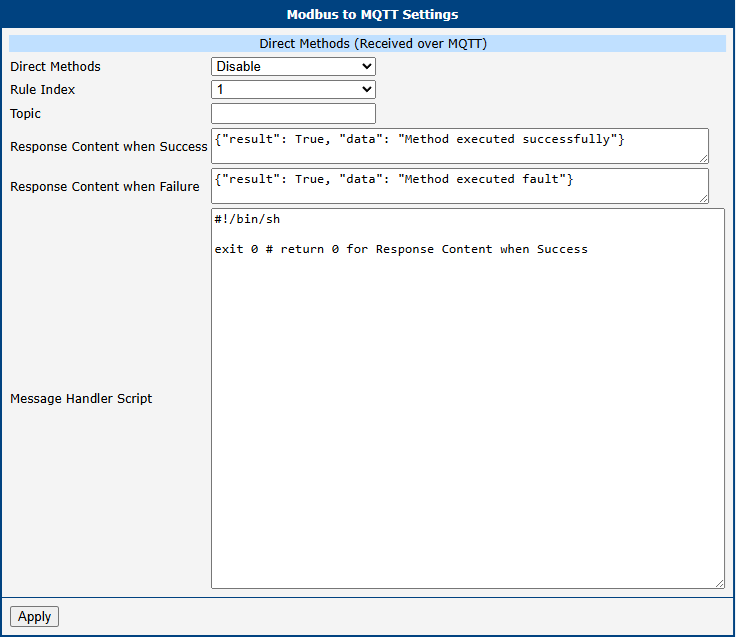
| Item | Description |
|---|---|
| Direct Methods | Enables or disables the selected Direct Method rule. When disabled, the Router App ignores the rule. |
| Rule Index | Selects which Direct Method rule is currently being configured. Multiple rules can be defined to handle different MQTT topics or control behaviors. |
| Topic | Specifies the MQTT topic that the Router App subscribes to for receiving control messages. Any message published to this topic is processed by the corresponding rule. |
| Response Content when Success | Defines the JSON message returned to the MQTT broker when the command is processed successfully. This response is sent when the handler script exits with code 0. |
| Response Content when Failure | Defines the JSON message returned to the MQTT broker when the command processing fails. This response is sent when the handler script exits with a non-zero code. |
| Message Handler Script | A user-editable shell script that processes incoming MQTT messages and performs the corresponding Modbus actions. The script can parse the MQTT payload, extract parameters, execute Modbus write commands, and determine success or failure based on its exit code. |
Direct Methods settings items
Processing Workflow
- An external system publishes a command to the configured Topic.
- The router passes the payload to the Message Handler Script.
- The script interprets the data and executes a Modbus write command.
- Based on the script's exit code, the router returns the Success or Failure response to the broker.
Peripheral Ports
Tips
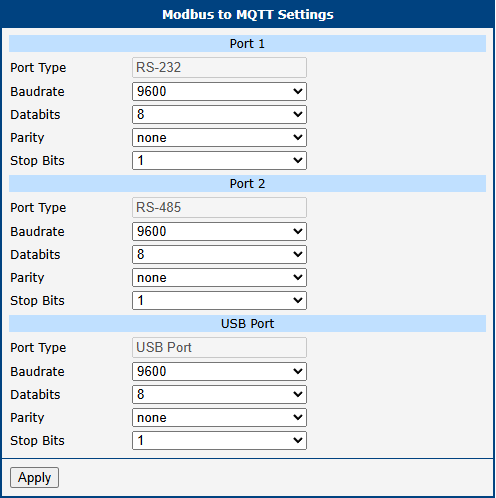
The configuration available on this page depends on the specific hardware model of the router.
This page configures physical interfaces, including serial and USB ports.
Data Mapping and Messaging
CSV Configuration File
The mapping between Modbus TCP and MQTT is defined in a CSV file (comma-delimited).
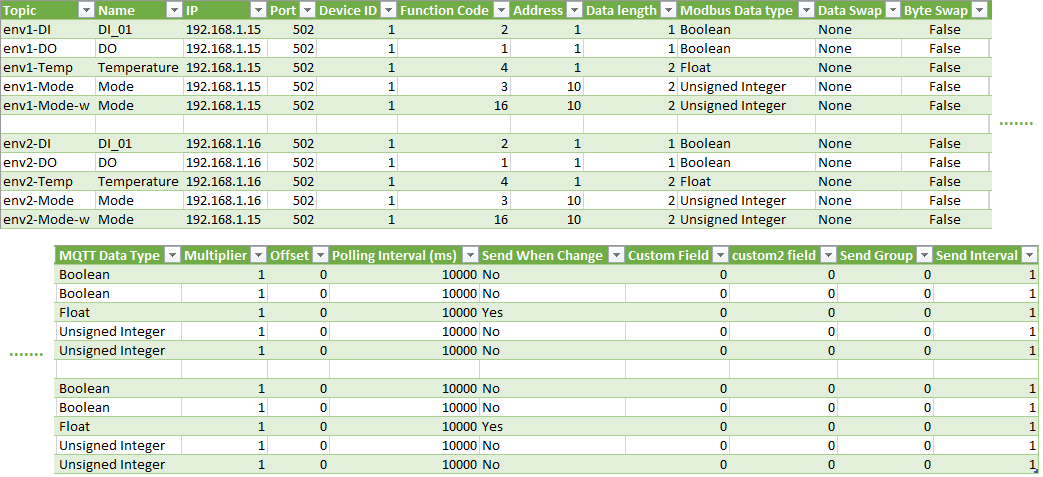
The table below describes all supported columns in the CSV file (columns A through AB).
| Column | Item | Description |
|---|---|---|
| A (1st) | Topic | MQTT topic string. |
| B (2nd) | Name | Identifier for the mapping rule. |
| C (3rd) | IP Address or Peripheral Interface Selection | Specifies the network IP address of the target Modbus device when using Modbus TCP communication. When Modbus RTU or Modbus ASCII mode is selected, this field specifies the physical communication interface. Supported options: • Expansion Port 1 • Expansion Port 2 • USB Port |
| D (4th) | Port Number / Communication Mode | For Modbus TCP, specifies the TCP port number of the remote Modbus slave device. When Modbus RTU or Modbus ASCII mode is selected, defines the serial communication protocol format. Supported options: • RTU (default) • ASCII |
| E (5th) | Device ID | Modbus Unit ID (Slave ID). |
| F (6th) | Function Code | Supported Modbus function codes: 01: Read coils 02: Read discrete inputs 03: Read holding registers 04: Read input registers 05: Write single coil 06: Write single register 15: Write multiple coils 16: Write multiple registers |
| G (7th) | Address | Starting Modbus register address. |
| H (8th) | Data Length | Number of bits (FC 1, 2, 5, 15) or words (FC 3, 4, 6, 16). |
| I (9th) | Modbus Data Type | Boolean, Integer, Unsigned Integer, Float. |
| J (10th) | Data Swap | Byte order handling: None: No swap. Word: 0x0102 → 0x0201. Double Word: 0x01020304 → 0x04030201. Quad Word: Swaps 8 bytes fully. |
| K (11th) | Byte Swap | TRUE or FALSE. Swaps bytes within words. |
| L (12th) | MQTT Data Type | JSON payload format: Boolean, Integer, Unsigned Integer, Float, Long Integer, Unsigned Long Integer, String. |
| M (13th) | Multiplier | Factor to multiply the value by. |
| N (14th) | Offset | Value added to or subtracted from the data. |
| O (15th) | Polling Interval | Polling interval in milliseconds (range: 1 to 10000000). |
| P (16th) | Send When Change | Yes: Send only on change. No: Send every poll. |
| Q (17th) | Custom1 Field | Definition value for Custom Field 1. |
| R (18th) | Custom2 Field | Definition value for Custom Field 2. |
| S (19th) | Send Group | Group ID (0–500) to bundle multiple Modbus points into one MQTT message. 0 = disabled. |
| T (20th) | Send Interval | Interval for grouped messages in seconds (1–10000). |
| U (21st) | Custom3 Field | Definition value for Custom Field 3. |
| V (22nd) | Custom4 Field | Definition value for Custom Field 4. |
| W (23rd) | Custom5 Field | Definition value for Custom Field 5. |
| X (24th) | Custom6 Field | Definition value for Custom Field 6. |
| Y (25th) | Custom7 Field | Definition value for Custom Field 7. |
| Z (26th) | Custom8 Field | Definition value for Custom Field 8. |
| AA (27th) | Custom9 Field | Definition value for Custom Field 9. |
| AB (28th) | Custom10 Field | Definition value for Custom Field 10. |
CSV configuration columns
CSV Example
env1-DI,DI_01,192.168.1.15,502,1,2,1,1,Boolean,None,FALSE,Boolean,1,0,10000,No,0,0,0,1
env1-DO,DO,192.168.1.15,502,1,1,1,1,Boolean,None,FALSE,Boolean,1,0,10000,No,0,0,0,1
env1-Temp,Temperature,192.168.1.15,502,1,4,1,2,Float,None,FALSE,Float,1,0,10000,Yes,0,0,0,1
env1-Mode,Mode,192.168.1.15,502,1,3,10,2,Unsigned Integer,None,FALSE,Unsigned Integer,1,0,10000,No,0,0,0,1
env1-Mode-w,Mode,192.168.1.15,502,1,16,10,2,Unsigned Integer,None,FALSE,Unsigned Integer,1,0,10000,No,0,0,0,1
env2-DI,DI_01,192.168.1.16,502,1,2,1,1,Boolean,None,FALSE,Boolean,1,0,10000,No,0,0,0,1
env2-DO,DO,192.168.1.16,502,1,1,1,1,Boolean,None,FALSE,Boolean,1,0,10000,No,0,0,0,1
env2-Temp,Temperature,192.168.1.16,502,1,4,1,2,Float,None,FALSE,Float,1,0,10000,Yes,0,0,0,1
env2-Mode,Mode,192.168.1.16,502,1,3,10,2,Unsigned Integer,None,FALSE,Unsigned Integer,1,0,10000,No,0,0,0,1
env2-Mode-w,Mode,192.168.1.16,502,1,16,10,2,Unsigned Integer,None,FALSE,Unsigned Integer,1,0,10000,No,0,0,0,1
MQTT Data Format
When Modbus TCP function codes 1, 2, 3, or 4 are used, Modbus to MQTT acts as an MQTT publisher and sends Modbus data in JSON format to the MQTT broker:
{
 "time": "2026-06-09 15:25:06.667",
 "topic": "env1-DI",
 "name": "DI_01",
 "value": true,
 "ip": "192.168.1.15",
 "port": "502",
 "id": "1",
 "fc": "2",
 "address": "1",
 "data length": "1"
}
When function codes 5, 6, 15, or 16 are used, Modbus to MQTT acts as an MQTT subscriber, receives control messages from the broker, and forwards them to the Modbus device. Only the topic, name, and value fields of received subscription messages are validated:
{
 "topic": "env1-Mode-w",
 "name": "Mode",
 "value": "1234"
}