
Protocol MODBUS-RTU2TCP
 Installation files
 Caution
- This Router App is not compatible with the v4 platform.
Router App Description
The Router App converts Modbus RTU messages received via a serial line into Modbus TCP messages and sends them via TCP to a specified Modbus server. This is useful for applications where a computer collects data from devices such as boilers. Data in Modbus RTU format is sent to the Advantech router via RS-485, converted to Modbus TCP format, and forwarded via the Internet to the Modbus server and then to SCADA.
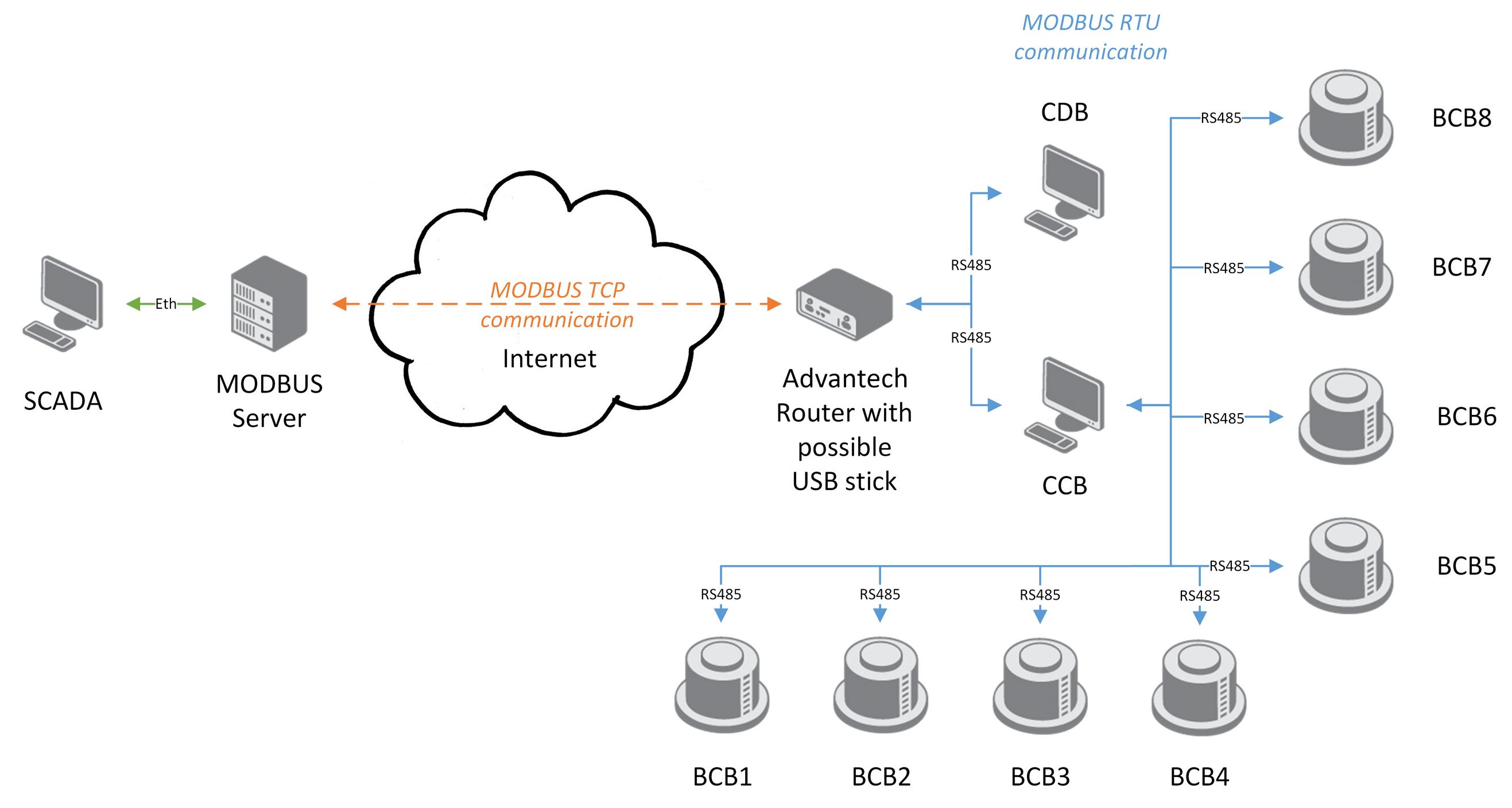
With the Router App enabled, the router acts as an RS-485 Modbus slave — all data must be sent to the router by a computer or cascade display.
The Router App can store received data on a USB flash drive if the TCP network connection (Internet) is temporarily unavailable. Data is resent in the correct order once the connection is re-established.
Modbus RTU and Modbus TCP Protocol
The Router App converts between the Modbus RTU and Modbus TCP protocols. The Modbus RTU protocol runs on a serial line using the RS-232 or RS-485/422 expansion port.
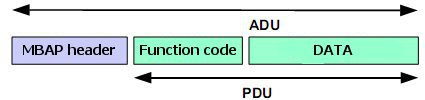
Both protocols share a common part — the Protocol Data Unit (PDU). They differ in the Application Data Unit (ADU). On the serial line, the ADU consists of the PDU preceded by the destination unit address and followed by a checksum.

A Modbus ADU sent over TCP/IP uses an MBAP header for identification. TCP port 502 is reserved for Modbus TCP ADU.
Configuration
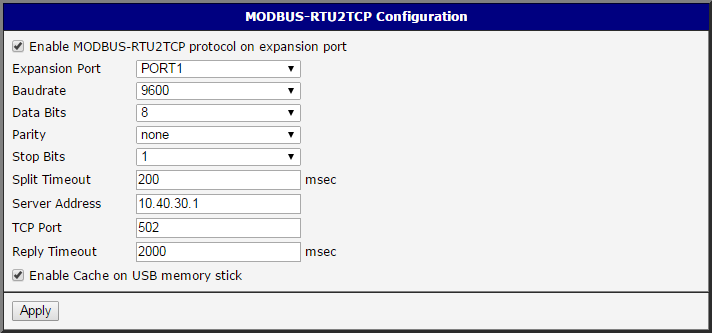
To access the Router App web interface, click the Router App name on the Router Apps page of the router's web interface. The menu on the left contains two items: Config opens the configuration page, and Return goes back to the router's web interface.
| Item | Description |
|---|---|
| Enable | Enables conversion of Modbus RTU protocol to Modbus TCP/IP protocol. |
| Expansion port | Port on which the Modbus RTU connection is established: • PORT1 — Modbus RTU connection on PORT 1. • PORT2 — Modbus RTU connection on PORT 2. See the General page or the Expansion Port 1 / Expansion Port 2 pages in the router interface for the position of the serial interface. |
| Baudrate | Serial interface communication speed. Range: 300 to 115200. |
| Data Bits | Number of data bits in serial communication: 7 or 8. |
| Parity | Parity bit setting in serial communication: • none — No parity. • even — Even parity. • odd — Odd parity. |
| Stop Bits | Number of stop bits in serial communication: 1 or 2. |
| Split Timeout | Time interval used to delimit a message. If the gap between two received characters exceeds this value (in milliseconds), a message is assembled from all received data and sent. |
| Server Address | IP address of the TCP server to which data is forwarded. |
| TCP Port | TCP port of the server. Port 502 is set by default for Modbus ADU. |
| Reply Timeout | Time interval in which a response is expected. If no response is received, one of the following error codes is sent: • 0A — Transmission path unavailable: the gateway cannot allocate an internal path from the input to the output port (likely overloaded or misconfigured). • 0B — Target device not responding: the device may be unavailable. |
| Enable Cache on USB memory stick | Enables storing messages that could not be delivered to the TCP side. Each Modbus message is saved as a separate file. Up to 65,536 messages can be stored. The Router App periodically attempts to resend the oldest message; if successful, subsequent messages are resent in order. |
Configuration form items
Click Apply to apply all configuration changes.