
Operating Hours Counter
 Installation files
 Caution
- This Router App has been tested on a router with firmware version 6.3.10. After updating the router firmware to a higher version, check whether a newer version of the Router App has also been released and update it accordingly for compatibility.
Tips
This Router App is not compatible with the v4 platform.
Description
The Operating Hours Counter Router App provides one resettable and one non-resettable time counter for each binary input on the router. It works with both the router's built-in binary inputs and the binary inputs on an expansion Advantech CNT card, if installed.
The counters are triggered by the state of the corresponding binary input — they run while the binary input is in the On state. Note that the logic and voltage levels may vary between Advantech router models.
You can read the current counter values for all inputs from the router using the Modbus TCP protocol. You can also use the protocol to reset the resettable counters. For details about Modbus TCP communication, see the Modbus TCP Communication section.
Web Interface
Main Menu
To access the web interface of the Operating Hours Counter Router App, click the Router App name on the Router Apps page of the router's web interface.
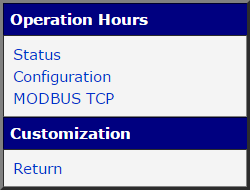
The main menu contains an Operation Hours section with Status and Configuration pages, as shown in the figure below. The Customization section contains only the Return item, which returns to the router's main web configuration interface.
Status
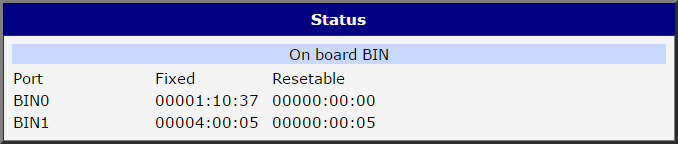
The Status page shows the status of all available time counters, as shown in the figure below. One line is displayed for each binary input, showing the current value of both the non-resettable (fixed) and resettable time counters. The time format is hhhhh:mm:ss (h = hours, m = minutes, s = seconds).
Configuration
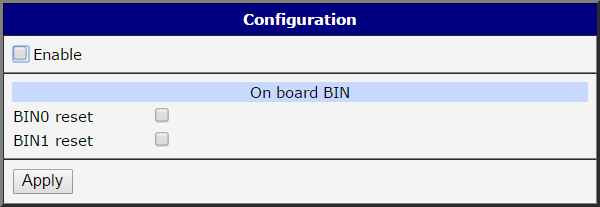
Activate and configure the Router App on the Configuration page, shown in the figure below. To activate the Router App, select the Enable checkbox. To reset a resettable counter, select the corresponding BINx reset checkbox. Click Apply to save and apply the new configuration.
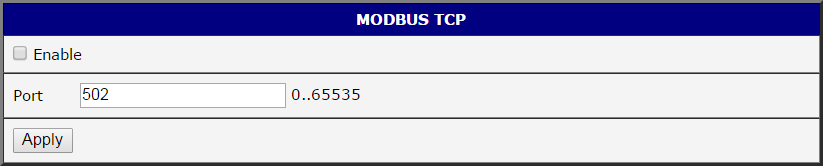
Before using Modbus TCP communication, enable the protocol on the Modbus TCP configuration page by selecting the Enable checkbox, as shown in the figure below. The default port is 502 and can be changed in the Port field. Click Apply to save and apply the new configuration.
Modbus TCP Communication
Address Mapping
Values of resettable counters are stored in Holding Registers, and values of non-resettable counters are stored in Input Registers (Modbus terminology). Each counter occupies two Modbus registers with a total size of 4 bytes. Data are stored in big-endian format — the most significant byte is stored in the register with the lower address.
The router's built-in binary inputs (typically IN0 and IN1) are mapped first, followed by binary inputs on the expansion Advantech CNT card, if installed.
Input Registers — non-resettable counters:
| Counter No. | Register No. | Data Address | Access | Binary Input | Description |
|---|---|---|---|---|---|
| 1 | 30001 | 0x00 | R/- | BIN1 (IN0) | Two most significant bytes. |
| 1 | 30002 | 0x01 | R/- | BIN1 (IN0) | Two least significant bytes. |
| 2 | 30003 | 0x02 | R/- | BIN2 (IN1/CNTx) | Two most significant bytes. |
| 2 | 30004 | 0x03 | R/- | BIN2 (IN1/CNTx) | Two least significant bytes. |
| 3 | 30005 | 0x04 | R/- | BIN3 (CNTy) | Two most significant bytes. |
| 3 | 30006 | 0x05 | R/- | BIN3 (CNTy) | Two least significant bytes. |
| ... | ... | ... | ... | ... | ... |
Non-resettable counters address mapping
Holding Registers — resettable counters:
| Counter No. | Register No. | Data Address | Access | Binary Input | Description |
|---|---|---|---|---|---|
| 1 | 40001 | 0x00 | R/W | BIN1 (IN0) | Two most significant bytes. |
| 1 | 40002 | 0x01 | R/W | BIN1 (IN0) | Two least significant bytes. |
| 2 | 40003 | 0x02 | R/W | BIN2 (IN1/CNTx) | Two most significant bytes. |
| 2 | 40004 | 0x03 | R/W | BIN2 (IN1/CNTx) | Two least significant bytes. |
| 3 | 40005 | 0x04 | R/W | BIN3 (CNTy) | Two most significant bytes. |
| 3 | 40006 | 0x05 | R/W | BIN3 (CNTy) | Two least significant bytes. |
| ... | ... | ... | ... | ... | ... |
Resettable counters address mapping
Modbus Functions
Reading Counters
Use the following Modbus functions to read the registers containing counter values:
| Function Code | Description |
|---|---|
| 0x03 | Read Holding Register (resettable counters) |
| 0x04 | Read Input Register (non-resettable counters) |
Available Modbus functions for reading
Modbus functions are executed from a client acting as a Modbus master device. The exact syntax depends on the specific software implementation. All functions require at least two parameters: data address and data length. In this implementation, both parameters must be even numbers — otherwise an error is returned.
Resetting Counters
Use the following Modbus function to write to the registers of resettable counters:
| Function Code | Description |
|---|---|
| 0x10 | Write Holding Register (resettable counters) |
Available Modbus functions for writing
Writing any value to a resettable counter register resets it to zero, regardless of the value sent. You cannot set a resettable counter to a non-zero value.
Modbus Communication Examples
The examples below illustrate Modbus communication and data interpretation for the counter state shown in the figure below.
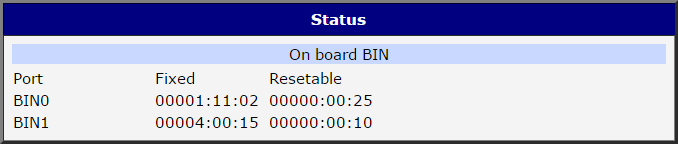
Querying the value of counter no. 1
Resettable counter
- Query: function
0x03, start address 0, data length 2 - Returned:
0x00000019→00000:00:25
Non-resettable counter
- Query: function
0x04, start address 0, data length 2 - Returned:
0x000010A6→00001:11:02
Querying the value of counter no. 2
Resettable counter
- Query: function
0x03, start address 2, data length 2 - Returned:
0x0000000A→00000:00:10
Non-resettable counter
- Query: function
0x04, start address 2, data length 2 - Returned:
0x0000384F→00004:00:15
Resetting resettable counter no. 1
- Query: function
0x10, start address 0, data length 2, sent data0x00000000 - Value set to:
0x00000000→00000:00:00
Resetting resettable counter no. 2
- Query: function
0x10, start address 2, data length 2, sent data0xFFFFFFFF - Value set to:
0x00000000→00000:00:00