
Node.js
 Installation files
 Caution
- This Router App has been tested on a router with firmware version 6.3.10. After updating the router firmware to a higher version, check whether a newer version of the Router App has also been released and update it accordingly for compatibility.
- This Router App is only compatible with v3 and v4 platform routers.
Node.js Router App
Introduction
Node.js is an open-source server-side JavaScript runtime environment available for Advantech cellular routers. Advantech Router Apps written in JavaScript use this runtime, and any third-party JavaScript application can also use it for router administration and maintenance.
This Router App contains the following nodes in addition to the built-in nodes:
- node-authenticate-pam — asynchronous PAM authentication for Node.js
- router node — a proprietary node for Advantech's cellular routers, described in detail in the Router Node section
Building the Custom Nodes
The official way to build and install a node is to use the npm command. However, there are some limitations because Advantech routers are embedded devices with specialized hardware and without a full Linux OS. You can install the npm Router App on the router and use it as usual, or prepare nodes with the npm tool on your PC and then copy them to the router. Not all nodes available in the npm repository can be installed.
For more details, see the Node-RED page — refer to its Building the Custom Nodes section.
Router Node
Tips
This section is intended primarily for programmers.
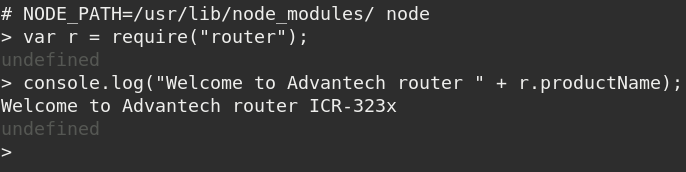
The router node (named router) provides access to router-specific functions and hardware. You can load the router node in your code by using require("router"), for example:
var r = require("router");Tips
The variable r from this example is used to access all the properties in the following sections.
Simple Example of Router Node Use
The figure below shows an example of loading the router node.
Node Properties
productName
Read-only string variable containing the router's product name. Example of usage:
console.log(r.productName);Output: SPECTRE-v3T-LTE
productModel
Read-only string variable containing the router's model designation. Example of usage:
console.log(r.productModel);Output: ICR-3201W
productRevision
Read-only string variable containing the router's product revision number. Example of usage:
console.log(r.productRevision);Output: 1.0
platformCode
Read-only string variable containing the router's platform code. Supported by routers of v3 and v4 production platforms. Example of usage:
console.log(r.platformCode);Output: V3
serialNumber
Read-only string variable containing the router's serial number. Example of usage:
console.log(r.serialNumber);Output: ACZ1100000322054
firmwareVersion
Read-only string variable containing the router's firmware version. Example of usage:
console.log(r.firmwareVersion);Output: 6.2.1 (2019-10-16)
RTCBatteryOK
Read-only boolean variable containing the router's RTC battery state. true means OK, false means bad. Example of usage:
console.log(r.RTCBatteryOK);Output: true
powerSupply
Read-only decimal number variable containing the router's power supply voltage. Example of usage:
console.log(r.powerSupply + " V");Output: 11.701 V
temperature
Read-only integer number variable containing the router's internal temperature in degrees Celsius. Example of usage:
console.log(r.temperature + " °C");Output: 39 °C
usrLED
Write-only boolean variable for controlling the router's USR LED. Example of usage:
r.usrLED = true;Sets the USR LED to ON (lit).
bIn
Read-only array with values on the router's binary inputs. The array has items corresponding to the number of binary inputs. For example, if the router has BIN0 and BIN1, the array has valid indexes 0 and 1. Array items can have values 0 or 1. Example of usage:
console.log("The secondary binary input: " + r.bIn[1]);Output: The secondary binary input: 0
bOut
Array for the router's binary outputs. Similar to bIn, but values can also be written — writing a value changes the output state. Example of usage:
console.log(r.bOut[0]);Output: 1
r.bOut[0] = 0;Sets the first binary output to 0.
XBus
Object for working with XBus. XBus is a proprietary bus for communication between processes. For example, you can subscribe to information about which network interface goes up or down, or receive SMS messages from the mwan daemon. You can also publish and subscribe to your own topics between your applications.
XBus.publish(topic, payload, store=false)
Sends a message with a topic string and payload string to XBus. Example of usage:
r.XBus.publish("watchdog/proc/myapp", "Timeout: 300");Sends a watchdog request to the system to watch the myapp application. The application must send this message regularly within the period defined in the message (300 s in this example). A timeout of 0 stops watching.
XBus.subscribe(topic, callback)
Subscribes to receive messages with the given topic and returns a numeric subscription ID. Example of usage:
const id = r.XBus.subscribe("status/mobile/mwan0", (msg) => {console.log(msg.payload);});Asynchronous output:
Registration: Home Network
Technology: LTE
Signal-Strength: -88 dBm
Signal-Quality: -8 dB
XBus.unsubscribe(id)
Cancels the subscription with the given ID (returned by XBus.subscribe). Example of usage:
r.XBus.unsubscribe(id);Stops receiving network registration information from the previous example.
XBus.list()
Lists stored messages. Example of usage:
r.XBus.list();Output:
[ 'iface/ipv4/mwan0/config',
  'iface/ipv4/mwan0/running',
  'iface/ipv4/mwan1/config',
  'iface/ipv4/mwan1/running',
  'status/mobile/mwan0',
  'status/mobile/mwan1',
  'watchdog/proc/bard',
  'watchdog/proc/bard6',
  'watchdog/proc/mwan1d',
  'watchdog/proc/mwan2d',
  'watchdog/proc/mwanxd' ]
XBus.read(topic)
Reads a stored message from XBus. Example of usage:
r.XBus.read("iface/ipv4/mwan0/config");Output:
Up: 1
Iface: usb0
Address: 10.184.131.221
Gateway: 192.168.253.254
DNS1: 217.77.165.211
DNS2: 217.77.165.81
configuration
Object containing the router configuration. To read a configuration item, get the corresponding object property; to write it, set the property. The object keys are the same as configuration keys in the settings files. Firmware configurations are stored in the /etc/settings.* files. Router App configurations are stored in the /opt/*/etc/settings files. The Router Report (Web UI: Status / System Log / Save Report) contains a full list of the current configuration and may be the easiest way to find the requested configuration key.
If a given key does not exist, reading it returns undefined and writing it throws an exception (in strict mode). You cannot add a new configuration item; you can only modify an existing one. All configuration values are treated as strings — if a different type is needed, you must convert it. The node does not perform any value validation; you are responsible for sending the correct values.
Example — reading a configuration value:
console.log("Current router AP SSID is " + r.configuration["WIFI_AP_SSID"]);For WIFI_AP_SSID=ROUTER_AP in /etc/settings.wifi_ap (or the SSID field in the WiFi — Access Point 1 form), the output is:
Current router AP SSID is ROUTER_APExample — setting a configuration value:
r.configuration["ETH_IPADDR"] = "192.168.99.1"Changes the IP address on the eth0 interface.
Note: Setting a value only writes the new configuration. To apply it to the running environment, restart the router or the related service. For the example above, use the following shell command:
/etc/init.d/eth restart