
Samba
 Installation files
 Caution
- This Router App has been tested on a router with firmware version 6.3.10. After updating the router firmware to a higher version, check whether a newer version of the Router App has also been released and update it accordingly for compatibility.
Description
Samba is the standard Windows interoperability suite of programs for Linux and Unix. The Samba Router App creates a Samba server on the router.

Web Interface
Once installation is complete, access the Router App's web interface by clicking the Router App name on the Router Apps page of the router's web interface.
The left menu contains a Status section (System Log), a Configuration section (Samba), and an Information section (Licenses). The Customization section contains only Return, which switches back to the router's main web interface.

Status
System Log
The System Log page shows the system log messages related to Samba (the smbd and nmbd daemons).
Configuration
Samba
Configure all Samba Router App settings on the Samba page in the main menu.
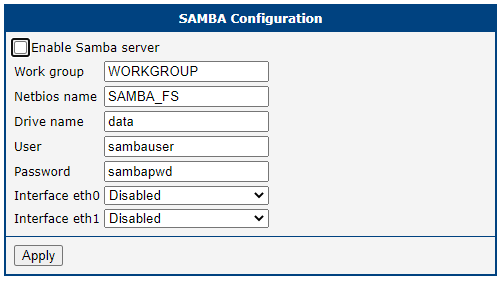
| Item | Description |
|---|---|
| Enable Samba server | Enables creation of the Samba server. |
| Work group | Workgroup name in which the Samba server operates. |
| Netbios name | Name of the Samba server. |
| Drive name | Name of the shared folder (SMB share) that clients see on the network, for example \\<Netbios name>\data. The share points to the /var/data/samba directory on the router and is writable. Default: data. |
| User | Username for connecting to the Samba server. |
| Password | Password for connecting to the Samba server. |
| Interface eth0 | Enables the Samba interface on the eth0 port. |
| Interface eth1 | Enables the Samba interface on the eth1 port. |
Configuration items
Information
Licenses
This section summarizes the open-source software (OSS) licenses used by this Router App.
