
LwM2M Manager
 Installation files
 Description
The LwM2M Manager Router App implements an OMA LwM2M 1.1 device management client. It connects the Advantech router to a remote LwM2M server, enabling remote monitoring, configuration, and lifecycle management using the standardized Lightweight Machine-to-Machine protocol.
Communication is carried over CoAP/UDP. The Router App supports both plain (unencrypted) CoAP and DTLS-secured CoAP, with two DTLS authentication methods: Pre-Shared Key (PSK) and X.509 certificates.
Connection Modes
The Router App supports two connection modes:
- Direct registration — The router registers directly with the configured LwM2M server. This mode is used when the server address and credentials are pre-configured on the router.
- Bootstrap — The router first connects to a bootstrap server, which provisions the LwM2M server URI and security credentials. After a successful bootstrap, the router registers with the provisioned server. This mode is suitable for zero-touch provisioning scenarios.
Registered LwM2M Objects
In LwM2M, each object is identified by a numeric ID assigned by OMA, shown as /ID (e.g. /0, /6). The Router App always registers the following standard LwM2M objects:
- Security Object (/0) — Holds server URI, security mode, and credentials.
- Server Object (/1) — Registration lifetime, binding mode, and server ID.
- Device Object (/3) — Read-only device identity (manufacturer, model, serial number, firmware version) and current time.
The following objects are optional and registered only when the corresponding feature is enabled in the configuration:
- Location Object (/6) — GNSS position data (latitude, longitude, altitude, timestamp). Registered only when Send GNSS Location (object /6) is enabled and the router hardware supports GNSS.
- Connectivity Object (/3412) — Mobile WAN status data (technology, RSSI, IMEI, operator, ICCID, signal strength and quality). Registered when Send Mobile WAN Status (object /3412) is enabled.
Tips
Location and connectivity resource values are refreshed every five seconds. The current time resource is updated every second to keep its value live for server observers.
Keepalive and NAT Traversal
The Router App sends an LwM2M registration update to the server every 30 seconds, independently of the configured registration lifetime. This keepalive ensures that NAT mappings remain open and allows the server to send downlink messages (observations, write operations) to the router at any time.
Web Interface
A web interface is available for configuring the LwM2M Manager Router App. Access it by clicking the Router App name on the Router Apps page of the router's web interface.
The Status → System Log page shows the part of the system log related to the Router App. The Configuration → Global page contains the configuration described in the following sections. The Return item under the Administration section returns to the router's web interface.
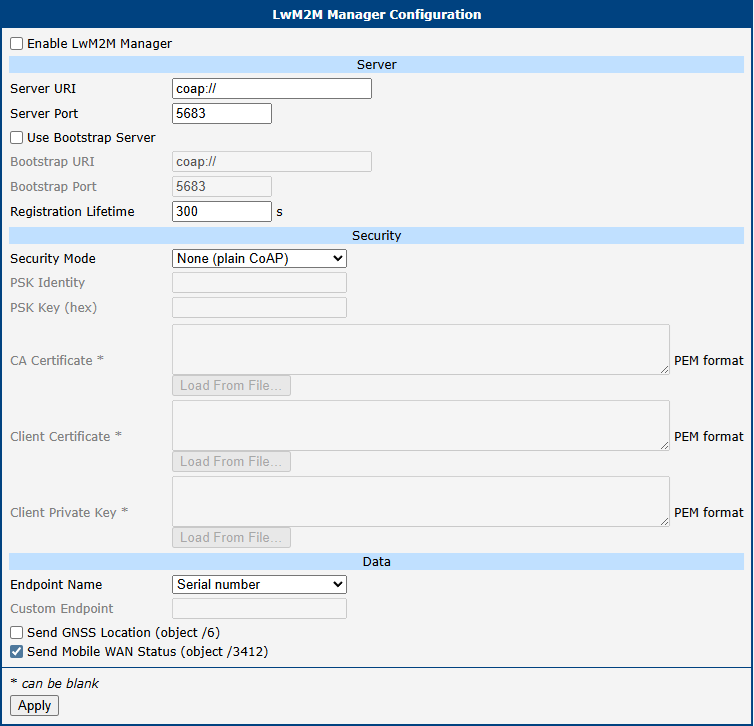
The configuration is organized into three sections: Server Settings, Security Settings, and Data Settings.
Server Settings
The Server Settings section configures the LwM2M server connection and registration parameters.
| Item | Description |
|---|---|
| Enable LwM2M Manager | Enables the LwM2M Manager daemon. The Router App does not connect to any server when disabled. |
| Server URI | URI of the LwM2M server (e.g. coap://192.168.1.1 or coaps://lwm2m.example.com). Use coap:// for plain CoAP and coaps:// for DTLS. |
| Server Port | UDP port of the LwM2M server. Default: 5683 for plain CoAP, 5684 for DTLS. |
| Use Bootstrap Server | Enables bootstrap mode. When checked, the router connects to the bootstrap server first to obtain LwM2M server credentials. |
| Bootstrap URI | URI of the bootstrap server. Required when Use Bootstrap Server is enabled. |
| Bootstrap Port | UDP port of the bootstrap server. Default: 5683. |
| Registration Lifetime | Duration in seconds for which the LwM2M registration is valid. The server removes the router's registration if no update is received within this interval. Default: 300. |
Server settings parameters
Security Settings
The Security Settings section controls the DTLS security mode and the associated credentials.
| Item | Description |
|---|---|
| Security Mode | Selects the transport security: • 0 – None: Plain CoAP without encryption or authentication. • 1 – PSK: DTLS with a Pre-Shared Key. Both PSK Identity and PSK Key must be filled in. • 2 – Certificate: DTLS with X.509 certificates. CA Certificate, Client Certificate, and Client Private Key must be filled in. |
| PSK Identity | Identity string sent to the server during the DTLS PSK handshake. Used when Security Mode is PSK. |
| PSK Key (hex) | Pre-shared key encoded as a hexadecimal string (e.g. deadbeef1234). Used when Security Mode is PSK. |
| CA Certificate | CA certificate in PEM format. The client uses this certificate to verify the server identity. Used when Security Mode is Certificate. |
| Client Certificate | Client certificate in PEM format. Sent to the server for mutual TLS authentication. Used when Security Mode is Certificate. |
| Client Private Key | Client private key in PEM format. Must correspond to the Client Certificate. Used when Security Mode is Certificate. |
Security settings parameters
Warning
PSK and certificate credentials are stored in the router configuration. Ensure that access to the router configuration is adequately protected.
Data Settings
The Data Settings section controls the device endpoint identity and which optional LwM2M objects are registered with the server.
| Item | Description |
|---|---|
| Endpoint Name | Selects the source of the LwM2M endpoint name used during registration: • Serial number: The router's hardware serial number is used as the endpoint name. This guarantees a unique identifier without manual configuration. • Custom: The value entered in Custom Endpoint is used. |
| Custom Endpoint | Arbitrary endpoint name string (e.g. my-device-001). Required when Endpoint Name is set to Custom. |
| Send GNSS Location (object /6) | When enabled, the Location Object (/6) is registered with the server and GNSS position data is reported. The option has no effect if the router hardware does not support GNSS. |
| Send Mobile WAN Status (object /3412) | When enabled, the Connectivity Object (/3412) is registered with the server and mobile WAN status data (signal strength, operator, IMEI, etc.) is reported. Default: enabled. |
Data settings parameters
LwM2M Objects
This chapter provides a resource-level reference for all LwM2M objects implemented by the Router App. Each object is identified by its OMA-assigned numeric ID shown in the section title (e.g. /0, /3412); individual resources within an object follow the same notation (e.g. /0/1). The Access column uses the following notation: R = read-only, W = write-only, RW = read/write, E = executable.
Object /0 – Security
The Security Object holds the LwM2M server URI, security mode, and credentials. It is always created and is not directly readable by the LwM2M server (access is restricted to the bootstrap interface). The Access column below shows the resource definitions used internally by the Router App, not the operations available to the LwM2M server.
| ID | Resource Name | Type | Access |
|---|---|---|---|
| /0 | Server URI | String | RW |
| /1 | Bootstrap Server | Boolean | RW |
| /2 | Security Mode | Integer | RW |
| /3 | Public Key or Identity | Opaque | RW |
| /5 | Secret Key | Opaque | RW |
| /10 | Short Server ID | Integer | RW |
| /11 | Client Hold Off Time | Integer | RW |
Object /0 – security resources
Object /1 – Server
The Server Object contains the registration parameters for the LwM2M server.
| ID | Resource Name | Type | Access |
|---|---|---|---|
| /0 | Short Server ID | Integer | R |
| /1 | Lifetime | Integer | RW |
| /6 | Notification Storing When Disabled or Offline | Boolean | RW |
| /7 | Binding | String | RW |
| /8 | Registration Update Trigger | None | E |
Object /1 – server resources
Tips
The Binding resource is always set to U (UDP). The Registration Update Trigger resource can be executed by the server to force an immediate registration update.
Object /3 – Device
The Device Object provides read-only identity information derived from the router firmware and hardware, plus a writable current time resource.
| ID | Resource Name | Type | Access |
|---|---|---|---|
| /0 | Manufacturer | String | R |
| /1 | Model Number | String | R |
| /2 | Serial Number | String | R |
| /3 | Firmware Version | String | R |
| /6 | Available Power Sources | Integer (multi) | R |
| /7 | Power Source Voltage | Integer (multi) | R |
| /13 | Current Time | Time | RW |
Object /3 – device resources
- Manufacturer is always
Advantech. - Model Number, Serial Number, and Firmware Version are read from the router system at startup.
- Available Power Sources and Power Source Voltage expose a single instance representing the DC power supply (type 1). Voltage is reported in millivolts.
- Current Time returns the Unix timestamp. When written by the server, the client stores the difference from the system clock as an in-memory offset and reports adjusted time in subsequent messages — the router system clock is not modified and the offset is lost on client restart.
Object /6 – Location
The Location Object is created only when Send GNSS Location (object /6) is enabled and the router hardware provides GNSS capability. Resource values are polled from the hardware every 5 seconds.
| ID | Resource Name | Type | Access |
|---|---|---|---|
| /0 | Latitude | Float (degrees) | R |
| /1 | Longitude | Float (degrees) | R |
| /2 | Altitude | Float (meters) | R |
| /5 | Timestamp | Time | R |
Object /6 – location resources
Object /3412 – Connectivity
The Connectivity Object is created when Send Mobile WAN Status (object /3412) is enabled. It reports the current state of the mobile WAN interface. Resource values are polled every 5 seconds.
| ID | Resource Name | Type | Access |
|---|---|---|---|
| /1 | Technology | String | R |
| /20 | RSSI | Integer (dBm) | R |
| /22 | IMEI | String | R |
| /23 | Operator | String | R |
| /24 | ICCID | String | R |
| /27 | Signal Strength | Integer (dBm) | R |
| /28 | Signal Quality | Integer (%) | R |
Object /3412 – connectivity resources
- Technology reports the current radio access technology as a string (e.g.
LTE,NR). - RSSI and Signal Strength report signal power in dBm.
- Signal Quality reports a percentage-based quality indicator.