
Protocol DF1-Ethernet
 Installation files
 Caution
- This Router App has been tested on a router with firmware version 6.3.10. After updating the router firmware to a higher version, check whether a newer version of the Router App has also been released and update it accordingly for compatibility.
Tips
This Router App is not compatible with the v4 router platform.
Introduction
DF1 – Ethernet Router App
The DF1 – Ethernet Router App converts the DF1 protocol running on a serial line to the AB CSPv4 and EtherNet/IP protocols, both of which run over Ethernet.
On v2 platform routers, either an RS-232 or RS-485/422 expansion port can be used as the serial line — both can be fitted in PORT1 or PORT2, and automatic serial port detection is supported. On v3 platform routers, an RS-232 or RS-232/RS-485/422 interface is required. Only full-duplex DF1 communication is supported, and only a single device can communicate via DF1 with the router at a time.
In the Router App web interface, you can configure the specific protocols (CSPv4 and EtherNet/IP can both be enabled simultaneously) and download an EDS file for use with dispatching SCADA software.
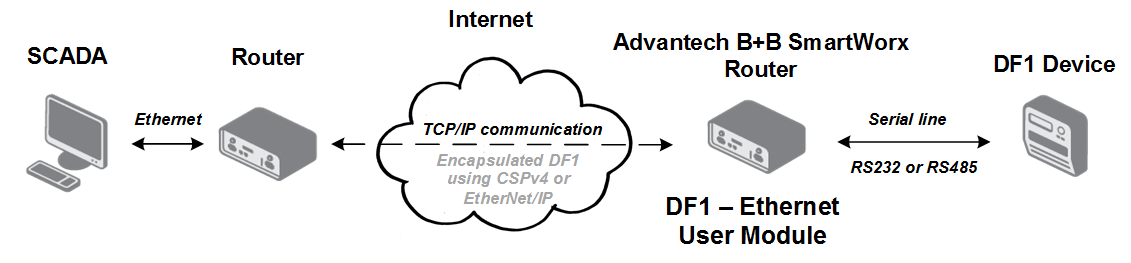
DF1 Protocol
DF1 is an open, freely available protocol developed by Allen-Bradley (a line of factory automation equipment manufactured by Rockwell Automation). It is a data-link layer protocol combining features of subcategories D1 (data transparency) and F1 (two-way simultaneous transmission with embedded responses) of the ANSI X3.28 specification. The serial frame parameters are 8 data bits, no parity, and a maximum baud rate of 19200. There is no guarantee that commands are received in the order they were sent.
This Router App supports only full-duplex DF1 communication. DF1 full duplex operates over a point-to-point link (one device connected to another), allowing simultaneous bidirectional communication and higher throughput for high-performance applications. Half-duplex master-slave multi-drop communication is not supported.
AB CSPv4 Protocol
AB CSPv4 (Allen-Bradley Client Server Protocol v4), also known as AB Ethernet, uses IP addressing and TCP/IP to carry PCCC commands. This protocol is similar to DF1, except that it uses Ethernet instead of RS-232. It is a good choice for non-routed communications with low overhead, though routing via TCP/IP can also be used.
EtherNet/IP Protocol
EtherNet/IP is an industrial Ethernet network that combines standard Ethernet technologies with the media-independent Common Industrial Protocol (CIP). The CIP protocol can carry PCCC commands — Programmable Controller Communication Commands described in the DF1 Protocol and Command Set Manual (publication 1770-6.5.16) and the Logix Data Access Reference Manual (publication 1756-RM005A-EN-E), both available for download from www.ab.com.
Tips
Only encapsulation of PCCC messages in the CIP protocol is supported (PCCC in CIP).
Configuration
The DF1 – Ethernet Router App web interface is accessible by selecting the Router App name on the Router Apps page of the router's web interface. The left menu contains Configuration, System Log, EDS File, and Return items. Return switches back to the router's main web interface. Select Configuration from the menu to open the configuration form.
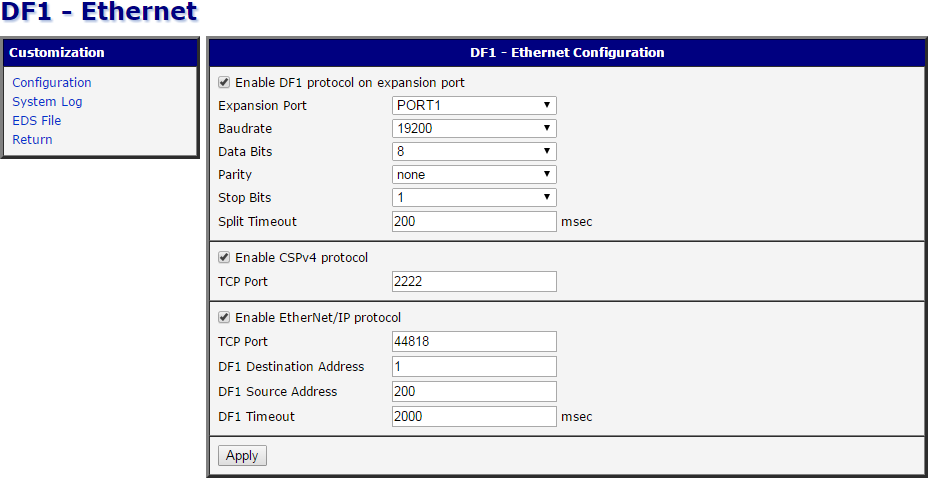
The configuration form is divided into three parts according to the supported protocols, described in the tables below.
| Item | Description |
|---|---|
| Enable DF1 protocol on expansion port | Activates DF1 serial communication on the port selected below. |
| Expansion port | Port on which the connection is established: • PORT1 — Connection on PORT 1. • PORT2 — Connection on PORT 2. |
| Baudrate | Communication speed (default: 19200). |
| Data Bits | Number of data bits (default: 8). |
| Parity | Parity checking mode: • none — No parity. • even — Even parity. • odd — Odd parity. |
| Stop Bits | Number of stop bits (default: 1). |
| Split Timeout | If communication is interrupted mid-frame, the system waits this duration for communication to resume. If the end of the frame does not arrive within the timeout (e.g. cable disconnected), the frame is dropped and a new frame is awaited. Default: 200 ms. |
DF1 protocol configuration items
CSPv4 and EtherNet/IP can both be enabled simultaneously. Packets in both formats are sent via the Ethernet interface.
| Item | Description |
|---|---|
| Enable CSPv4 protocol | Activates CSPv4 communication on the Ethernet interface. |
| TCP Port | TCP port on which the router listens for connection requests. |
CSPv4 protocol configuration items
| Item | Description |
|---|---|
| Enable EtherNet/IP protocol | Activates EtherNet/IP communication on the Ethernet interface. |
| TCP Port | TCP port on which the router listens for connection requests. |
| DF1 Destination Address | Address of the device connected to the serial interface. |
| DF1 Source Address | Any address different from the destination address. This value is not significant — it can be any number. |
| DF1 Timeout | Time to wait for a response from the DF1 serial communication side. |
EtherNet/IP protocol configuration items
Click Apply to save all configuration changes.
System Log
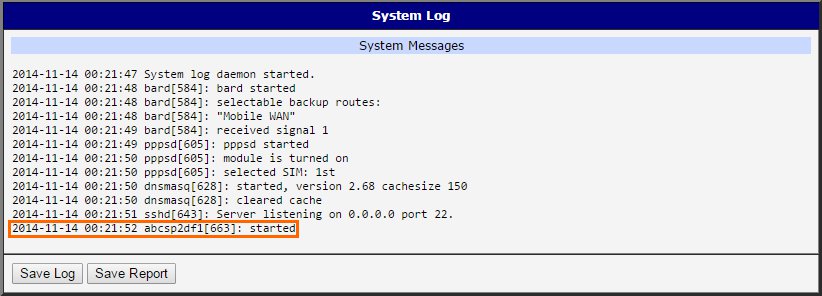
If connection problems occur, view the system log by selecting the System Log menu item. It displays detailed reports from all applications running on the router. Activity of the DF1 – Ethernet Router App appears in rows starting with abcsp2df1. Use the Save Log button to save the log to your computer. The Save Report button generates a detailed report with all information required for technical support, saved as a single file.
EDS File
Select the EDS File menu item to download the EDS file describing the router with the DF1 – Ethernet Router App installed. This file can be imported into dispatching or SCADA software. EDS files are simple text files used by network configuration tools to identify products and commission them on a network.