Modbus to LwM2M
 Installation files
 Tips
For an overview of the Modbus protocol, communication modes, and how to connect Modbus devices to Advantech routers, see the Modbus Application Guide.
Caution
- This Router App is compatible only with firmware version 6.4.x.
Router App Modbus to LwM2M
Description
The Modbus to LwM2M Router App provides seamless communication between Modbus/TCP devices and an LwM2M device. The Router App works as a Modbus/TCP master to communicate with Modbus/TCP devices.
Installation
Download the latest version of the Modbus to LwM2M Router App from the Router App catalog (Installation files).
In the router's web interface, navigate to Customization → Router Apps. Select the downloaded Router App installation file and click Add or Update.
Once the installation is complete, access the Router App's web interface by clicking the Router App name on the Router Apps page. The main menu, shown in the figure below, includes Status, Configuration, and Customization items. To return to the router's web interface, click Return.

Module Configuration
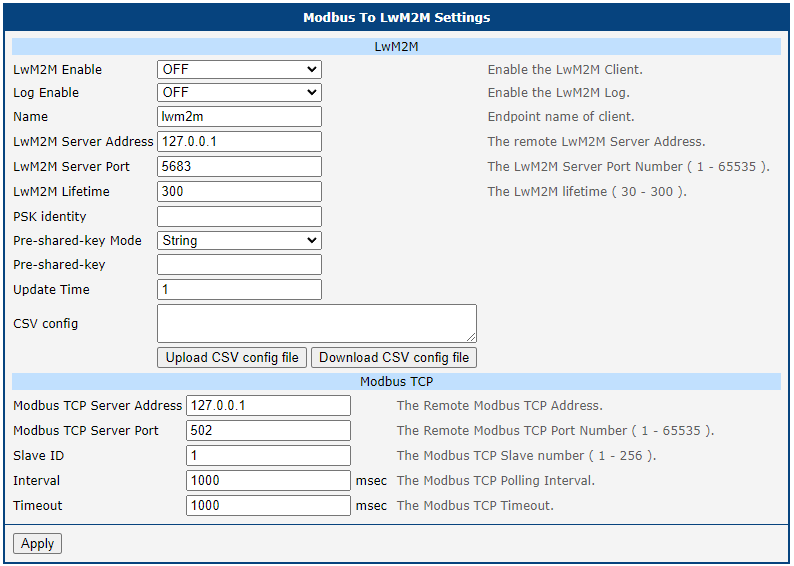
Configuration is available on the LwM2M page under the Configuration menu. The figure below shows the page, and the table describes the configuration items.
| Item | Description |
|---|---|
| LwM2M Enable | Enable the LwM2M client. |
| Log Enable | Enable the LwM2M log. |
| Name | Endpoint name of the client. |
| LwM2M Server Address | The remote LwM2M server address. |
| LwM2M Server Port | The LwM2M server port number (1–65535). |
| LwM2M Lifetime | The LwM2M lifetime in seconds (30–300). |
| PSK identity | Unique identifier associated with the Pre-Shared Key. |
| Pre-shared-key Mode | Select whether the pre-shared key is a string or a HEX string. |
| Pre-shared-key | Value of the pre-shared key. |
| Update Time | Update time in seconds. |
| CSV Config | CSV configuration. Insert the configuration string into this field or select a CSV file. |
| Modbus TCP Server Address | The remote Modbus TCP address. |
| Modbus TCP Server Port | The remote Modbus TCP port number (1–65535). |
| Slave ID | The Modbus TCP slave number (1–256). |
| Interval | The Modbus TCP polling interval in milliseconds. |
| Timeout | The Modbus TCP timeout in milliseconds. |
Configuration items
Configuration Uploading
To configure the mapping between Modbus TCP and LwM2M devices, import a CSV file. The figure below shows the file format, and the table describes the key columns. The separator (delimiter) for the CSV file is a comma.

To import the file, go to the LwM2M configuration page, click Upload Config, choose the file, and click Upload. If the upload is successful, click Return and then click Save at the bottom of the configuration page. The new mapping configuration takes effect immediately.
| Column | Field | Description |
|---|---|---|
| A | IPSO SO | LwM2M Object ID. |
| B | Name | The name to identify the mapping. |
| G | Address Start | The starting Modbus register address. |
| H | Data Length | For range 1–9999 or 10000–19999, the unit is bit(s). For range 30001–39999 or 40000–49999, the unit is word(s). |
| I | Designator | Designates the LwM2M Object. Includes Object ID, Short ID, and Resource ID. Format: /Object_ID/Short_ID/Resource_ID |
| Q | Data Type | LwM2M data type: • 7 Boolean • 4 IEEE, Reversed Word • 1 Double Precision |
Key column descriptions
CSV Example
10701,Vibration_Alarm,1,TCP,1,3,10811,1,/10701/0/101,Port 1,192.168.0.12,502,none,none,0 Always,FALSE,7 Boolean
10702,Water_Alarm,1,TCP,1,3,10820,1,/10702/0/105,Port 1,192.168.0.12,502,none,none,0 Always,FALSE,7 Boolean
10706,Max_Pressure,1,TCP,1,3,40054,2,/10706/0/201,Port 1,192.168.0.12,502,none,none,0 Always,FALSE,1 Double Precision
10706,Min_Pressure,1,TCP,1,3,40062,2,/10706/0/202,Port 1,192.168.0.12,502,none,none,0 Always,FALSE,1 Double Precision
10707,DC_Voltage,1,TCP,1,3,40802,2,/10707/0/302,Port 1,192.168.0.12,502,none,none,0 Always,FALSE,1 Double Precision
10707,DC_Current,1,TCP,1,3,40804,2,/10707/0/303,Port 1,192.168.0.12,502,none,none,0 Always,FALSE,1 Double Precision
10708,Temperature_Alarm,1,TCP,1,3,10808,1,/10708/0/105,Port 1,192.168.0.12,502,none,none,0 Always,FALSE,7 Boolean
10708,Pressure_Alarm,1,TCP,1,3,10810,1,/10708/0/107,Port 1,192.168.0.12,502,none,none,0 Always,FALSE,7 Boolean
Mapping Table
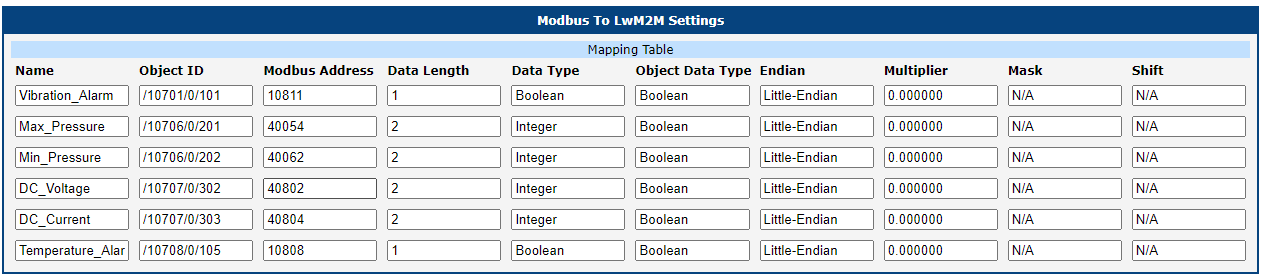
The Mapping Table page displays the mapping table of Modbus TCP and LwM2M devices. This table is populated by importing a CSV file — see the Configuration Uploading section above.
Log Messages
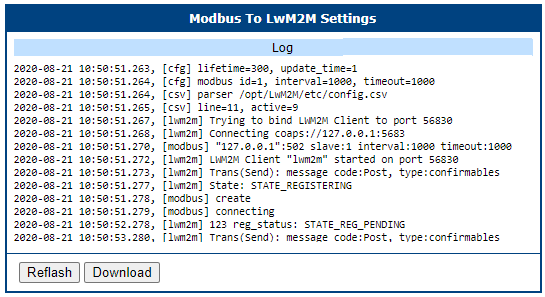
The Log page displays log messages from the Modbus to LwM2M Router App. Logging can be enabled on the LwM2M configuration page.